
LinkedIn has become the leading B2B marketing platform. With over a billion members, engagement is at record levels, but that brings a harder challenge: standing out from the competition. Every brand, executive, and marketer is fighting for attention in the same feed, and the bar for quality has never been higher.
Marketers face a tougher environment. Organic reach is declining, paid costs are rising, and algorithms change too often. Many company pages still rely on outdated tactics; product pushes, recycled updates, and promotional posts that perform poorly.
The opportunity is in nailing your LinkedIn marketing strategy: choosing the right formats, maintaining a consistent cadence, running advocacy campaigns, and using performance data to inform decisions.
This marketing guide shows how to do that. Focusing on what works on LinkedIn right now, where brands lose traction, and how to build a strategy that drives both reach and results.
Get the Basics Right
A strong LinkedIn strategy doesn’t start with content, it starts with clarity. Brands that skip the groundwork end up failing before they even started: posting inconsistently, chasing trends, and investing time in the wrong things.
Before you plan campaigns, build creative, and execute, make sure these foundations are in place:
Set clear goals
Decide what you need LinkedIn to achieve. Awareness, lead generation, employer branding, and community building each have different tactics.
A page trying to do everything ends up doing nothing, well.
Define one or two primary outcomes and align your content, strategy, and targeting to match. Tie each goal to a clear metric so every post has a defined job to do.
Identify your audience
Precision matters more than reach. Define the exact industries, company sizes, seniority levels, and job functions that are important to your business.
Use LinkedIn’s analytics, CRM data, and audience insights to confirm who engages with your existing content.
Study how those people interact on the platform. What they comment on, what they share, and what topics they ignore.
Build your voice around their interests and problems, not your product.
Research competitors and the market
Audit how competitors and leaders in your niche use LinkedIn: posting frequency, formats, tone, and engagement quality.
Take note of what earns engagement, like the topics, content style, or even employee involvement. Then find gaps.
Most industries are saturated with promotion, not valuable content. Fill that gap by sharing useful, evidence-based content that positions your brand as the expert.
Define your message and tone
Decide what you want to be known for. Strong brands own a few clear themes and talk about them with consistency.
Document key messaging pillars and the tone that fits your brand, whether that’s analytical, conversational, or pragmatic.
Make sure every contributor understands it. This consistency builds recognition and trust, especially when multiple people or departments post under the same brand.
Get your profile set up right
Optimize your visuals, bios, and descriptions to align with your current positioning. Refresh the company banner, update the tagline, and ensure the About section is accurate.
Link employees properly to the company page and optimize their headlines with relevant search terms.
Install the LinkedIn Insight Tag early so you can track visitors and build retargeting audiences later.
Internally, set a fast approval flow for posts, clear enough to stay on brand, light enough not to slow content down.
Set baseline metrics
Track where you’re at before scaling. Record your follower count, engagement rate, average post impressions, CTR, and conversions.
Identify which content types already perform well; it might be carousels, polls, or leadership posts. These benchmarks become your reference for testing new tactics.
Without a baseline, you’ll never know if the strategy is improving performance or just changing activity.
Content Formats for LinkedIn
Format choice is an important consideration. Posts that get it right will earn more engagement and reach, so your content strategy should contain formats with proven performance where time allows.
What are the best content types for LinkedIn?
Carousels and documents currently drive the highest engagement on LinkedIn, followed by short native videos under 90 seconds.
Single-image posts with text are reliable, while polls are good for reach.
Text-only posts can still perform if they deliver strong value or opinion, but avoid external link posts, they consistently rank lowest in reach and engagement.
Carousels/Documents (PDF/slide-deck uploads)
Data shows document uploads and carousel posts outperform other formats. According to an analysis of 1 million posts across 9,000 LinkedIn company pages, these formats generated the highest average engagement. (Source).
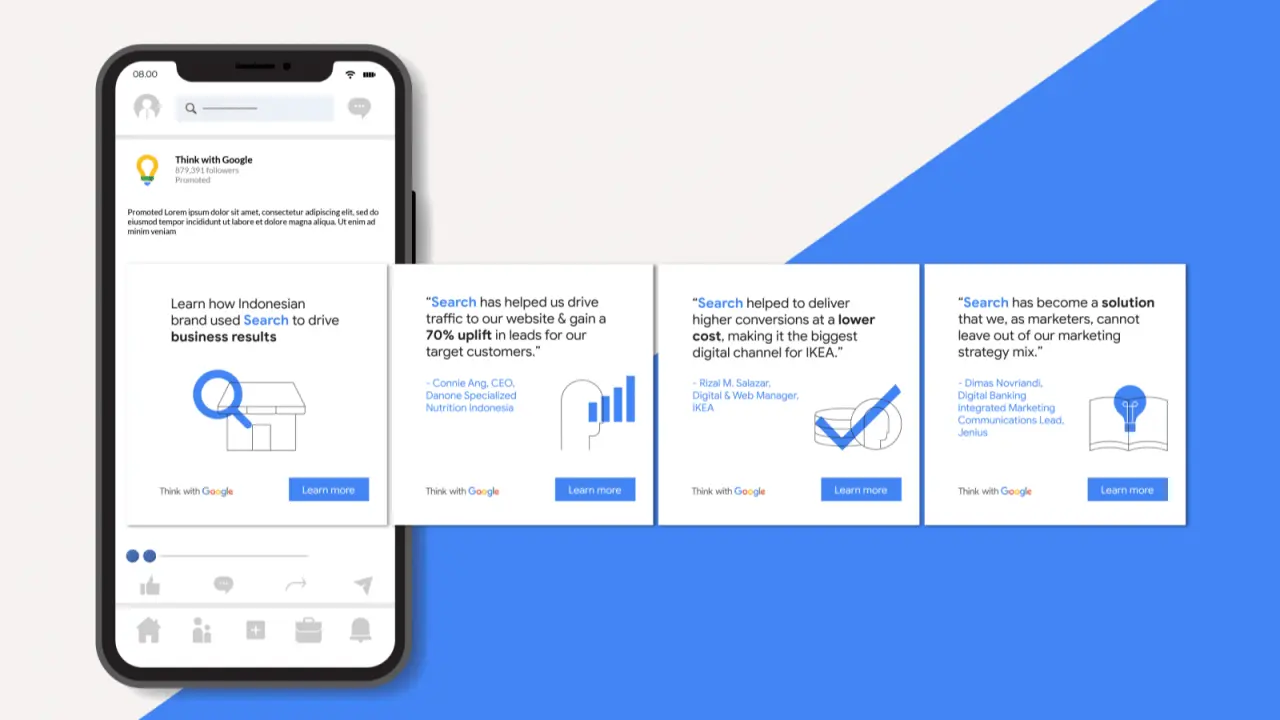
Another report shows that carousels get 5× as many clicks as any other post format. (source) These formats should be included in your content mix as they boost dwell time and give the algorithm signals of value.
Video posts
Native video is also strong and improving on LinkedIn, especially short clips under 90 seconds, with captions and a hook in the first 3 seconds.
In the benchmark data, video is among the top-performing formats in terms of engagement increases. (source) Because video keeps people watching longer, it gives good signals to the algorithm.
Single-image + text posts
An image post with text is more reliable and easier to produce at scale. Although they may not perform as well as other content types, they still perform.
Currently, personal photos (even selfies) tend to perform better than generic stock images. Use them to fill content gaps or turn text-only posts into something more, but try to add value somewhere.
Polls
Used correctly, polls can drive strong reach, especially impressions and comments.
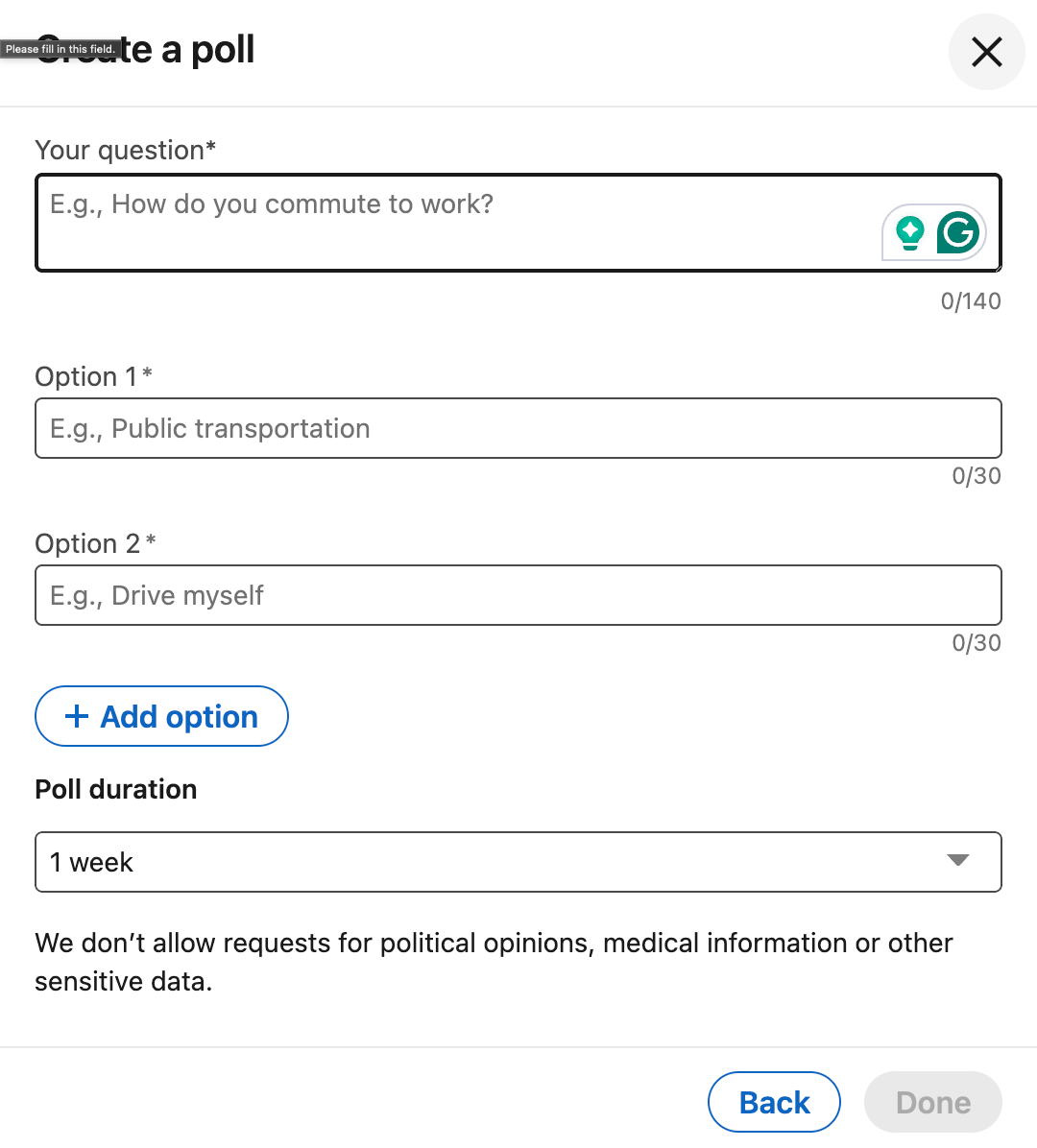
Data shows that polls reach a 4.4% engagement rate and when linked to opinionated topics, can encourage comments and discussion. (source).
Text posts
Text posts have the lowest average engagement (around 4% in recent data), but they still work when the writing is valuable or personal and relevant.
Use this format every now and then, for moments where your message alone carries the weight.
Avoid or adapt external links
Posts that contain external links tend not to perform well because LinkedIn’s algorithm prefers content that keeps users on the platform.
Recent studies and practices have shown that adding external links in a post can cut reach by 50%. (source)
What you should do is embed the value in your post, then place the external link in the first comment. If users really have the intent to click, they will find that link.
Recommended content mix
To operationalize this, consider a mix like:
- 40% carousels/documents
- 25% short native video
- 20% image + text
- 15% polls/text-only
Adjust based on your brand, resources, and audience.
| Format | Best Practice | Share of Strategy |
|---|---|---|
| Carousels/Documents | Use native uploads with one clear idea per slide. Design for swipes, not reading. | 40% |
| Native Video (<90 s) | Upload directly to LinkedIn. Add captions and a hook in the first 3 seconds. | 25% |
| Single-Image + Text | Short copy with authentic images. Avoid stock photos. | 20% |
| Polls | Ask opinion based or industry questions that provoke comments. | 7% |
| Text-Only Posts | Use for strong viewpoints or personal insights. Keep around 300–350 words. | 7% |
| External Link Posts | Place links in comments or repurpose into native formats. | Use only when necessary |
Posting Frequency, Timing & Cadence
How often and when you post directly affects the performance of your content. LinkedIn’s algorithm favors steady, predictable activity and punishes gaps or bursts of posts in short windows.
There are clear trends for timing and frequency, but every audience behaves differently. Treat the benchmarks as a baseline, then test and adjust to find what actually works for yours.
How often should you post on LinkedIn
Across multiple studies, top-performing company pages post between 3 and 5 times per week. One report (based on over 1 million posts) found that pages sticking to that range saw the best mix of visibility and engagement per post.
Fewer than three updates a week causes declining page impressions, while posting daily or multiple times a day adds minimal benefit. Another LinkedIn analysis supported this, noting that 2–5 quality posts per week is optimal for most B2B brands (source).
Consistency and quality are more important than volume. Posting 4 times a day won’t outperform 3–5 strong, valuable updates spread through the week.
Best time to post on LinkedIn
According to various studies, the best time to post on LinkedIn is Tuesday through Thursday. These are the highest-engagement days, with peaks around mid-morning (9am–12pm) and early afternoon (1–3pm) in your audience’s local time zone (source).
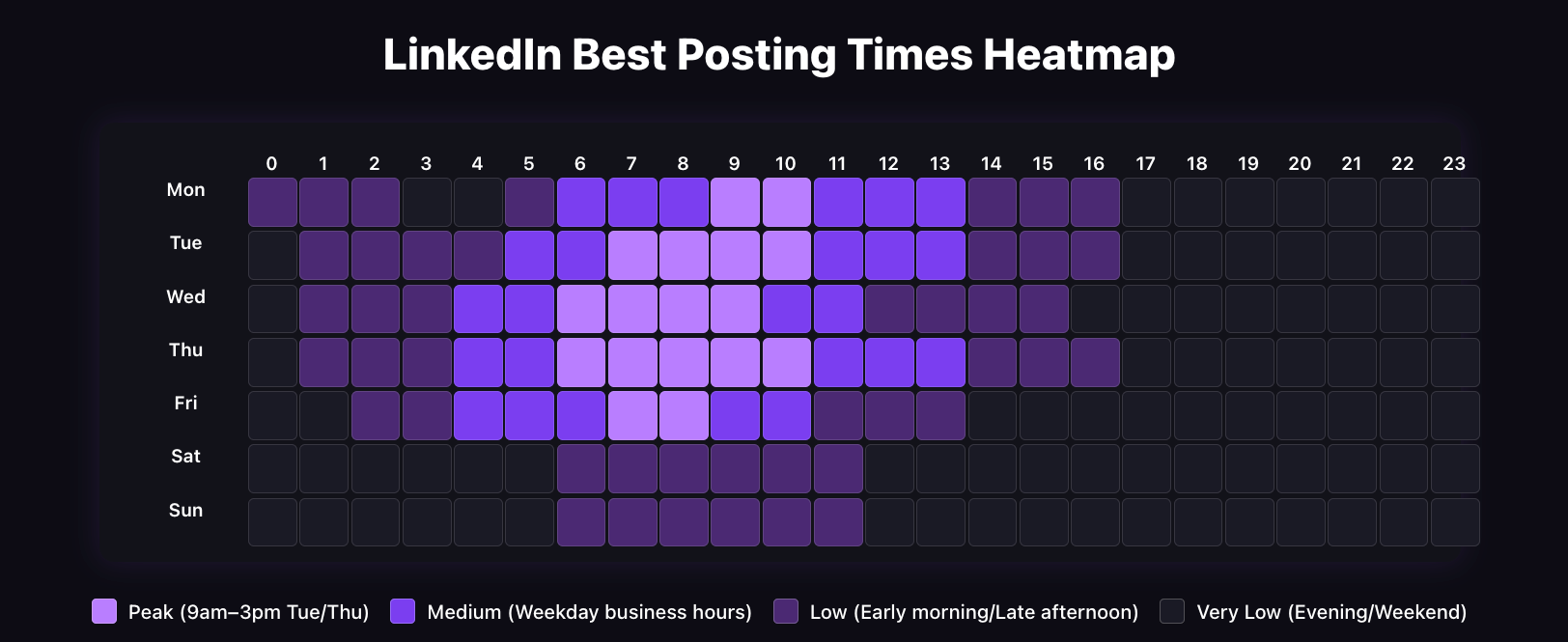
Other data backs this closely, showing Tuesdays 10am–12pm and Thursdays 1–4pm as top-performing days and times.
These hours line up with natural LinkedIn behavior, which is professionals active before or after meetings, checking notifications over lunch, and engaging before the afternoon slows.
Engagement drops extensively on weekends and late evenings.
Why consistency matters
LinkedIn’s algorithm prefers predictable publishing patterns. Posting regularly prepares both your audience and the platform to expect activity from your page. Consistent posting can double engagement rates compared to sporadic updates.
Avoid bursts of multiple posts within a few hours; LinkedIn recommends a 12–18 hour gap between updates to avoid being filtered as spam or splitting engagement between posts.
Make the first hour count
Every post goes through an initial ‘sample test’ on a small part of your network. The algorithm measures early interactions, especially comments and dwell time, to decide whether to show the post more widely.
Posts that get engagement in the first 60 minutes see the highest overall reach. Encourage team members or advocates to comment and interact soon after publishing to trigger that momentum.
Avoid low-value engagement or emoji comments; the algorithm can detect inauthentic patterns.
Treat best practices as a guide, not a rulebook
Optimal times can change as user habits do and as LinkedIn adjusts its algorithm. Use LinkedIn Analytics to see when your own followers are active and test small variations, morning vs afternoon, weekday vs Friday, to validate what’s best for your audience.
Recommended Schedule Overview
| Factor | Best-Practice |
|---|---|
| Posting Frequency | 3–5 posts per week |
| Best Days | Tuesday – Thursday |
| Best Times (local) | 9am–12pm or 1–3pm |
| Gap Between Posts | 12–18 hours |
| First-Hour Focus | Drive genuine comments and interaction |
Hashtags, Link Strategy & Algorithm Triggers
LinkedIn’s feed isn’t random. It ranks content based on quality, relevance, and how long users spend engaging with it. Small adjustments like hashtags, tags, links, and engagement decide whether your post reaches 10 people or tens of thousands.
The goal isn’t to trick the algorithm but to provide value while meeting its expectations of it.
Use hashtags correctly
Hashtags are still one of LinkedIn’s clearest indicators of topical relevance. They help the algorithm, and users understand what your content is about and who might find it useful. But too many hashtags come across as spam.
Posts with three to five relevant hashtags perform best. Anything beyond that can be more harmful than good. The algorithm interprets excessive tags as keyword stuffing, not added value.
Choose a mix of broad and niche tags: one or two large community hashtags like #Marketing or #Leadership, then two or three specific ones such as #DemandGeneration or #EmployerBrand. Keep them at the end of the post or naturally within the copy.
Tag only when it adds context
Mentioning people or companies in posts can help, but only when it’s relevant. Tagging multiple unrelated accounts is spam.
LinkedIn’s own documentation suggests tagging fewer but more meaningful connections improves engagement rates, because users tagged with context are more likely to respond.
When tagging, make sure the person or company is directly referenced or involved. A genuine tag, which causes a response, is worth more than ten ignored mentions.
Use external links carefully
External links are one of the biggest reach killers on LinkedIn. The algorithm is designed to keep users on the platform (zero-click), so posts that send traffic outside are shown less often.
One report found that posts with links in the body get much lower impressions and engagement, up to 50% less reach than native formats (source).
The workaround is to publish your full post, then place the link in the first comment. Or, repurpose the same content into a native format, a document post, a short video, or a carousel.
This keeps engagement on-platform and still drives attention to your core message.
Prioritize meaningful comments
The algorithm looks at engagement quality, not just quantity. Comments carry far more weight than likes. Some studies suggest up to 8× more influence on distribution (source).
The algorithm tracks how long users spend reading the thread and interacting with replies. Poor one-word responses or emoji strings have a small impact.
Instead, write posts that encourage others’ perspectives: end with a question, ask for experiences, or challenge assumptions.
Reply quickly and add context to keep the conversation. Each extra comment extends the life of your post in the feed.
Optimize for dwell time and topic authority
LinkedIn currently gives extra weight to dwell time, which is how long users spend with your content before scrolling. Over time, consistent posting around topics like B2B marketing, SaaS growth, or HR analytics builds topic authority.
When you post again on that subject, the algorithm recognizes your track record and is more likely to show your content to people interested in it. Random content confuses the algorithm; focus drives reach.
Recommended Practices
| Element | Best Practice |
|---|---|
| Hashtags | Use 3–5 relevant tags per post (mix broad + niche) |
| Tagging | Mention only people or companies directly involved |
| External Links | Share value in-post; place links in first comment |
| Comments | Encourage thought-based replies and engage quickly |
| Dwell Time & Topic Focus | Use formats that hold attention and post consistently on defined topics |
Repurpose Content & Extend the Life of Your Ideas
You don’t earn full value from a single post and leave it there. Instead, you scale one strong idea into multiple formats, stretch its lifespan, and get more from the work you’ve done. Here’s how to do that:
Choose a core idea
Pick a substantial piece of content like a research report, case study, long-form blog, or webinar. This will be the anchor for your repurposing. By starting with something content-heavy, you get enough material to spin out into various formats without losing value.
Create multiple formats from that idea
A multi-format approach hits different audience preferences and gives you multiple touchpoints from one initial investment. Don’t just copy and paste. Reimagine the content:
- Turn key findings into a carousel or document (PDF/slides) to improve engagement and dwell time.
- Produce a short native video summarizing the idea, with captions and a strong first 3-second hook.
- Write a text post that puts the insight into an opinion or lesson for your audience and you can also add an infographic for value.
- Use a poll asking your audience a question related to the core idea, for example, their biggest challenge or preference in that domain.
Schedule variations over time
Don’t publish everything at once and expect reach. Spread the formats over a timeframe like one format every week for 4–6 weeks.
After a few months, revisit the idea: refresh a statistic, add a new angle, re-publish in a different format or time slot. Because the algorithm now treats older content differently, you’ll get additional reach.
Studies have shown that posts that earn strong engagement may continue to show up after the initial publish date (source). Also, since mid-2025, LinkedIn has been showing users posts that are 2–3 weeks old if they’re still relevant.
Refresh evergreen content
Even when an idea doesn’t feel new, you can still give it new life. Update with recent data, change the angle (for example: what changed since 2024), or refocus it to a new audience segment.
The aim is to keep value high and avoid posting boring and flat content just for the sake of posting.
Systemize the process
Make repurposing part of your workflow. For every long-form asset, build a checklist: formats to create, publish schedule, and tracking metrics. Then keep an eye on which formats get engagement and improve future repurposing based on what works.
Employee Advocacy & Personal Branding
Employee advocacy has become one of the strongest performing tactics on LinkedIn. Company pages have been hit with decreased reach, and posts from people are consistently performing better.
LinkedIn’s own data shows employee-shared posts get about 2× more engagement than company updates, and the combined networks of employees are roughly 10× larger than a brand page (source). That scale alone makes it too valuable to ignore.
Start with leadership
Executives and senior managers set the tone. When they post about what they’re learning, how the business is advancing, or what they’re seeing in the market, it shows the brand’s expertise without sounding like marketing. Leadership visibility builds confidence inside and outside the company.
Make advocacy a system, not a request
Ad-hoc encouragement doesn’t work. Build a process. Outline who should post, how often, and what themes to cover in the quarter.
Create a simple resource bank with prompts, graphics, or recent wins that people can adapt into their own posts.
Keep it optional but supported; authenticity drives performance.
Train and guide your team
Most people want to post but don’t know what to say. Offer practical help with how to write a clean hook, use hashtags correctly, tag others with purpose, or comment in ways that start conversations.
This removes hesitation and keeps quality high. Internal examples work best, show what good looks like using real posts from your own team.
Use Thought Leader ads to extend reach
LinkedIn now lets you promote posts from personal profiles through paid campaigns. Use this to push high-performing employee content without losing the personal tone.
It’s an effective way to combine natural trust with paid reach.
Keep the brand aligned, not cloned
Every post should feel connected to the brand themes but still sound personal. Set restrictions on tone and visuals, then step back.
Uniform messaging comes across as corporate and staged. Variation is more credible and trustworthy. The goal is consistency in direction, not duplication.
Track and recognize results
Track metrics like engagement, profile growth, and leads influenced by employee activity. Share wins internally and thank people who post regularly. Small public recognition goes further than incentives.
Employee advocacy works because people trust people. It builds reach, credibility, and visibility faster than company updates ever will.
Paid Advertising: Full-Funnel Strategy & New Formats
LinkedIn ads are no longer about lead blasts or one-off campaigns. Performance comes from running full-funnel systems that build awareness, nurture intent, and convert when timing is right.
LinkedIn’s targeting is still unmatched for B2B, but costs are high, so precision and sequencing matter.
Full-Funnel Campaign Design
Start with clear objectives
Every campaign should have one measurable goal: awareness, engagement, traffic, or lead capture. LinkedIn optimizes delivery based on the objective you choose, so forcing one campaign to do everything wastes budget.
Use Brand Awareness or Video Views at the top of the funnel, Website Visits or Engagement for mid-stage education, and Lead Generation or Conversions for final-stage action.
Build retargeting pools
LinkedIn’s strength is its data. Use the Insight Tag to build audiences of people who watched your videos, clicked on content, opened a lead form, or visited key pages on your site.
Then serve them follow-up ads that match where they are in the buyer journey, awareness content first, proof or demo offers later. This keeps your brand visible through long B2B sales cycles without overspending on cold outreach.
Use matched audiences and ABM targeting
For high-value accounts, combine first-party data with LinkedIn’s filters. Upload company lists, layer them with job titles, seniority, or functions, and target only the people who can actually buy.
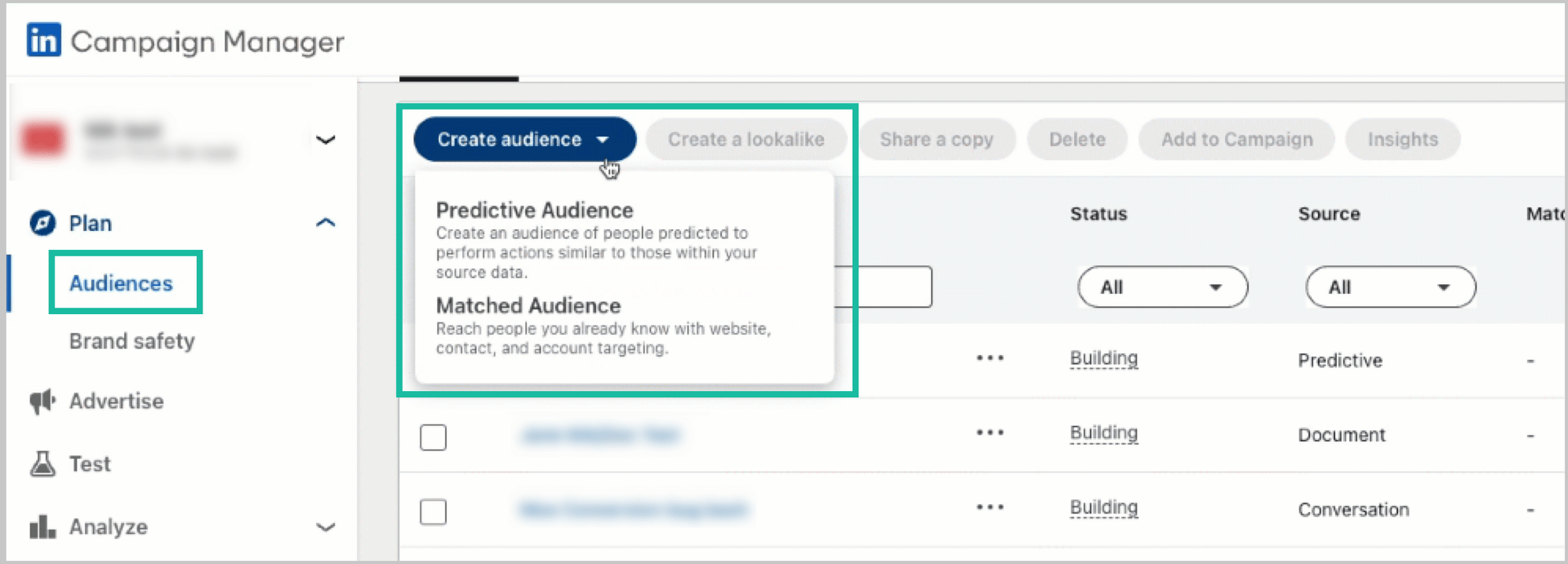
For smaller budgets, focus on niche but high-intent segments rather than large industry audiences. Campaign Manager’s demographic breakdowns will show exactly which roles are engaging, so you can optimize continuously.
Sequence messaging across stages
Top-funnel ads should focus on insight, not product. Mid-funnel campaigns support expertise with guides, webinars, or case studies. Conversion-stage content is where you show results, proof, or direct offers.
Each stage feeds the next. Awareness builds trust, retargeting builds intent, and conversion captures demand. It’s a system, not separate campaigns.
Emerging Ad Formats & Zero-Click Content
Document and carousel ads
Formats that provide value inside the feed perform best. Document Ads and Carousel Ads let users consume information without leaving LinkedIn, which the algorithm prefers.
Use these to share reports, frameworks, or short visual explainers. You can still gate a document with a lead form if needed, but front-load value first.
Conversation and Click-to-Message ads
Both formats turn ads into interactions. Conversation Ads open a chat with multiple prompts like ‘See a demo’ or ‘Download a case study’, letting users choose their next step.
Click-to-Message ads appear in the feed but open a direct message thread when clicked. Use these to qualify interest, book meetings, or direct users to the right rep.
Thought Leader ads
These newer formats let you promote posts from personal profiles instead of company pages. They mix the trust of a human voice with the precision of paid targeting.
Use them to boost posts from your CEO, subject-matter experts, or key employees that already show strong organic engagement. It’s the fastest way to merge advocacy with paid performance.
Zero-click and creative rotation
Zero-click ads, where users get value without leaving LinkedIn, build brand authority and trust over time. Share useful insights or frameworks inside the ad itself rather than forcing a click.
Combine that with steady creative rotation: change visuals, headlines, and calls-to-action every few weeks to avoid ad fatigue.
Watch performance and spend tightly
LinkedIn is one of the pricier platforms, with average CPCs around $5–6 and CPMs often above $30. That cost is worth it when campaigns are structured properly, but waste adds up fast.
Review CTRs, conversion rates, and lead quality weekly. Pause underperformers quickly and reinvest in assets showing clear traction.
Community Engagement & Comment-Driven Amplification
LinkedIn reach is also built by engaging with your community. The algorithm prioritizes interaction and conversation, and posts that generate active discussions outperform those that don’t. It also works well for your brand, showing up and interacting with your audience regularly.
Design posts to invite a response
Posts that ask for opinions, disagreement, or request examples get longer dwell time and more comments. That tells the algorithm your content is worth keeping in the feed.
Replace announcements with questions. End posts with prompts like ‘How are you handling this?’ or ‘What’s worked best for your team?’ Genuine questions encourage useful conversations and drive more impressions than static statements.
Respond quickly and keep threads alive
When people comment, reply fast. Each exchange adds time-on-post, which the algorithm tracks as engagement depth. A conversation between author and audience is one of the strongest ways to improve reach.
Treat your comments section as an extension of the post. Clarify points, ask follow-ups, and thank people who contribute with unique views. This keeps the discussion visible longer and encourages others to join in.
Encourage organic tagging and sharing
If someone else’s input adds value, tag them directly. If a partner, client, or peer is part of the story, mention them in context. Relevant tagging brings their network into the discussion, extending reach naturally.
Forced tagging, however, hurts performance. Only include those genuinely connected to the topic.
Monitor what earns responses
Look at which topics, tones, and formats get the most conversation for your brand. LinkedIn Analytics shows comment counts, but you should also read the quality of replies. Are people adding value or just reacting with emojis?
Build your content calendar around posts that generate valuable discussion. If an angle consistently drives thoughtful responses, make it a recurring theme.
Engage outside your own posts
Comment with value on industry posts, client updates, or discussions from your network. The algorithm boosts visibility for active users, and your comments can show your profile to new audiences.
This also improves networking and strengthens relationships. People notice who contributes value, not just who posts often.
Use community spaces
LinkedIn Groups have regained traction for niche discussions, but they only work with consistent activity.
Join groups where your audience is active, share insights and move those conversations into your main feed. The goal isn’t to sell, but to stay visible where decision-makers engage.
Measurement, Analytics & Iteration
LinkedIn marketing requires testing, tracking, and adjusting constantly. The platform changes often, audience behavior changes, and what worked last quarter might not work next. The brands that keep winning are the ones that measure everything and move fast on the data.
Measure what’s important, not just what’s easy
Vanity metrics like impressions and total followers look good but don’t tell you if your strategy is working. Focus on indicators that show actual performance gains: engagement rate (by impressions), comment depth, share rate, and format performance.
Track which content types actually get interaction, not just reach. LinkedIn’s analytics dashboard provides these, but build your own view to see patterns over time.
Track audience quality over size
Growth means nothing if your followers don’t care about your content. Review audience demographics and engagement by industry, job title, and seniority. A small, relevant audience that engages regularly is far more valuable than a mass following that does nothing.
For brand pages, steady growth of the right people shows your content is attracting the right attention.
Track paid performance like a portfolio
For ads, your core metrics are CTR, conversion rate, cost per lead, and lead quality. A good CTR on LinkedIn is around 0.5%, anything below 0.3% needs review. Form completions above 10% are strong.
Always weigh cost per lead against downstream quality, expensive clicks are fine if they convert to high-value opportunities. Rotate creative and frequency to avoid ad fatigue, and benchmark each campaign before scaling.
Use data to cut and reinvest
Every few weeks, review what’s working and what’s not. If certain formats consistently underperform, drop them. Double down on the ones delivering engagement or conversion.
The fastest way to build results on LinkedIn is through constant iteration by pruning weak areas and focusing effort where the audience responds.
Run controlled experiments
A/B test everything: headlines, visuals, post times, calls to action, even tone. Change one variable at a time so results are clear. Keep tests simple and short; a two-week window is enough to see directional trends. Build a culture of curiosity, small experiments reveal big insights over time.
Bring organic and paid into one view
If your teams treat organic and paid separately, you’ll miss how they feed each other. Use one dashboard that tracks both. See which organic topics perform best, then boost them with ads. Watch which paid creatives draw high engagement, then rework them into organic posts.
FAQ: LinkedIn Marketing
Most active company pages post 3–5 times per week. Consistency matters more than volume—posting every weekday won’t help if quality drops. Allow at least 12–18 hours between posts to avoid algorithm overlap and keep engagement clean.
Mid-morning to early afternoon in your audience’s time zone still performs best. Data from Sprout Social and Socialinsider shows Tuesday to Thursday, between 9 AM–1 PM, drives the highest engagement. Test variations, but avoid weekends unless targeting global or always-on industries.
Carousels and document uploads lead for engagement, averaging 6–6.5% rates. Short native videos follow at around 5.5%, while image + text sits near 4.8%. Use text-only posts sparingly—only when the writing is strong enough to hold attention. Mix formats: anchor your strategy with high-engagement types and fill gaps with lighter posts.
Yes. Posts that push users off-platform still see significantly lower reach—up to 50% less, according to multiple 2025 studies. Always prioritise native formats and place links in the first comment instead of the post body.
Around 1,800–2,000 characters (300–350 words) is the sweet spot. That’s long enough to add value but short enough to hold attention. Break paragraphs every 3–4 lines to stay readable on mobile.
If you’re in B2B, yes—but run them as a full-funnel system, not one-off lead grabs. Combine video or thought-leader ads for awareness, document or carousel ads for education, and lead-gen forms or conversation ads for conversion. Track cost per lead and retarget anyone who engages.
Yes—if you use them properly. Stick to 3–5 relevant hashtags. Mix broad ones (#Marketing, #Leadership) with niche ones tied to your audience (#B2BDemandGen). More than that risks triggering spam filters.
Make it easy. Give topic prompts, short tips, and examples of good posts. Show results—when employees see their content perform, participation rises. Encourage leadership to post too; when executives model behaviour, others follow.
Focus on engagement rate, comment depth, share rate, and audience relevance. For paid, track CTR, CPL, and conversion quality. High impressions with no interaction means you’re not reaching the right people.