
Nano Banana 2 (officially Gemini 3.1 Flash Image) is Google’s latest update for high-volume visual production using generative AI.
In today’s workflow, the designer bottleneck slows campaigns. Nano Banana 2 reduces that bottleneck with consistency and the ability to generate multiple variations from one source image.
It’s built for marketing teams that need to turn one concept into 40+ platform-ready assets with speed and scale.
These features let teams generate variations from Instagram Stories to 4K display ads while keeping the same product details and the same brand style across every version.
This guide covers Nano Banana 2 in 2026, including localized text rendering and how to use the ‘Thinking’ toggle when you need more complex ad layouts.
- What It Is: Google’s image generation and editing model built for high-volume marketing production.
- Best For: Turning one approved concept into 20–50 usable assets across formats and locales, including in-image text.
- Main Differentiators: Stronger subject consistency controls (up to 5 characters and 14 objects per workflow) and optional Search grounding for factual details.
- Biggest Limitation: Long or tiny text and perfect consistency can still drift. Final legal copy, labels, and high-stakes details need human QA in a design tool.
- Cost: Gemini API pricing starts around $0.045 per 512px image (higher for larger outputs; batch rates are lower).
What Is Nano Banana 2?
Nano Banana 2 (officially Gemini 3.1 Flash Image) is Google’s AI image generation tool for high-velocity production, released in February 2026. It’s built to generate and edit marketing visuals quickly while still handling more complex layouts and instruction-following when needed.
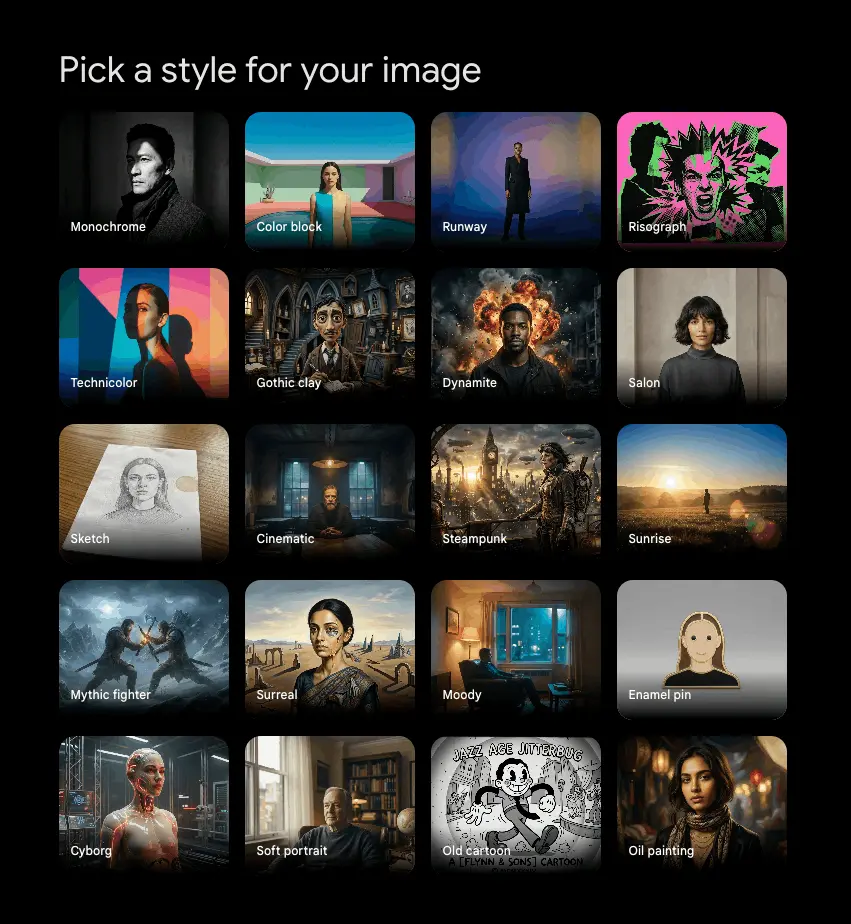
Unlike earlier versions that created images from a prompt, Nano Banana 2 is more like an editing system that can produce large numbers of image variations quickly. Marketers can request specific changes like changing wardrobe, setting, or lighting without opening design software.
Key improvements from the previous Nano Banana version
- Search grounding: The system can reference Google Search to confirm live details (for example, a specific car model or a recognizable skyline) so ads match the facts.
- Subject consistency (Likeness Lock): Teams can keep the same product or character consistent across 14 objects in a single workflow, which helps multi-asset campaigns stay visually uniform.
- Production-ready output: Nano Banana 2 supports outputs from 512 px up to 4K, with pricing starting at $0.045 per image. This makes it easier to scale creative across social, web, and print without relying on full photo shoots for every variation.
Is Nano Banana 2 Different from Other AI Image Generators?
Nano Banana 2 is aimed more towards marketing production, where it can turn one concept into multiple usable assets without the product, mascot, or key details drifting.
Most other image generators are better at one-off visuals (style exploration, concept art, hero images) but get harder to manage when you need repeatable output across a full campaign.
The clean way to compare these tools is by what breaks a marketing workflow: turnaround time, consistency, and detail control.
See how to maintain brand consistency with Nano Banana 2.
Turnaround time for iteration
Nano Banana 2 is built for fast iteration so teams can stay in the same review loop and keep generating variations without breaking flow. Important when you’re running live reviews, building 20–40 variants, or testing creative in cycles.
Midjourney can produce high-quality visuals, but it’s often used in a more ‘create and iterate’ loop. DALL-E 3 is usually a quick idea generator, but production-style iteration can get messy when you need control over repeated elements.
Choose Nano Banana 2 when the workflow is focused on generating multiple variations quickly, rather than one perfect image.
Consistency across many assets
This is where most generators struggle in marketing use. You can often get one good image, but the product details or character identity change when you ask for the next 10 versions.
- Nano Banana 2: Likeness Lock is built for keeping the same subject consistent across multiple outputs (within its limits).
- Midjourney: Character reference features can help keep a character consistent, but results still vary based on prompts and settings.
- DALL-E 3: Consistency is possible, but it’s more dependent on careful prompting and reference workflows, so outcomes are more variable across a long run of assets.
If the campaign lives or dies on a consistent mascot or product silhouette, prioritize the tool built for locking identity.
Accurate detail control
Most image generators will produce something that looks like a real object or place while getting details wrong. That’s a problem for marketing materials where factual details are important.
Nano Banana 2’s differentiator here is Search Grounding. Using Google Search to confirm details instead of guessing. Most other generators don’t have an equivalent built-in search verification step as part of the image workflow.
Use Nano Banana 2 when the visual must match a specific live reference.
Nano Banana 2 vs. Midjourney vs. DALL-E 3
I think for marketing use cases, Nano Banana 2 is much better than other AI image generators. It has its limitations, but it’s more effective to scale, integrate, and get finished visuals than others I have tried.
| Nano Banana 2 | Midjourney | DALL-E 3 | |
|---|---|---|---|
| Best at | High-volume marketing variations | Stylized hero visuals and art direction | Quick concepts and simple creative |
| Iteration speed | Built for rapid variant output (timing varies by setup) | Usually slower per iteration (varies by plan/queue) | Moderate for ideation (varies by workflow) |
| Consistency tools | Likeness Lock for repeated subjects (within limits) | Character reference options (results vary) | More prompt/references dependent (results vary more) |
| Detail control | Search grounding for verification | No built-in search verification | No built-in search verification |
| When to choose it | You need 20–50 usable assets that stay consistent | You need standout visuals with a strong style | You need fast ideation and lightweight production |
I ran a quick prompt through to compare DALL-E 3 with Nano Banana 2:
“A 16:9 lifestyle banner for a sustainable coffee brand, featuring a barista pouring an oat milk latte in a sunlit café. The brand logo ‘GREEN BEAN’ is clearly visible on the cup.“
DALL-E 3 Example
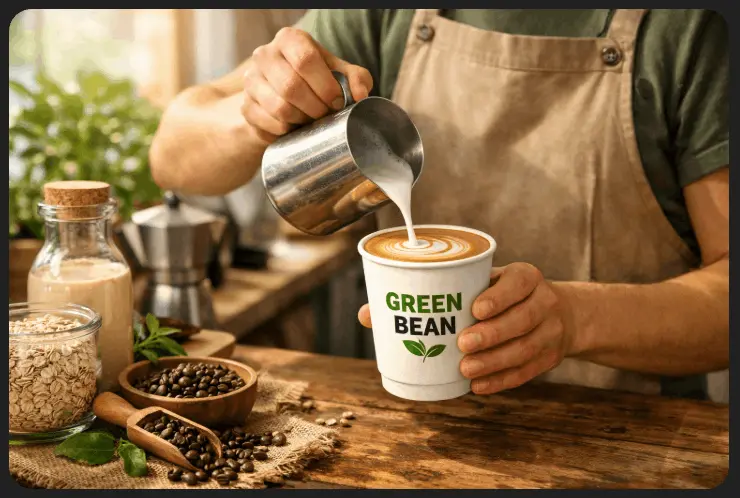
Nano Banana 2 Example
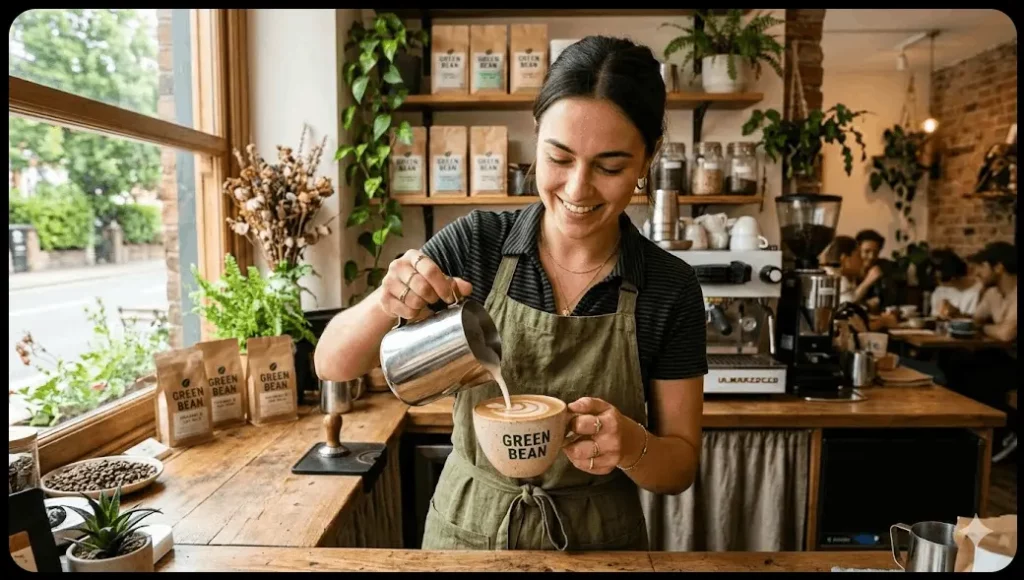
They are both good at first glance. But when you dig deeper, you can see how much more detail goes into Nano Banana 2. It’s more realistic, the logo is accurate and used for products in the background, there are other people in the scene, there’s outdoor contrast with indoor lighting… It’s just better.
- Choose Nano Banana 2 for repeatable campaign production across formats and audiences.
- Choose Midjourney when the goal is premium style and hero creatives.
- Choose DALL-E 3 when you want fast ideation and simple creative support.
How to Keep Brand Consistency with Nano Banana 2
Consistency is not so much about detailed prompts but more about running a controlled workflow: one approved reference, one stable identity spec, and small, repeatable edits.
If you’re wondering how to keep brand consistency across assets with AI image generation, follow these steps:
1) Build a reference kit (before you generate anything)
Pick one canonical image that represents the true version of the product/mascot (the one you’d actually approve). If you have options, use a clean, well-lit image with minimal motion blur.
If your workflow supports multiple references, add 2–4 supporting references that show:
- A second angle (3/4 view)
- A close-up of the logo/texture
- The ‘hero detail’ that must not drift (ridge pattern, label shape, face features)
In the Gemini API workflow, you can provide multiple images as inputs (up to a total cap) and use them as anchors for edits and consistency. (Gemini image generation docs)
2) Write an Identity Spec you paste into every prompt
Keep this short and factual. It should be like a product/character QA checklist.
Identity Spec template:
- Subject name: [Insert Name]
- Must-match features: (3–6 bullets: silhouette, colors, materials, unique marks)
- Logo/text rules: (exact text, placement, orientation, ‘do not invent new text’)
- Do-not-change list: (anything that breaks recognition)
Example:
- Subject name: Silver ridged suitcase
- Must-match features: vertical ridges; brushed silver finish; black handle shape; corner caps
- Logo/text rules: no new logos; no new brand text; keep any existing marks identical
- Do-not-change list: ridge count/spacing; handle geometry; overall proportions
3) Create a master image, then iterate only by editing
Do one strong base generation first. Treat that as your master copy.
After that, don’t keep generating from scratch. Instead, edit the master (or the last approved version). This is the easiest way to prevent drift because you’re anchoring each step to a real image.
4) Run the ‘One Change Rule’
Only change one variable per iteration: background or lighting or wardrobe or camera angle.
Not 3–4 at once.
Changing multiple things at once increases drift. If you need multiple changes, do them in separate edits (one change per pass).
5) Use a strict edit prompt format
Use a structure that forces ‘change only X’ and repeats your Identity Spec every time.
Edit prompt template:
- Input: Use the previous approved image as the input image.
- Task: ‘Change only: ___.’
- Keep: Paste the Identity Spec.
- Rules: ‘Do not add/remove objects. Do not change proportions. Do not invent text.’
- Output: ‘Return one image.’
Example:
“Using the provided image as input, change only the background to a realistic airport terminal. Keep the suitcase identical to the input. Identity Spec: … Do not change size/proportions. Do not add extra wheels/handles. Return one image.”
6) Separate formatting from identity work
If you need 9:16, 1:1, 16:9, etc., do this in stages:
- Lock the identity first (master + a couple of clean edits)
- Then generate/rescale/crop format variants
- Then do localization text/layout changes
If you mix identity changes and layout/localization in the same step, consistency usually collapses.
7) Add a QA step and a drift fix loop
Before you call something final, run it by a quick checklist:
- Silhouette/proportions match the reference
- The ‘hero detail’ matches (logo, ridges, label shape, face features)
- No new text, no altered text
- No extra limbs/wheels/handles, no warped edges
If it drifts, don’t try again with a longer prompt. Re-anchor:
- Use a tighter crop reference of the drifting area (logo/face)
- Reduce changes back to one variable
- Explicitly say: ‘Match the input subject pixel-for-pixel; only change background.’
This is the reliable pattern in image edit workflows: re-anchor with stronger references and smaller edits.
How to Use Nano Banana 2 for Marketing
Marketing teams use Nano Banana 2 to speed up the parts of creative production that are often repetitive. The AI image generator works best when you already have a core concept or product image and need to produce variations for different channels, audiences, and markets.
Most teams should be using the tool to remove bottlenecks in ad production, social response, ecommerce content, and localization.
High-velocity ad creative and A/B testing
Paid media teams constantly test new visuals. A typical paid campaign needs 10–30 creative variations across Meta, TikTok, and Google Ads, and designers often become the bottleneck when each version requires manual edits.
Nano Banana 2 helps teams generate and test more variations from the same core concept. The goal is not replacing creative direction; the goal is producing enough versions to find a winning ad faster.
Teams typically use it for:
- Segment-specific backgrounds: Start with one product image and swap the setting to match the audience (for example, a cozy home scene for families or a minimalist office environment for professionals).
- Rapid concept iteration: Test multiple hero concepts quickly instead of waiting on a design queue for every new version.
Social media and trend response
Social teams work on short timelines. Trends, memes, and news cycles often peak within 24–48 hours, so waiting days for new creative usually means missing the moment.
Nano Banana 2 helps social teams generate quick visuals that match a trending topic or format. The tool works best when the team already has brand assets, mascots, or products ready to reuse.
Common uses include:
- Live trend response: Create branded visuals that reference a trending meme or news event while engagement is still high.
- Platform formatting: Convert one visual into multiple formats like 9:16 Stories, 4:5 Instagram posts, or 16:9 video thumbnails without rebuilding the layout.
Ecommerce catalog and lifestyle imagery
Ecommerce teams need both clean product photos and lifestyle imagery. Traditional lifestyle shoots require locations, props, and lighting setups, which increases cost and slows catalog updates.
Nano Banana 2 helps generate staged product environments from a standard product photo. Teams can expand catalog visuals without scheduling new shoots.
Typical workflows include:
- Virtual product staging: Place a product into a realistic environment, such as putting a skincare bottle on a marble vanity or a coffee mug on a kitchen counter.
- Colorway expansion: Show a product in multiple color options without photographing each variation separately.
Global localization and multilingual ads
Global campaigns often reuse the same creative but need different languages and regional variations. The slow part of localization is usually rebuilding layouts for translated text.
Nano Banana 2 helps teams replace and re-render text inside an image while keeping the design intact. This makes it easier to adapt a single campaign for multiple regions.
Marketing teams commonly use it for:
- In-image translation: Replace headlines or calls-to-action in languages like French, Hindi, or Japanese while maintaining readable layout and spacing.
- Regional campaign variants: Adjust visuals to better match local culture or settings without redesigning the ad.
Content marketing and visual storytelling
Content teams publish long-form assets like blog posts, guides, newsletters, and reports. These formats benefit from consistent visuals, especially when a brand uses recurring elements.
Nano Banana 2 helps create visual continuity across multiple pieces of content.
Typical examples include:
- Consistent elements or characters: Use the same brand character across a blog series, newsletter graphics, or educational content.
- Illustrated explanations: Create diagrams or visual examples that support a concept inside a guide or article.
Sales enablement and presentation design
Sales teams often need visuals for pitch decks, proposals, and presentations. These materials work better when they look aligned to the specific client or industry.
Nano Banana 2 helps teams quickly generate supporting visuals that make a presentation feel more customized.
Common uses include:
- Custom pitch visuals: Generate hero images that reflect the client’s industry, market, or product category.
- Localized presentation graphics: Add recognizable city landmarks or regional context when pitching to companies in specific locations.
Examples of How I Tested Nano Banana 2
I ran some basic prompts through Nano Banana 2 to see how accurate and consistent it performed. These are the 3 tests:
Test 1: High-Reasoning Layout Consistency
The goal here was to prove the model can maintain a pixel-perfect UI/UX layout across different content swaps.
Prompt 1: “Generate a professional 1:1 Instagram ad for a luxury hotel suite. At the bottom, place a solid sage-green rectangular footer. Inside that footer, render the text ‘BOOK YOUR ESCAPE’ in white, bold, sans-serif typography. Ensure the text is perfectly centered.”

Prompt 2: “Now, [Lock Layout]. Keep the green footer and the white text exactly where they are. Swap the hotel suite image for a high-end rooftop infinity pool at sunset. The lighting of the pool should match the premium feel of the previous suite.”

Given the basic prompt, I think the result here is great. The subject (person) didn’t move, but I also didn’t instruct it to. The font and banner do look out of place for a luxury brand, but again, that was my instruction. The execution is almost perfect.
Test 2: Multi-Subject “Likeness Lock”
The goal with this test was to prove the model can track a brand mascot and a specific product simultaneously without merging their details.
Prompt 1: “Generate a studio photo on a white background of a [Brand Mascot: Golden Retriever wearing a blue tech-fabric vest] sitting next to a [Product: Silver metallic suitcase with distinct vertical ridges]. Render both in high detail.”
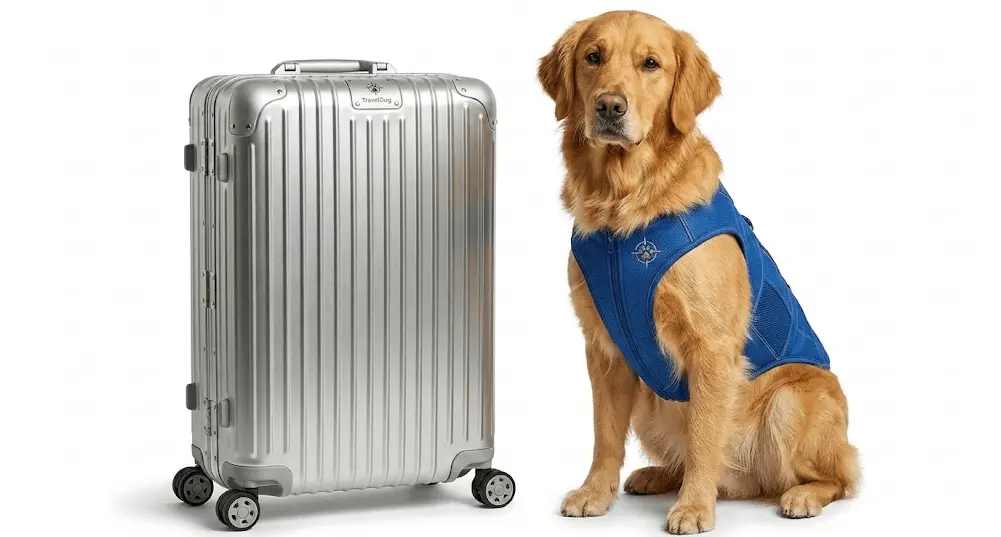
Prompt 2: “Now, [Lock Subject 1: Mascot] and [Lock Subject 2: Product]. Move them into a busy, realistic airport terminal. The dog’s vest and the suitcase’s specific ridge pattern must remain 100% identical to the first image. Adjust the shadows and reflections to match the airport lighting.”
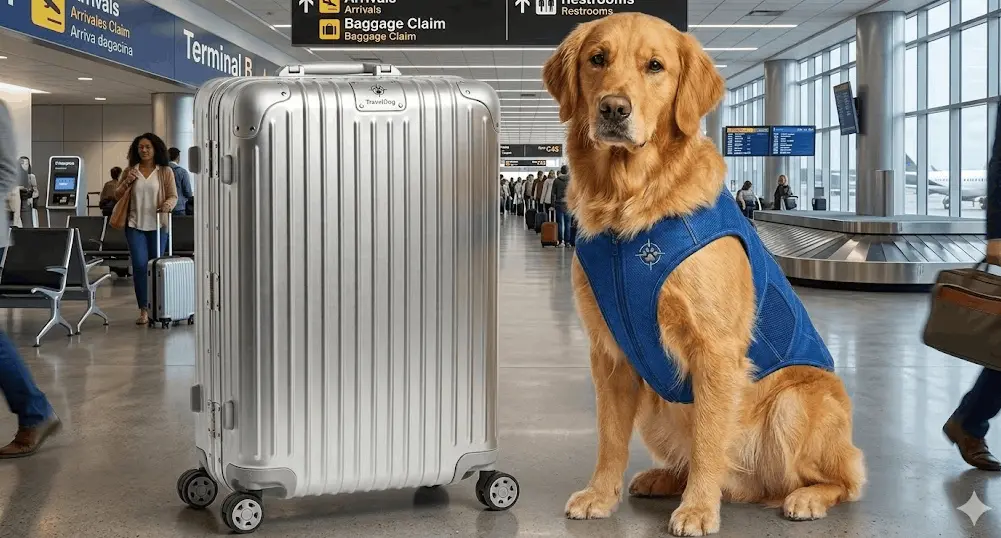
This one is slightly off. The dog and suitcase appear to be larger than the humans that are right next to them, so the perspective isn’t great. However, the consistency on the 2 main subjects, the shadows, and lighting ect, is all really good. With a better prompt, this could be a great image.
Test 3: Micro-Copy & Fact-Checking (Search Grounding)
The goal with this test was to prove the model can render tiny, accurate technical text and actual product details.
Prompt 1: “Generate a close-up ‘hero’ shot of a 2026 [Specific Car Brand] electric SUV charging port. Use Search Grounding to ensure the port design and the surrounding body panel textures are factually accurate to the 2026 model.”
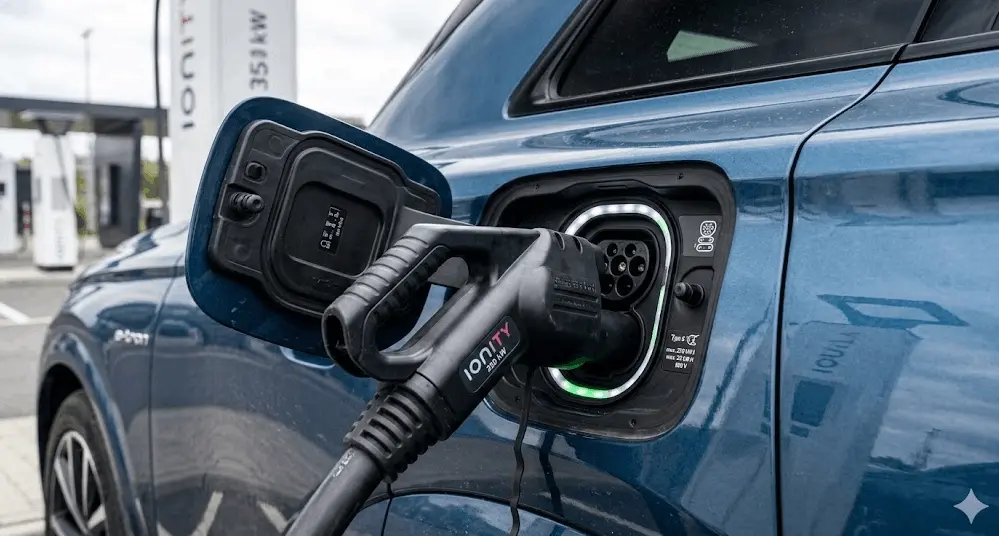
Prompt 2: “Now, zoom out slightly to show the side of the car. On the lower door panel, render the text ‘PROTOTYPE: 001’ and ‘EV-TECH’ in a tiny, crisp, 8pt-style silver font. The text must be sharp and perfectly horizontal, following the car’s body line.”
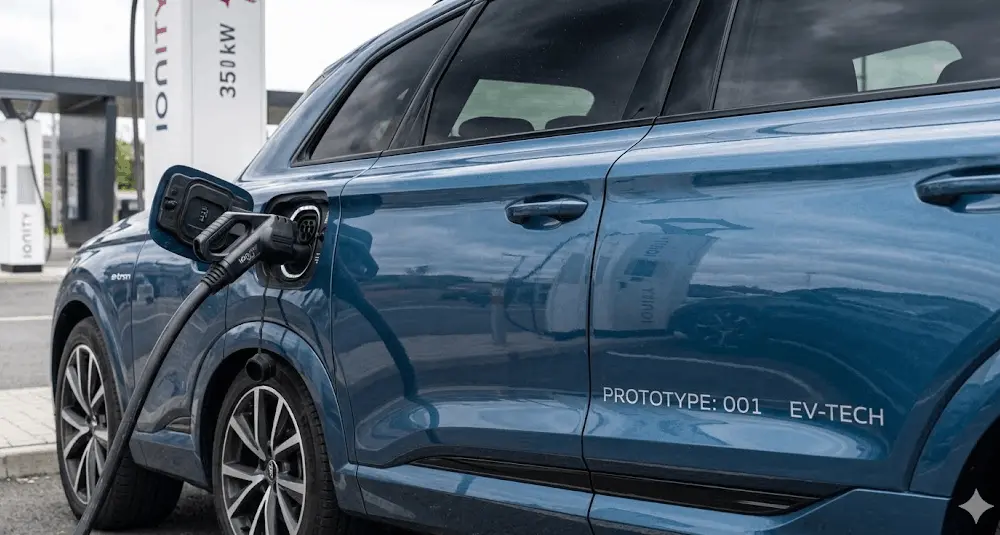
This one messed up slightly, given the extra wheel on the car. But it executed the text and prompt very well. Again, I didn’t prompt it to lock the car or add any further instructions. So with some prompt refinement, this would have likely turned out perfect.
Prompt Examples for Nano Banana 2 in Marketing
These are some other examples of prompts that you can use to generate images for marketing in Nano Banana 2.
One side note: when generating, consider using thinking modes for more complex image generation.
- Fast: Best for rapid-fire ideation, simple social crops, and 512px thumbnails. Sub-1-second latency.
- Thinking: Mandatory for complex infographics, multi-character scenes, and localized text rendering. It uses reasoning to plan the layout before pixels are drawn.
1. Global Campaign Prompt (Text & Localization)
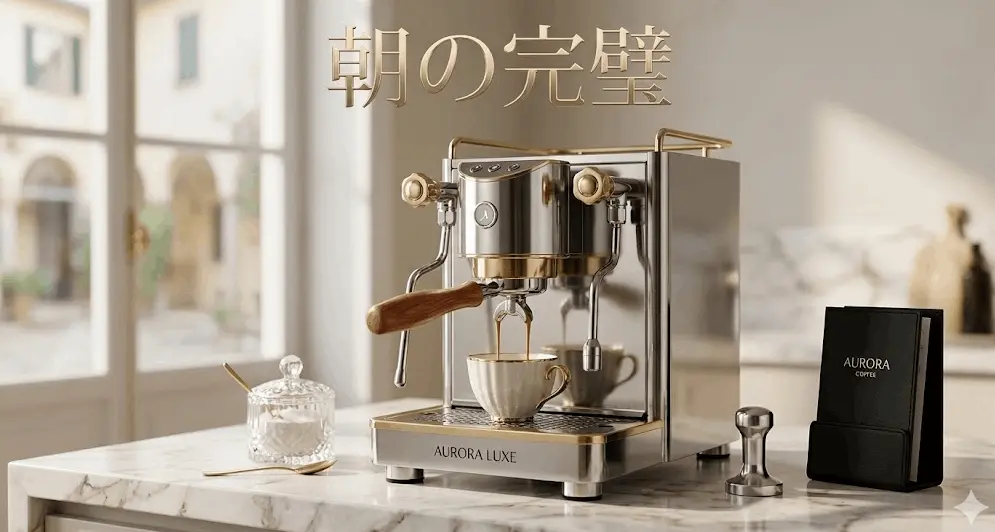
This was to create a localized ad for a specific market without a designer. The specific goal was to use a different language but also to set a good product scene.
The Prompt: “Generate a 4K high-fidelity ad for a luxury espresso machine on a marble kitchen counter. Render the headline ‘Morning Perfection’ in a sleek, gold serif font at the top. Once generated, translate that headline into Japanese (朝の完璧) while maintaining the exact same font style and background composition.”
2. Likeness Lock Prompt (Subject Consistency)
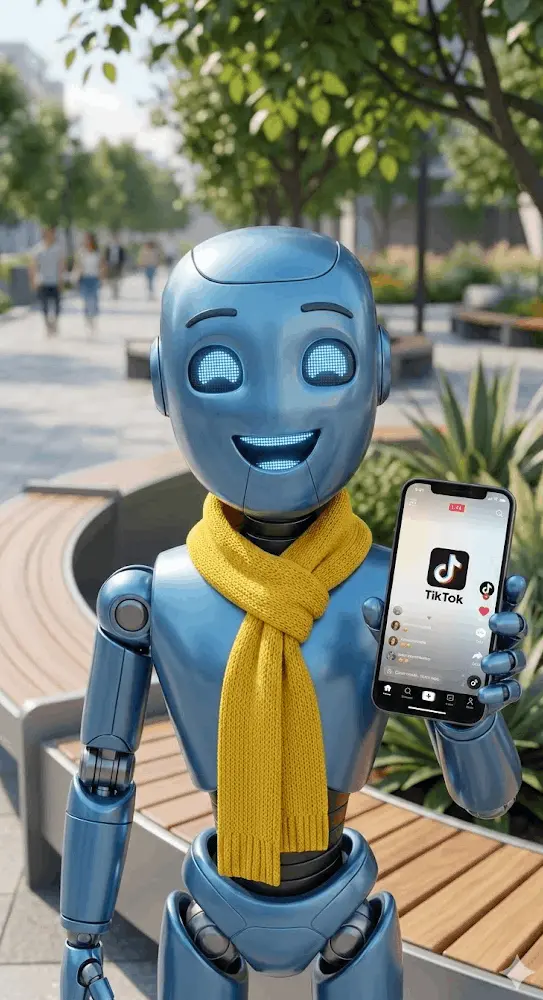
This one, I wanted to create a made-up brand mascot that could be used across different social platforms.
The Prompt: “Generate a 3D-style brand mascot: a friendly blue robot wearing a yellow scarf. [Lock Subject 1]. Now, place this exact mascot in a new 9:16 vertical scene for TikTok where he is holding a smartphone in a bright, modern park. Ensure the scarf and robot’s facial features are 100% identical to the first image.”
3. Search Grounding Prompt (Factual Accuracy)
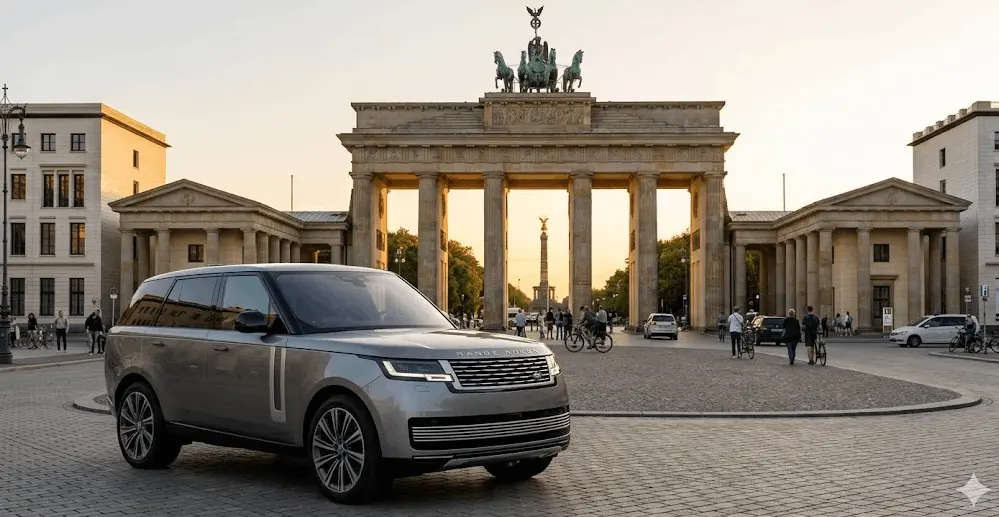
With this image, I wanted to create a factually accurate image of a brand name and location.
The Prompt: “Generate a 2K resolution photo of the 2026 [Range Rover] SUV parked in front of the Brandenburg Gate in Berlin. Use Search Grounding to ensure the car’s grill design and the gate’s architecture are factually accurate to current 2026 specifications. Set the lighting to ‘Golden Hour’.”
4. Lifestyle Staging Prompt (E-Commerce)
This is probably the biggest use case for ecommerce – turning a product shot into a high-end lifestyle image.
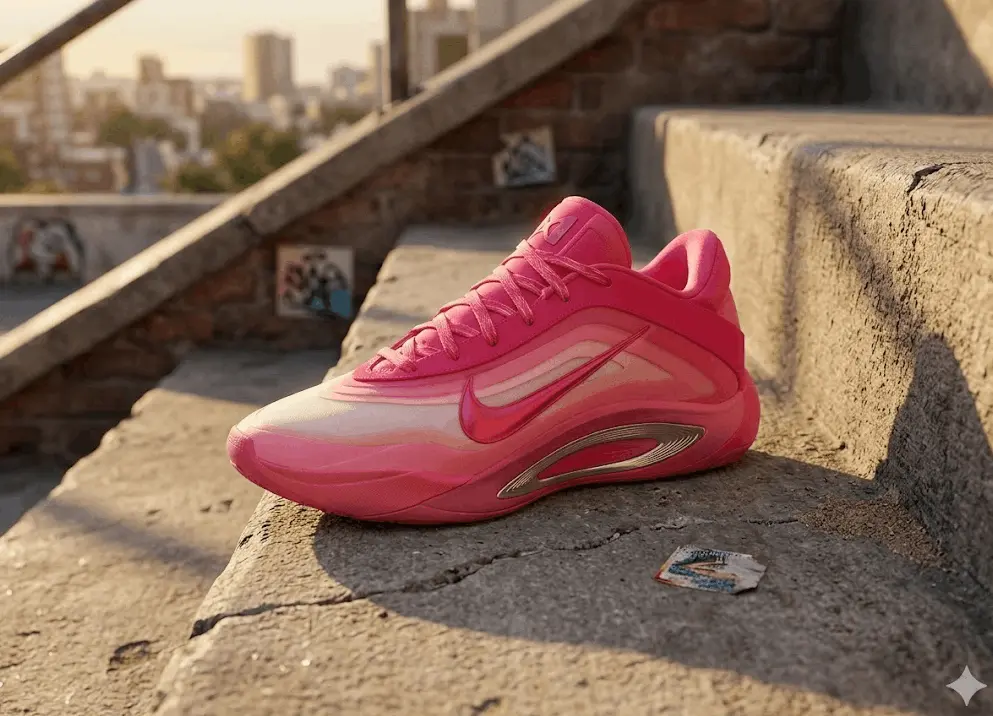
The Prompt: “[Upload product photo]. Remove the white background from this sneaker. Place it in a ‘Urban Streetwear’ setting on a concrete step with soft, cinematic shadows. The lighting should feel like a late-afternoon sun. Maintain the exact textures and logo placement of the uploaded shoe.”
What Limitations Does Nano Banana 2 Have?
Nano Banana 2 is a production tool, not a shortcut to perfect creative assets. While it produces some high-quality results, it has its limitations:
The subject cap (the 5 + 14 rule)
Likeness Lock is strong, but it is not unlimited. One workflow can hold up to 5 characters and 14 distinct objects before consistency starts to slip.
When you push past that cap, the output drifts. The same mascot starts changing face shape. The same product starts changing details. That drift usually shows up in small features like logos, textures, and edges.
Micro-copy and paragraphs
Nano Banana 2 handles headlines, logos, and short slogans well (roughly 10 words). It still struggles with dense text like ingredient lists, legal disclaimers, and full paragraphs.
The reliable workflow is to generate the visual background and the main headline, then add fine print in a design tool like Figma or Adobe Express.
Native 4K is not the same as large-format print
4K works for most digital placements and standard print. Large physical installs like billboards, building wraps, and trade show backdrops usually need 8K+ output and clean edges at close viewing distances.
That final step still belongs in a professional upscaler (for example, Topaz) or a higher-quality render pass (like a ‘Redo with Pro’ option if your workflow includes it).
Tight IP guardrails
As of January 2026, IP filtering is stricter. Requests for famous copyrighted characters (Disney, Marvel, etc.) or specific celebrity likenesses often get blocked.
For marketing teams, the rule is to use your own brand assets and build your own characters and mascots that you can control.
Daily usage quotas can run out fast
Even paid tiers have daily limits. Because generation is fast, it’s easy to burn through 100–1,000 images/day (varies by tier) in one long brainstorm.
The best way to manage this is to do early exploration in 512 px and save 4K outputs for the handful of concepts that survive review.
| Aspect | What Nano Banana 2 does well | What still needs human oversight |
|---|---|---|
| Consistency | Keeps 5 characters/14 objects consistent | Ensuring the pose, expression, and vibe match brand tone |
| Text | Clean headlines and short slogans | Long disclaimers, ingredient lists, and legally exact micro-copy |
| Accuracy | Uses search grounding for real-world details | Final QA on specific product parts, labels, and compliance details |
| Speed | Fast renders for A/B testing and iteration | Preventing wasted runs and managing quota burn |
| Compliance | Supports provenance markers (SynthID, C2PA) | Making sure the creative intent and claims meet legal standards |
How Nano Banana 2 Integrates With Your Marketing Stack
Nano Banana 2 is strongest when it fits into your current stack. The main benefit is automation: your other tools can kick off new image versions and apply updates as part of the same campaign workflow.
Creative design tools (Adobe and Figma)
Design teams move faster when they don’t bounce files between tools. The point here is to keep work inside the design space so revisions stay clean and tracked.
- Adobe Photoshop 2026: Nano Banana 2 and Nano Banana Pro are available as partner models in Adobe Firefly, and Gemini models can be used in Photoshop Generative Fill via the model picker (availability depends on the Adobe tool).
- Figma ‘Make an Image’: Use the built-in Make an image and Edit with prompt actions to generate or edit images directly on the canvas (and optionally attach a reference image for closer matching).
Google Ads Creative Studio
In Google Ads, Asset Studio is the native hub to create, edit, preview, and manage campaign assets, with AI-powered tools to generate and scale creative variations inside your ad workflow.
This is where performance teams see the most direct impact. You start with one hero image, then produce variations without spinning up a separate production process.
- Automatic Variations: Provide one hero asset and generate 20+ variations with different backgrounds and localized text for specific audience segments, all inside the ad builder.
CMS and asset management (DAM)
CMS and DAM integrations remove delays when teams need an image immediately. They also reduce manual effort by syncing asset updates across many pages and placements.
- Automated thumbnails: When a post moves to published, a trigger can generate a brand-consistent header image using the post’s metadata.
- Dynamic DAM updates: Bulk-update a library of product shots with seasonal changes (for example, add snow and holiday lights across a set of catalog images) inside the asset manager.
Developer API and Vertex AI
This is for teams that want image generation to happen in the background as part of a larger system. The benefit is personalization at scale without someone manually building every asset.
Learn more about the Nano Banana 2 API.
- Vertex AI access: Enterprise teams can connect it to internal systems so a CRM like Salesforce or HubSpot can trigger a personalized visual for a high-value prospect and drop it into an email (often called Visual ABM).
FAQ – Nano Banana 2
Nano Banana 2 is Google’s latest image generation and editing model in Gemini, also called Gemini 3.1 Flash Image. It generates new images and edits existing images using plain-language prompts, with an emphasis on fast turnaround and high volume.
No. Nano Banana commonly refers to Gemini 2.5 Flash Image, while Nano Banana 2 refers to Gemini 3.1 Flash Image. Choose Nano Banana 2 when you want the newest features and higher output sizes; choose Nano Banana when you need the older 2.5 endpoint.
You can use Nano Banana 2 in the Gemini app, and you can build with it through the Gemini API and Vertex AI. Google is also rolling it out across surfaces like Search AI Mode, Lens, and Flow.
As of March 2026, Gemini API pricing lists image output at about $0.045 per 512px image, $0.067 per 1K, $0.101 per 2K, and $0.151 per 4K, with cheaper batch rates (for example, about $0.022 per 512px). Your total cost rises when you generate more and larger images.
Nano Banana 2 supports multiple aspect ratios and outputs from 512px up to 4K, including upscaling to 2K/4K. Use 4K when you need sharp hero images; use 512px or 1K for fast testing and cheaper iteration.
Yes. Nano Banana 2 supports text-and-image-to-image editing, so you can upload an image and ask for changes like background swaps, object removal, or style tweaks. You get the best results when you give one clear edit request at a time and keep the prompt specific.
Nano Banana 2 renders readable text more often than earlier “fast” image models, but long paragraphs and tiny type still fail in practice. Google’s own guidance is to generate the final text first, then generate an image that uses that exact text.
Yes, within limits. Nano Banana 2 is designed to keep a single workflow consistent, including maintaining up to five characters and 14 objects more reliably than the first Nano Banana. Consistency improves when you reuse the same reference image and repeat exact identifiers (product name, color, key features) in every prompt.
Yes. Nano Banana 2 includes translation and localized variation features, which helps teams adapt one concept across regions and formats. The fastest workflow is “base creative → localized variants → human QA,” because brand names, legal text, and regulated claims still need review.
For the Gemini API, Google states it won’t claim ownership of content you generate, but you are responsible for lawful use (including avoiding IP infringement) and for following Google’s policies. If your use case is high-risk (logos, celebrity likeness, brand trade dress), add legal review and an internal approval step.