
Creative assets can often slow down workflows – especially for smaller teams without dedicated designers.
The problem is, every piece needs visuals in multiple sizes: blog, social, newsletter, landing pages, and ads. If you can’t get the creatives fast enough, you either delay publishing or ship something generic.
Nano Banana 2 makes it easier to create original and on-brand visuals quickly. It offers speed, accuracy, and scale for marketing campaigns.
This week, I’m going through some use cases that you can take as ideas. But a couple of small caveats first:
- Designers trump generative AI 100% of the time.
- These are just made-up examples and simple prompts to spark ideas.
Let’s get into it.
What is Nano Banana 2?
Nano Banana 2 is the newer version of Nano Banana, which is built into Google Gemini. It’s generative AI for visuals, which has the capabilities to create from scratch or edit existing images.
The main upgrades from the previous version:
- Advanced world knowledge (with web search grounding): It can use info and images from web search to render specific subjects more accurately.
- Precision text rendering and translation: It’s designed to produce more legible text inside images, and it can translate/localize that text within the image.
- Subject consistency: It can keep character resemblance for up to 5 characters and maintain the fidelity of up to 14 objects in a workflow.
- Native aspect ratios: It supports standard ratios and adds new native ones like 4:1, 1:4, 8:1, and 1:8 for real placements.
- New 512px resolution tier: In addition to 1K/2K/4K options, 512px is there for faster iteration when you’re testing lots of variants.
Here are some ways you can use it for your marketing needs:
1) Product Images (E-Commerce)
Nano Banana 2 is useful for product visuals because you can create premium-looking staging without paying for a shoot. It also gives you more control over lighting, background, and composition.
For example, you can place your brand onto products and set a scene that could easily be used for an ad or product listing.
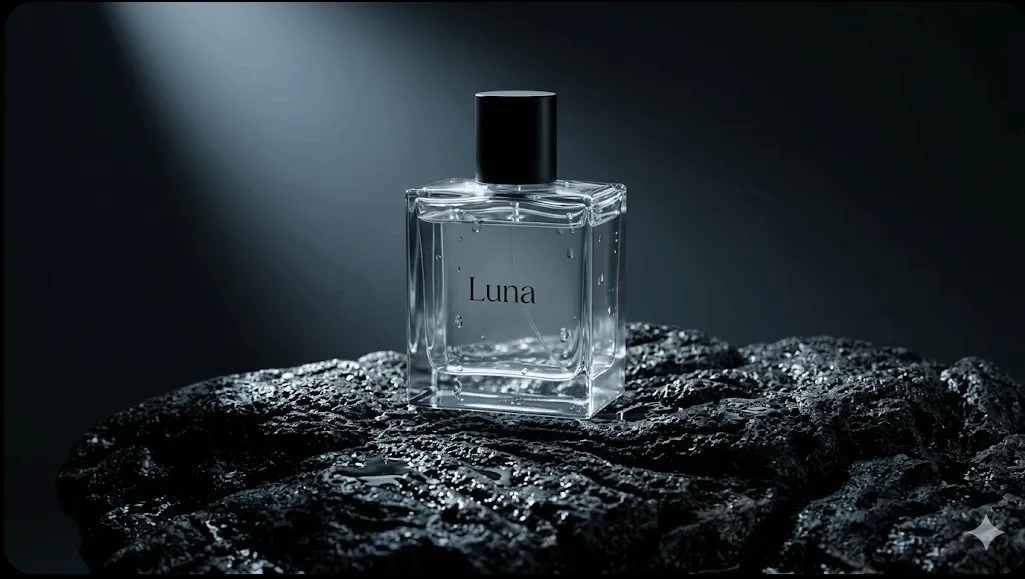
Then, if you need to do variations, you can just swap out the scene. Like this example, I just asked for a desert scene with blue liquid. A very basic prompt.
A more in-depth prompt would give you more control over everything in the scene.

2) Blog Post Featured Images
Nano Banana 2 is strong for featured images because you can build a repeatable visual style for a content category. It can give your blog a consistent look across a series, instead of a different random image on every post.
It also cuts the time spent searching stock libraries and settling for the least bad option.
This was a quick example that could be used for an AI/tech focused blog.

But what’s interesting is you can lock that style and switch a certain element to maintain consistency.

3) Comparison Visuals
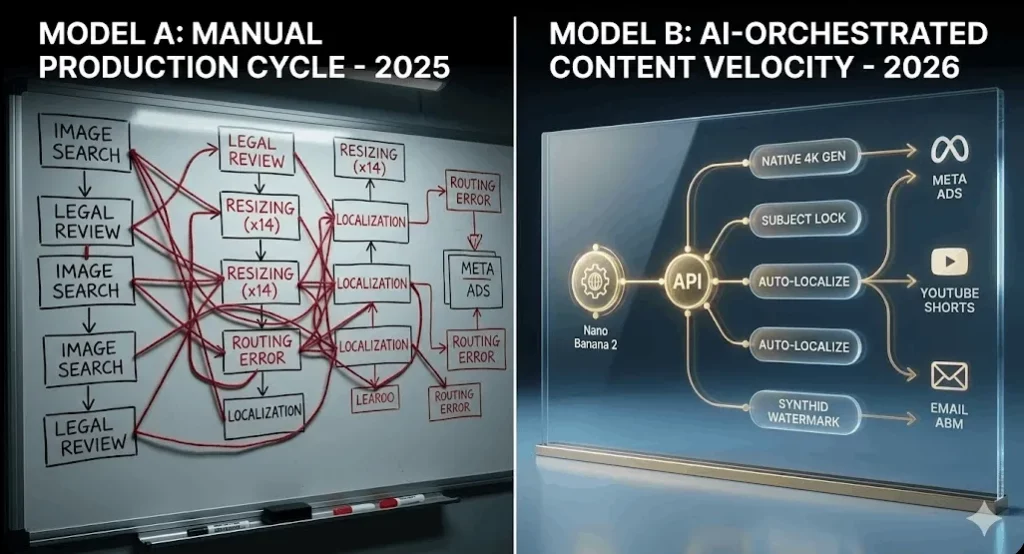
Nano Banana 2 can also be good for comparison visuals. Which helps your reader understand the point faster, and it makes your post more skimmable. You can also reuse the same layout across multiple articles so your comparisons are consistent.
The prompt for this one was slightly more detailed to see if it would get the text right, and it did. On previous versions and other AI image generators, text is one of the main failures.
4) Explainer Diagrams
It can also be a quick and easy way to add diagrams to support content. Especially for funnels, frameworks, and workflows where you can lose your audience.
This is a very basic example of a funnel diagram, but you can experiment and apply your brand colors and styles to these formats.

5) Social Media Post
Nano Banana 2 is great for generating a quick and clean social asset. For someone like me, who is not a designer, I could lose hours trying to get a visual done in Canva.
Instead, I can use AI to get this done in seconds and to a decent enough standard.
Of course, this example is random. But if you applied a brand template and structure, you have reusable social assets that can be created in a fraction of the time.

6) Newsletter Header Graphics
If you use different elements in your newsletter headers, Nano Banana 2 can save you time.
You can lock a style and switch out the title for every new image, or have variations of the same image to keep consistency, but add something new.
It can also work with promo banners if you need to switch something out for a seasonal deal or sale, like this Black Friday example:

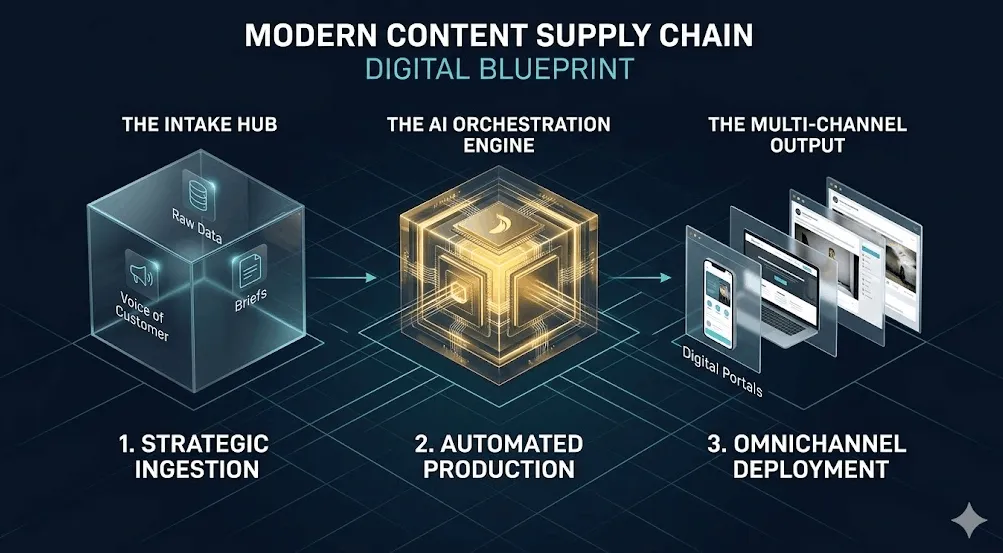
7) Process/Workflow Visuals
Process visuals can be time-consuming to make, but necessary for landing pages, product updates, and explainers.
With the new upgrades to text and consistency, Nano Banana can produce quite good results for these types of visuals.
A tip: the more text for the image and the larger the prompt, use thinking mode or Pro, as this now triggers the image to build differently and is more accurate.
8) Video/Webinar Thumbnails
Nano Banana 2 helps with thumbnails because you can generate multiple options quickly and pick the one that you prefer.
You can also keep the same thumbnail style across a series, just swapping the text out if needed. This saves time and usually improves click behavior compared to flat, generic designs.
Like this YouTube thumbnail example:

The goal is a repeatable way to create visuals that match your content and look consistent.
Here’s the takeaway stack:
- Pick a small set of formats and repeat them. Featured image, comparison visual, diagram, quote card, thumbnail, hero. Consistency beats variety.
- Be specific in your prompts. Always include the aspect ratio, the style type, and the brand constraints (palette, typography, mood). Vague prompts create random results.
- Create an asset pack per piece of content. One post should produce multiple visuals you can reuse: header + 1 diagram + 1 quote graphic + 1 comparison.
- QA before you publish. Check text legibility, spelling, and weird artifacts. If it looks off, it reduces trust.
If you do this well, you get faster production, better consistency, and more reuse from every piece you publish.