
Semrush One is Semrush’s newer suite that adds AI search tracking to its product alongside SEO. It launched in late 2025 to fill the gap for marketers scrambling to measure the impact of AI search on customer journeys, attribution, and brand performance.
I’ve been testing Semrush One and its AI features to see if it’s actually worth investing the $200/Mo. I put together this review to break down what’s included, how the workflow fits content marketers and SEOs, and whether the data is actually useful.
This review doesn’t include any of Semrush’s SEO features, strictly the AI addition. All the key information you need is in the first few sections, and the detailed dive into each feature is further down.
Quick Verdict – Is Semrush One Worth It?
I believe Semrush One is worth it if you are investing in an AI search strategy and want to start building content targeted at LLM’s and AI Overviews. The specific prompt level detail is useful for ideation and content creation. It’s also good for seeing where competitors show up for prompts in AI search and where you need to be to compete.
Semrush One isn’t worth it if you just want to track where and how often your site is showing up in AI search. The data can be questionable, but there are also more affordable tools that do the same thing to give users an idea of where they show up.
Rating
I believe Semrush One is worth it if you are investing in an AI search strategy and want to start building content targeted at LLM’s and AI Overviews. The specific prompt level detail is useful for ideation and content creation. It’s also good for seeing where competitors show up for prompts in AI search and where you need to be to compete.
Best For:
- Content marketers who want a repeatable way to track AI visibility trends.
- Teams doing competitive gap checks for mentions vs citations.
- Agencies that need a clear workflow to monitor prompts and explain progress.
The Bottom Line: An effective solution for AI search tracking and insights into prompt-level information, great for those honing in on AEO/GEO performance. The price (if purchasing with the Semrush suite) and data quality remain questionable.
Who Is Semrush One For?
Semrush One is a fit for teams that want a structured way to understand how they show up in AI answers, then turn that into content. It’s best when you’re willing to spend time using the prompts, gaps, and citation patterns to guide what you do next.
- You want to track where your brand shows up in AI search and how that changes over time.
- You want prompt and topic discovery to guide what to publish next, not just high-level visibility charts.
- You’re doing competitive work and need a clear way to find topic and prompt gaps where competitors appear and you don’t.
- You care about citations and sources, and you want to see which pages and external domains are influencing AI answers in your space.
- You need something you can report on internally or for clients without rebuilding everything in slides each month.
It’s not for those who don’t have the time to invest in AI search optimization. If you are planning to just keep an eye on scores and position, I think other tools are better suited at different price points.
Pros and Cons of Semrush One
After using Semrush One for various tasks and testing, I drew up a list of pros and cons:
| Pros | Cons |
|---|---|
| Directional monitoring of AI visibility over time | Not ground truth at prompt/query level; attribution can be inconsistent |
| End-to-end workflow across visibility, prompts, gaps, narrative, tracking | Modeled/simulated data limits precision; vendors can disagree |
| Strong competitor gap views (missing/weak vs competitors) | Some modules feel thin without a clear “do this next” process |
| Prompts are the most useful output for finding new targets | Prompt selection/customization limits vary by module and can be confusing |
| Prompt Tracking reduces repetitive manual checks | Freshness/cadence differs by module; easy to misread what’s updated |
| Reporting/exporting is useful for stakeholder updates | Costs can climb as you add domains, seats, and more prompt scope |
| AI visibility coverage is still rare in mainstream SEO suites | |
| Can be a lower-cost entry vs specialist AEO tools |
Pros
Semrush One is strongest when you use it for planning and monitoring tool, not a one-time report. I like it most when I’m trying to build ideas for my content strategy because the prompts and competitor gaps make it easier to pick targets without guessing.
- Strong monitoring of AI visibility over time. I like this because it gives you a steady stream of data you can track month to month, instead of relying on random spot checks.
- Practical workflow coverage across the toolkit (visibility > prompts > gaps > narrative > tracking). I like this because it keeps the work connected, so you’re not stuck exporting data and rebuilding the story in another tool.
- Really useful competitor gap framing. I like this because it shows where you’re missing or weaker, which helps you prioritize what to fix first.
- Prompts are the most actionable output. This gives you real phrasing and question types that can become content targets and brief inputs.
- Prompt Tracking cuts down manual checks. Once you pick a small set of prompts, you can monitor movement without constantly re-testing everything by hand.
- Reporting & exporting is helpful for stakeholder updates. I like this because it makes AI visibility easier to communicate, especially when paired with AI to visualize clearly.
- AI visibility coverage is still rare in mainstream SEO suites. It fills a gap that most normal SEO platforms still don’t cover in a useful way.
- Lower-cost entry point vs specialist AEO tools. It can be ‘good enough’ for teams that want monitoring and planning without buying another dedicated platform.
Cons
The biggest downside is still confidence in the data. I think the product would improve a lot if it made the limits and update timing more obvious, and if it reduced the number of times you have to question the strange data outputs.
- Not ground truth at prompt/query level. I think this could be improved by tightening attribution and making it clearer when the system is less confident about a result.
- Modeled/simulated data limits precision. Could be improved by being more explicit in-product about what is estimated versus captured, so expectations are set upfront.
- Some modules feel thin unless you already have a process. Could be improved with stronger ‘next step’ guidance that ties directly to prompts, pages, and sources.
- Prompt selection/customization can be confusing. I think this could be improved by standardizing prompt controls and showing limits clearly before you build a workflow around them.
- Freshness/cadence can be easy to misread. Could be improved with clearer ‘last updated’ labels and a simple cadence tag inside each module.
- Costs can climb as you scale, and ROI can be hard to justify. Could be improved with clearer packaging so teams can forecast what scaling will cost before committing.
Semrush One Pricing
Semrush One is $199/mo as of February 2026. This includes ‘SEO, AI search & GEO’ features. They do have a separate product offering for AI visibility at $99/mo per domain, but that’s not the ‘Semrush One’ bundle.
Semrush One bundles the AI Visibility Toolkit into tiered plans:
- Starter $199/mo. or $165.17/mo. (annual)
- Pro+ $299/mo. or $248.17/mo. (annual
- Advanced $499/mo. or $455.67/mo. (annual)
With scaling limits like websites to monitor (5/15/40) and daily tracking capacity (50 prompts + 500 keywords/100 prompts + 1,500 keywords/200 prompts + 5,000 keywords).
Before buying, confirm the limits that actually determine whether it fits your workflow: seats/users (and cost per extra user), how many domains/websites you can monitor, and the prompt limits (how many you can track daily, and whether those caps differ between standalone AI Visibility vs Semrush One tiers).
How Does Semrush One Work?
If you’re wondering “is Semrush One worth it?” this is the part that matters: Semrush One isn’t pulling a perfect, query-by-query feed straight from the AI platforms. It’s building a visibility intelligence from large-scale datasets, topic modeling, and repeated sampling. So it’s best used for planning & monitoring, not as the definitive truth.
I gathered some information to help you understand how Semrush One works behind the scenes:
Where the prompt data comes from (and what that implies)
Semrush states that is sources billions of real prompts from AI search clickstream data, plus Google’s keyword dataset for AI Overviews, then dedupes and simplifies phrasing while keeping the intent.
The important implication is that the prompt dataset isn’t a clean 1:1 list of the exact strings people typed. It’s topic modeling. Prompts get clustered into themes so you can analyze what people are asking about at a topic level, rather than chasing infinite one-off prompt variants.
That also means coverage will naturally skew toward what’s visible in those underlying datasets.
AI Volume and Topic Difficulty aren’t keyword metrics
AI Topic Volume is Semrush’s estimate of how often people ask about a topic across AI platforms. It’s measured at the topic level, not prompt level. It’s more of a prioritization signal (is this topic broadly active?) than a traffic forecast.
Topic Difficulty is then a competitiveness score (0–100%) based on which brands appear most often in AI answers for that topic, useful for judging where breaking in may take longer.
AI Visibility Score is relative, and the competitor set matters
Semrush AI Visibility is a 0–100 benchmark score showing how often your brand appears in AI answers relative to competitors, not an absolute share of AI search.
They also say the score is based on how often you’re mentioned compared to the median mentions of your top industry competitors, and that Semrush can auto-identify that competitor set.
If the competitor list changes (or it’s wrong for your niche), your visibility score can move even if your presence didn’t. That’s why I always read the score with the supporting views, mentions, competitors, and citations, so I can see why it moved.
Refresh cadence isn’t unified (so AI tracking isn’t one thing)
This toolkit is a mix of research & monitoring, and the cadence tells you which is which:
- Monthly: Visibility Overview, Prompt Research, Competitor Research. Best for benchmarking and planning.
- Weekly: Brand Performance (Perception, Narrative Drivers, Questions). Better for narrative pulse checks.
- Daily: Prompt Tracking. Best for repeatable monitoring on a defined prompt set.
If you don’t keep this in mind, it’s easy to misread up-to-date data and expect real-time movement from modules that aren’t designed for it.
The biggest factors that affect usefulness
Prompt Tracking looks like classic rank tracking, but it has constraints that impact how you can use it:
- It’s desktop-only for both ChatGPT Search and Google AI Mode.
- Google AI Mode targeting is country-level, while ChatGPT can be more granular (city/state/ZIP).
- There’s currently no estimated traffic, search volume, or share of voice inside AI prompt tracking.
- Even ‘position’ needs translation: in ChatGPT Search, Semrush ranks domains by where they appear in the citation area (top to bottom)
- In Google AI Mode, the response is treated as position 1, and citations fall into positions 2, 3, etc. and other modules can appear above.
The data is not 100% accurate
Semrush also notes that prompt responses are captured from real requests (not via APIs), and that no platform can provide perfectly exact numbers because outputs are personalized and change fast.
As extra context, Semrush’s clickstream sourcing claims sit alongside the fact that they have a majority stake in Datos (a clickstream provider). Semrush doesn’t explicitly equate the two in the AI Visibility docs, but it helps explain how they can run AI search clickstream coverage at scale.
Main Features of Semrush One
These are all the key features of the AI search tracking within Semrush One. I have used each one and have broken down how they work to give you more insight into what you get.
Visibility Overview
Visibility Overview is the main dashboard for Semrush One’s AI tracking. Here you can see an overview of how visible a brand is in AI answers, which LLM is performing best, and trends over time.
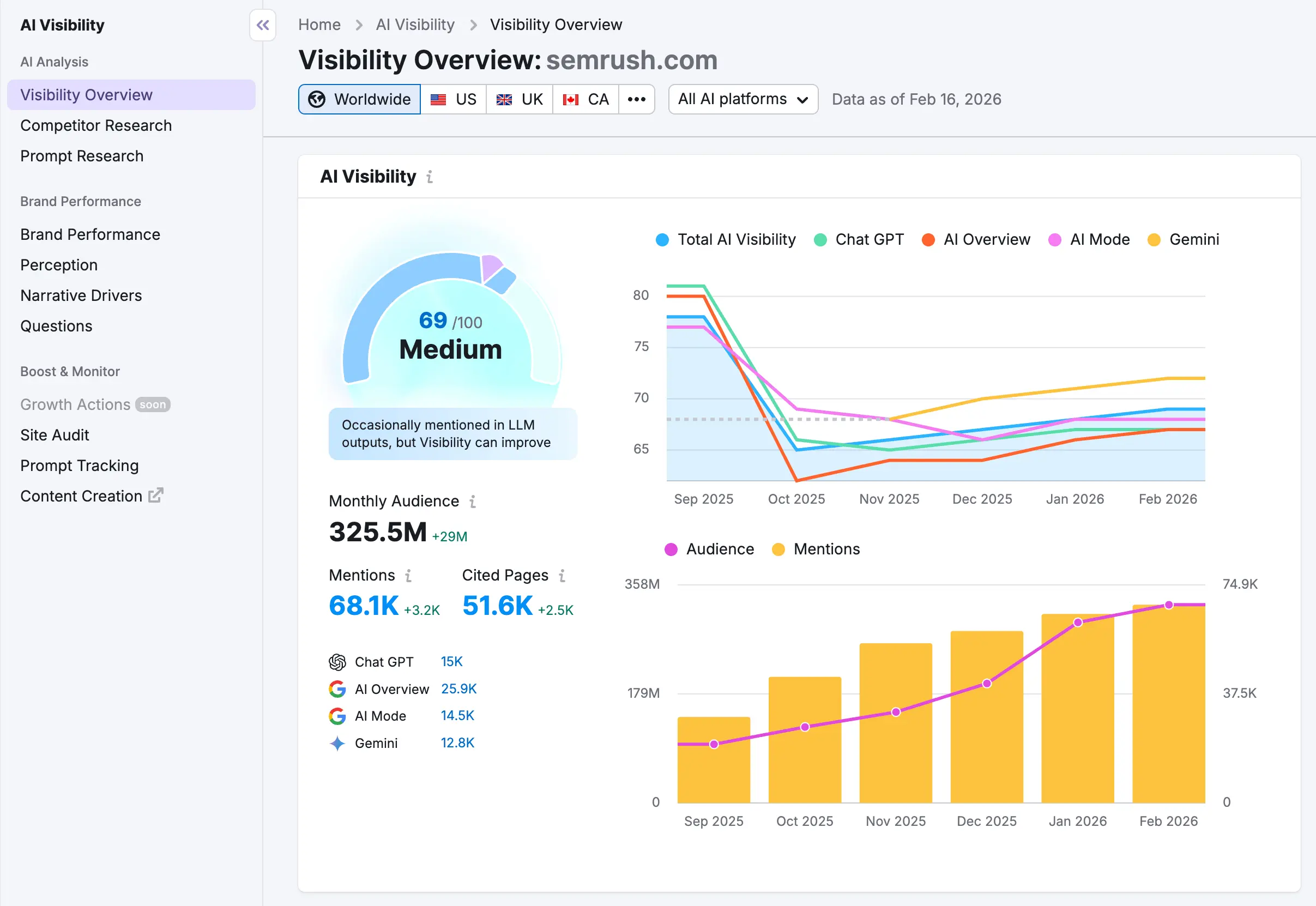
I do think this dashboard could be more in-depth with some interactive features. A one-stop screen where you can go to get all the information you need, but it still serves its purpose.
AI visibility score, platform trend, and audience
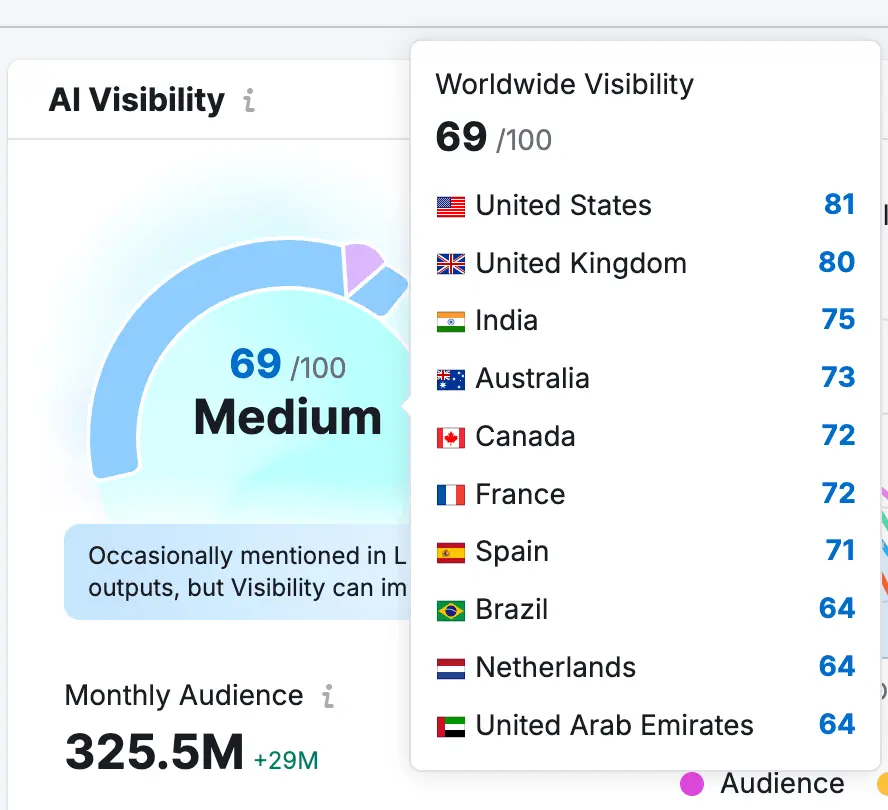
Here you get an AI Visibility score on a 0–100 scale, which reflects the number of topics where the brand is mentioned and how consistently it appears within those topics compared to other brands in the selected country. It also gives an industry benchmark, which I assume is based on Semrush score weighting.
This score won’t mean anything outside of Semrush, and I would only take it at face value. You can only truly build a bigger picture when you start diving into the data.
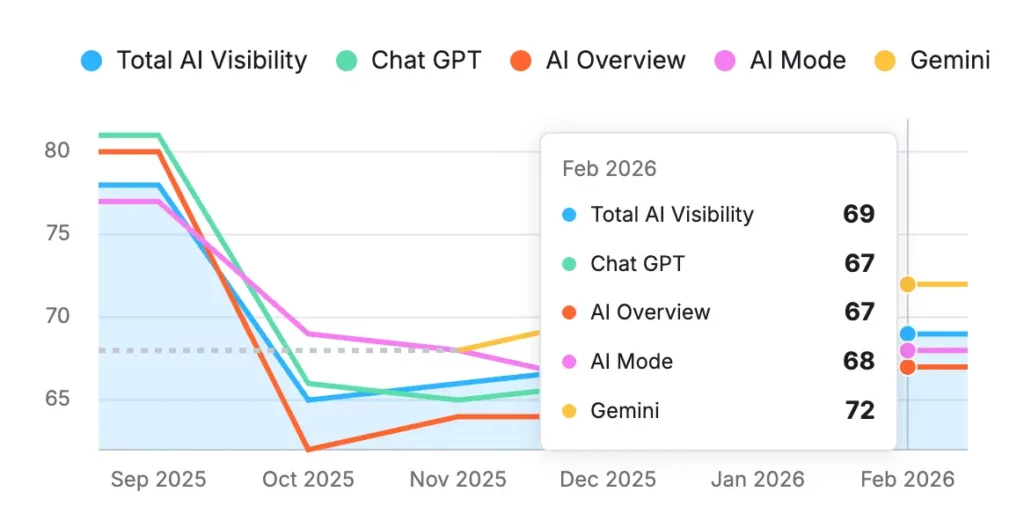
The better insight is the trend split by platform. Semrush One breaks visibility out across ChatGPT, Google AI Overview, Google AI Mode, and Gemini, plus the combined total. This is a better overview, as you can monitor performance across different LLMs, although it’s still a scoring system.
You can filter the dashboard by country and AI search platform too, which is useful if you are targeting specific markets.
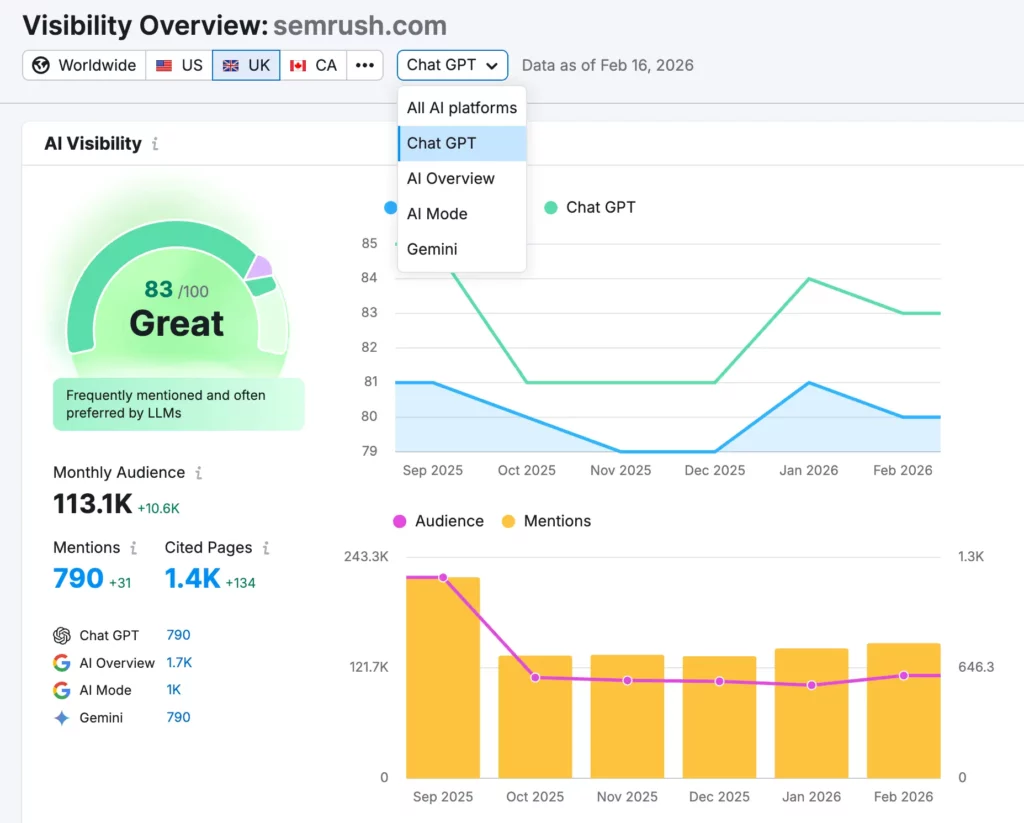
On the main dashboard, you also get a snapshot of what kind of presence you have across AI search. It shows the following info:
- Monthly Audience is a reach-style estimate tied to the set of questions Semrush is using.
- Mentions counts how often the brand appears in answers.
- Cited Pages shows how often AI answers cite pages from the brand’s site.
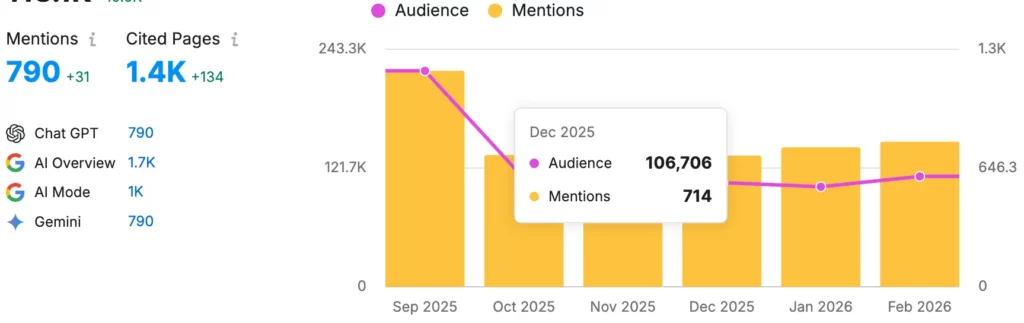
I like having these three together because it prevents the wrong conclusion. A brand can be mentioned a lot without being used as a source. If you care about authority and the chance of clicks, cited pages are usually what deserve more weight.
Topics and Sources
Under the general overview, you have a range of tabs and detailed dropdowns. This is the part of the tool that can actually be used to inform strategy and planning. It’s not a single report. It’s a set of views that answer different questions.

You get the option to monitor the topics and pages, intent, brand comparisons, and more. This can be analyzed in the dashboard or exported for easier filtering. This is probably my favorite part of the tool.
Your Performing Topics
This shows topics where the brand already appears. Each row includes a topic visibility score, your mention count, an AI Volume estimate, and an intent mix. For teams that already publish content, this is a quick way to see what the brand is already associated with in AI answers.
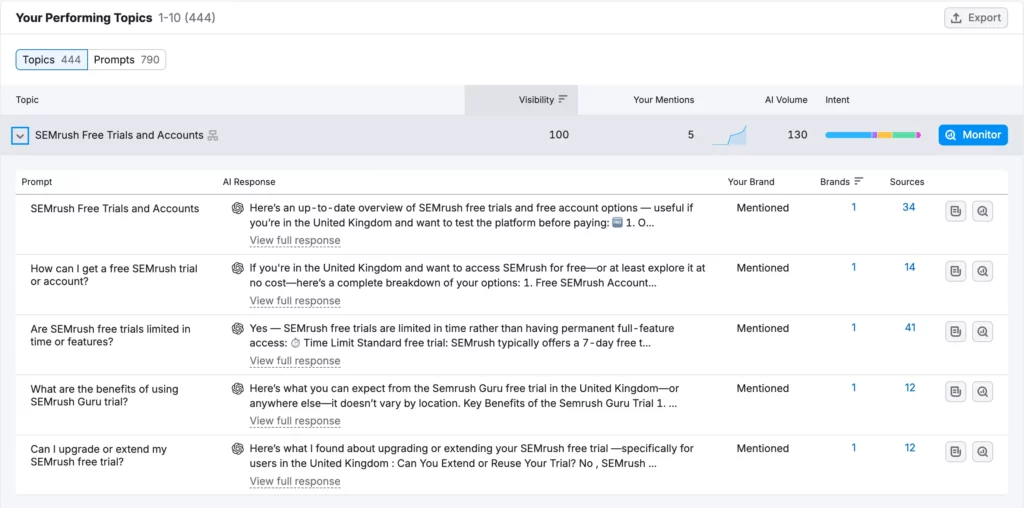
You can select each topic to see a breakdown of the prompt which includes an answer snippet, whether the brand is mentioned, and counts for how many brands and sources show up in that answer.
If you’re targeting AI citations or mentions, this is a great report to track that.
Topic Opportunities
This view is built for competitive gaps. You can add competitors and compare, then get a list of topics and questions where competitors show up, and you don’t. That output is one of the most useful parts of the Overview because it gives you a clear set of opportunities and improvement targets.
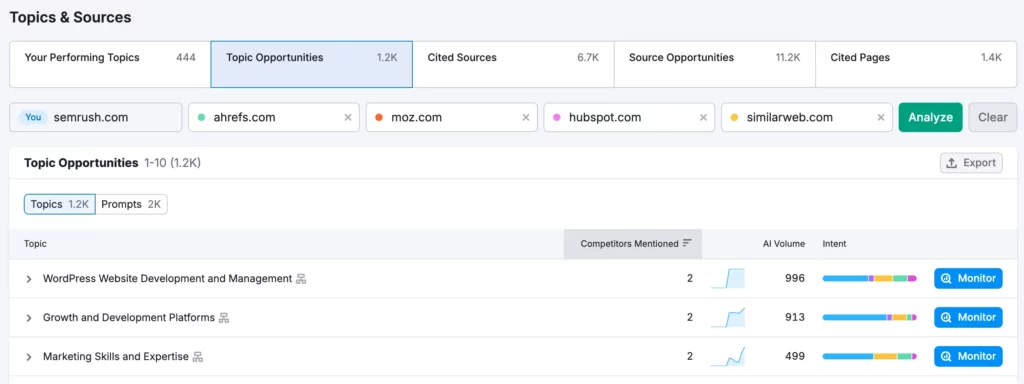
One thing to watch is market noise. If you leave the market wide open, you can get mixed languages and mixed intent in the question list. That can make the opportunities harder to use without cleanup. Set the market you care about first, then review the opportunity list through that market.
Cited Sources & Source Opportunities
This shows which domains AI answers cite across the dataset. It includes counts for URLs and the number of questions those URLs show up in. It also includes organic traffic.

For marketers, this is useful for understanding what types of sites are forming answers in your industry. You can see whether AI answers prefer forums, video platforms, publishers, marketplaces, or reference sites. You can also expand a source to see example questions and answer snippets. That helps explain what that source is getting cited for.
Source opportunities highlights sites where competitors are cited and the brand isn’t. It’s a useful report for competitor targeting because it points to places that already influence AI answers in your space.
Cited Pages
This ties AI citations back to specific URLs on the brand’s site. Each URL shows how many questions it’s cited in, and you can open it up to see example questions and answer snippets.
This is one of the strongest views in the Overview. It helps you prioritize updates based on what AI already trusts. If a single page is cited across a large number of questions, improving that page can improve visibility across related queries without creating a bunch of new content.
How to use Visibility Overview
This is what I would use the Visibility Overview dashboard for:
- Track AI visibility over time using the score and the platform trend lines so you can see where change is coming from.
- Compare markets by switching country views and checking whether visibility changes by location and language.
- Find what’s working by reviewing performing topics and the pages that are already being cited.
- Find competitive gaps by using Topic Opportunities to spot questions where competitors appear and you don’t.
- Prioritize page updates by sorting cited pages and improving URLs that already show up in lots of cited answers.
- Decide where distribution is impactful by checking cited sources and seeing which domains AI answers keep referencing.
My thoughts
What I liked
- Platform split (ChatGPT vs Google AIO/AI Mode) makes changes attributable.
- Cited Pages ties AI citations to specific URLs, which is actually actionable.
What I didn’t like
- The 0–100 visibility score is too abstract unless you drill into the underlying tables.
- Cadence differences aren’t obvious enough; it’s easy to assume data is fresh when some views are monthly.
Best use case
Monthly benchmarking & prioritizing which pages to refresh based on citations.
How to interpret
Score movement can be driven by competitor-set changes, not real visibility improvements. Sanity-check with mentions and cited pages before you act.
Prompt Research
Prompt Research is the part of Semrush One that helps you understand what people ask AI in a topic and who wins those answers (brands & sources). My first thought was: this is closest to keyword research, but instead of keywords > SERPs, it’s topics > prompts > AI responses & citations, which is much more useful for planning AI content.
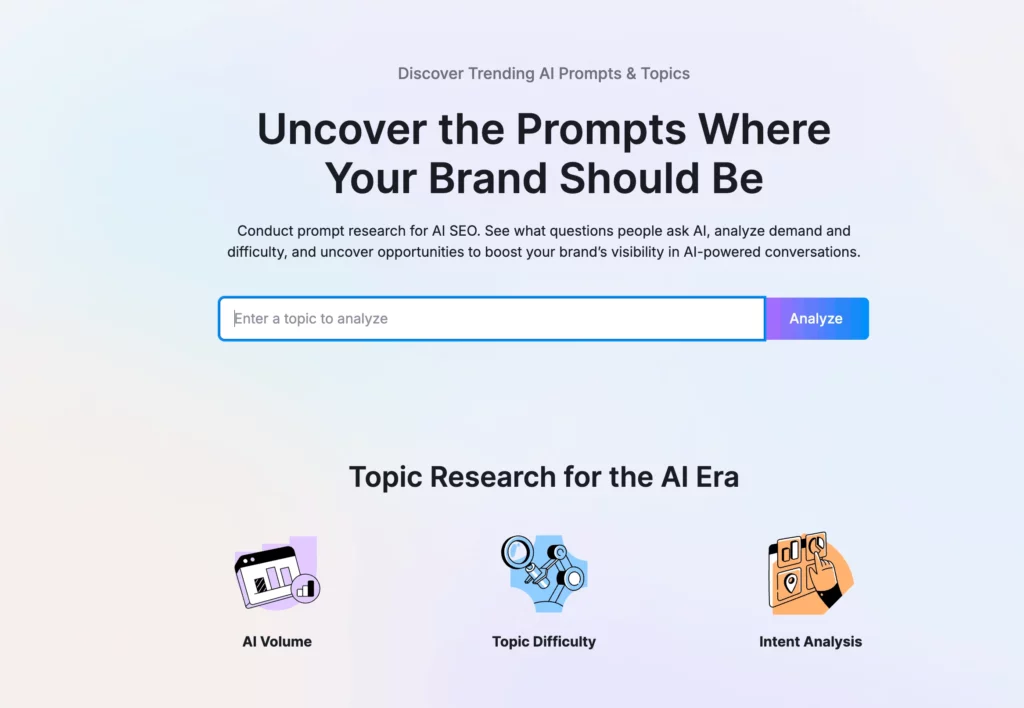
Topic snapshot (demand, intent, and who shows up)
When you search a topic (example shown: laptop), you get a quick summary of the topic cluster: Related Topics AI Volume, number of topics and prompts, the intent split, plus totals for brands mentioned and source domains.
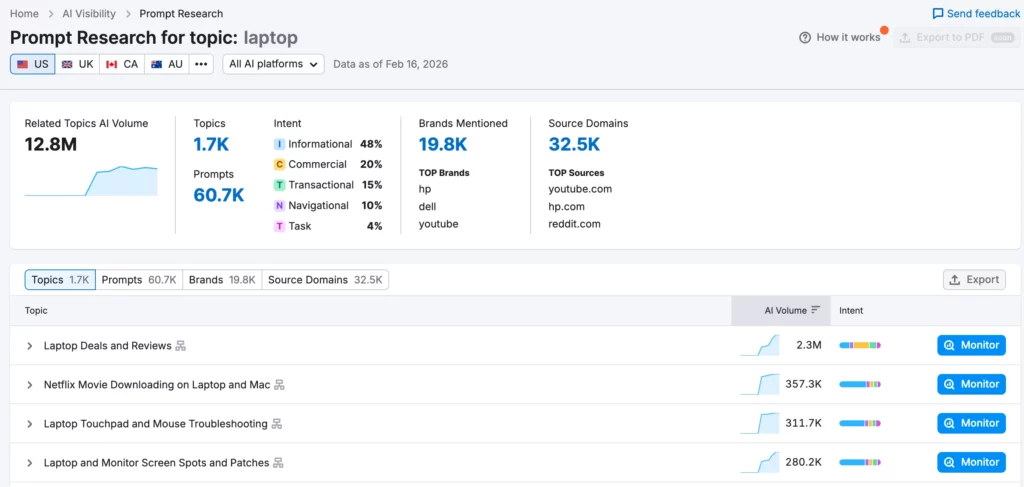
It’s useful because it tells you what type of content you’re competing with and who the top brands/sources are. But the best feature on this, from my perspective, is the intent behind the topic. This allows you to optimize and create content that aligns more with intent.
A topic that’s mostly commercial will usually favor comparisons, like best tools, and shortlists. A topic that’s mostly informational leans more towards definitions, explainers, and ‘how it works’ content.
Topic Breakdown
The Topics view breaks the cluster into subtopics with their own AI Volume and intent bar. This can then be broken down into prompts and responses. I find this highly useful for identifying content types that are being sourced and creating targeted content.
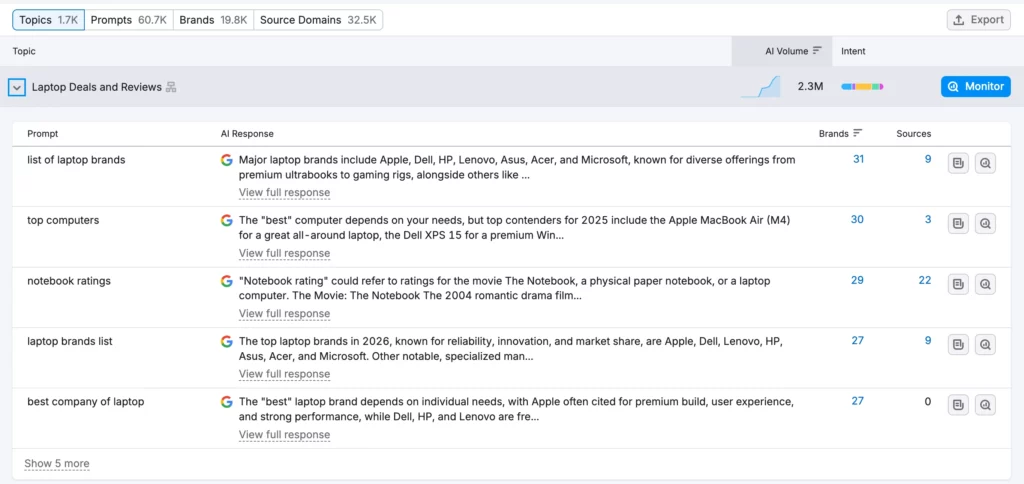
You can pick the few subtopics that are worth serious effort, then use the smaller ones as supporting pages or sections. Each topic also has a Monitor option, which allows tracking over time. Something you should use if you are targeting AI citations.
Prompts (the actual questions & what AI answers look like)
The Prompts section is basically the keyword research of the report. This is where you’re going to get ideas and understand what users are searching for.
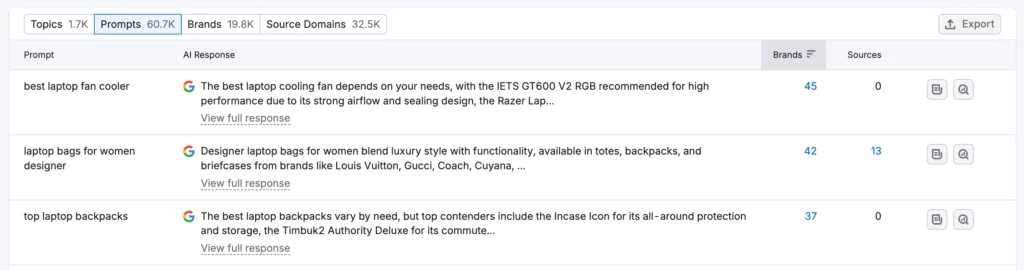
For each prompt, Semrush One shows the prompt text and an AI response snippet, plus counts for Brands and Sources. That’s helpful because it gives you context:
- A prompt with lots of brands usually means the AI answer is list-style and competitive (you need clearer differentiation to be included).
- A prompt with lots of sources usually means AI is pulling from many pages (you need stronger authority/coverage).
- A prompt with few sources can mean fewer trusted pages are informing the answer (sometimes an easier opening if you can produce the right page).
Opening a prompt expands it into something you can actually audit. You can see:
- The full AI response (not just the snippet)
- A list of brands mentioned (as tags)
- Example sources that appear to support the response (the screenshot shows sources like ProofHub, helloroketto.com, Go Fish Digital, etc.)
For marketers, this is valuable because it shows the pattern behind the answer: what gets referenced, what the response format looks like, and which sites are used. It’s a way to spot whether your category is full of tool blogs, publishers, UGC, or review-style posts. Also, whether your own site has the type of page that could realistically be cited.
Brands (who gets mentioned most in this topic)
The Brands view aggregates the topic into a list of brands with mentions, source domains, and a prompt example. You can also dive into the full prompt response or analyze further, which just takes you to the overview dashboard for that brand.
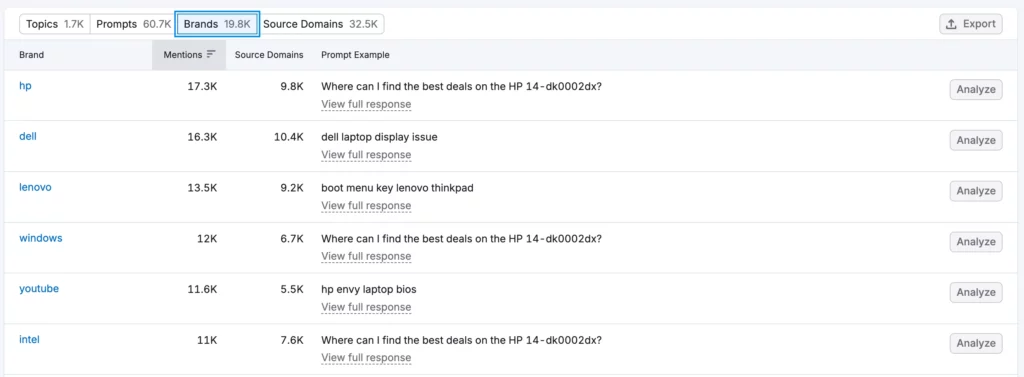
This is useful for competitive framing. If the same set of brands are repeatedly present across prompts, that’s a sign you’re competing against a shortlist in AI answers. I only think this is useful if you are investing the time into competitor analysis and have a solid AI search strategy.
Source Domains (which sites AI pulls from most)
Source Domains shows the domains AI uses as sources for the topic, with information on Source URLs, Mentions, Org. Traffic, and Prompt Example.
It’s one of the most actionable views because it tells you what types of websites influence answers in the category. If YouTube and Reddit are consistently present, that’s a sign that UGC and video are favored in that topic.
If big publisher sites dominate, it can point to PR/coverage as part of the strategy. Semrush also includes guidance on how to treat different source types (UGC vs competitor vs non-competitor media), which is useful as a starting point if you are unclear.
Prompt Tracking
Prompt Tracking lets you lock in a set of prompts and track them on a cadence, showing whether your domain is being shown in AI answers and how that changes.
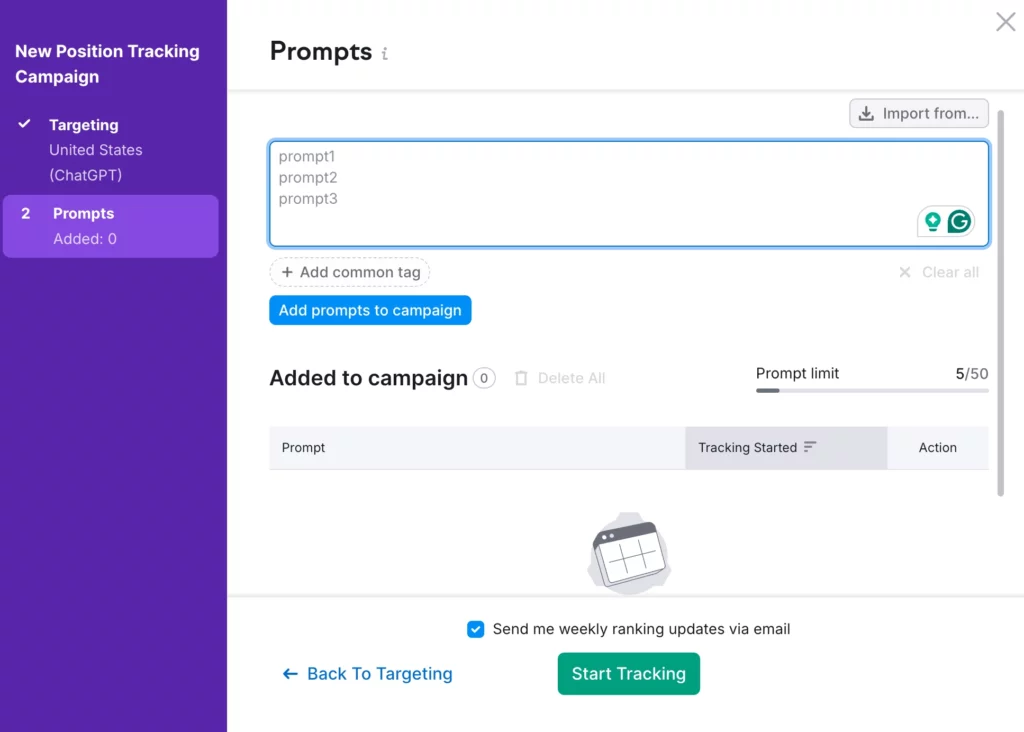
Once you set it up, you create a campaign by choosing your domain, the AI channel you want to track (e.g. ChatGPT or Google AI Mode), and your targeting (country & language). Then you paste in prompts and start tracking.
You can also tag prompts (useful for grouping by topic or intent), add competitors, and use location/device expansion where your plan supports it (some location visibility features are gated behind higher tiers).
I find the main value here is that it replaces the grind of manually re-checking the same prompts. Once the prompt set is defined, use it as a watchlist and use the trends to decide what to work on next.
What I don’t like here is that the limit of 50 prompts is a total limit – not per website. So if you are on the basic plan and have multiple websites, you might struggle to track large amounts of prompts.
How the data is built (so you interpret it correctly)
Semrush explains that they’re still building their own prompt database, and in the meantime, they use keywords from popular Google questions, filter for relevance, run them through multiple LLMs, then analyze the responses to identify brand/competitor mentions.
The important takeaway for marketers is: this isn’t ‘every possible prompt,’ it’s a large modelled set designed to represent the topic, good for research and prioritization, not a perfect dataset of every user query.
How to use Prompt Research
Use cases of the Prompt Research section can change depending on your strategy. But here are some ways I would use it:
- Build content briefs from the prompt list: Turn repeated prompts into headings and sections. Use the AI response patterns to see what the expected answer is (definitions, lists, comparisons, step-by-step, etc.).
- Plan topic clusters: Use Topics to pick the main pages worth building. Use smaller subtopics as supporting articles or sections to strengthen coverage.
- Find easy gaps: Prioritize prompts where the sources look beatable (thin pages, outdated lists, low variety). Prioritize prompts where the answer format matches something you can produce well (comparison, glossary, checklist, templates, etc.).
- Understand what AI is citing in your niche: Use Source Domains to see if your category leans on UGC, publishers, tool blogs, or review sites. Use that to decide whether you should publish better on-site content, earn mentions elsewhere, or both.
- Create a short monitoring set: Pick the handful of highest-value topics/prompts and monitor them so you can track changes without manually checking.
- Support competitive positioning: Use Brands to see who AI keeps grouping together. Use that to decide what differentiation needs to be clearer on your site (features, pricing, use cases, proof).
My thoughts
What I liked
- Prompts & response snippets make it clear what answer formats AI is using (lists, comparisons, definitions, steps).
- Source Domains shows what kinds of sites influence answers in your niche, which helps decide on-site content vs off-site coverage.
- Topic/subtopic intent mix is a strong planning signal for what content type to create.
What I didn’t like
- Prompts are clustered/modeled, so you’re not getting a clean 1:1 list of exact user queries.
- It’s easy to over-trust AI Volume as a demand metric when it’s not a traffic forecast.
- Filtering and market cleanup can take work if you don’t lock country/language early.
Best use case
Building content briefs and topic clusters from repeated prompt patterns, then choosing what to monitor based on the highest-value prompts.
How to interpret
Treat Prompt Research as a planning dataset (patterns, intent, sources), then validate the highest-stakes prompts with manual spot checks before you bet a roadmap on them.
Competitor Research
Competitor Research is the comparison report in AI Visibility, where you can directly enter brands to compare and find gaps. I believe this is most useful if you’re directly focusing on the competition – if you’re setting up an overall AI search strategy, then the brand performance section is probably more suitable.
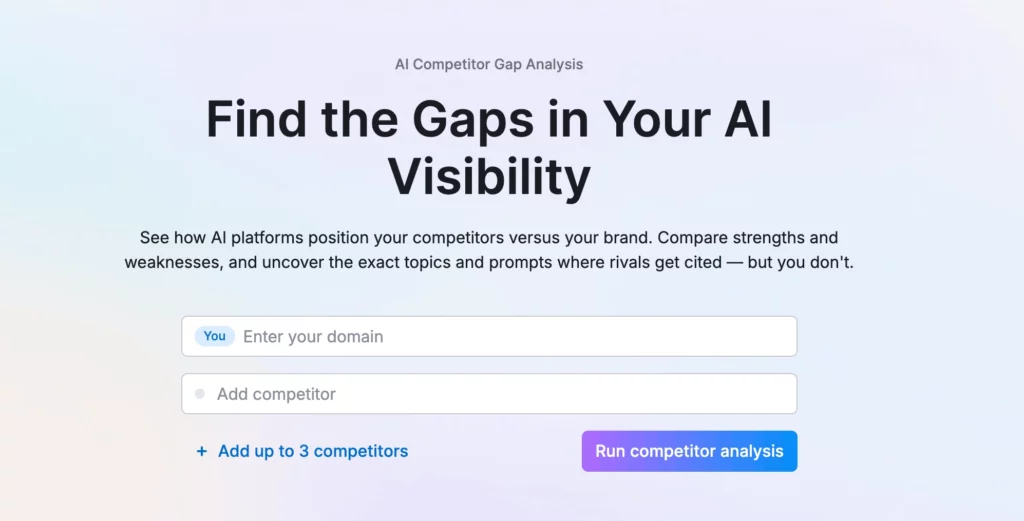
AI Visibility, Audience, and Mentions (the three comparison views)
This section has three ways to compare the same group of domains:
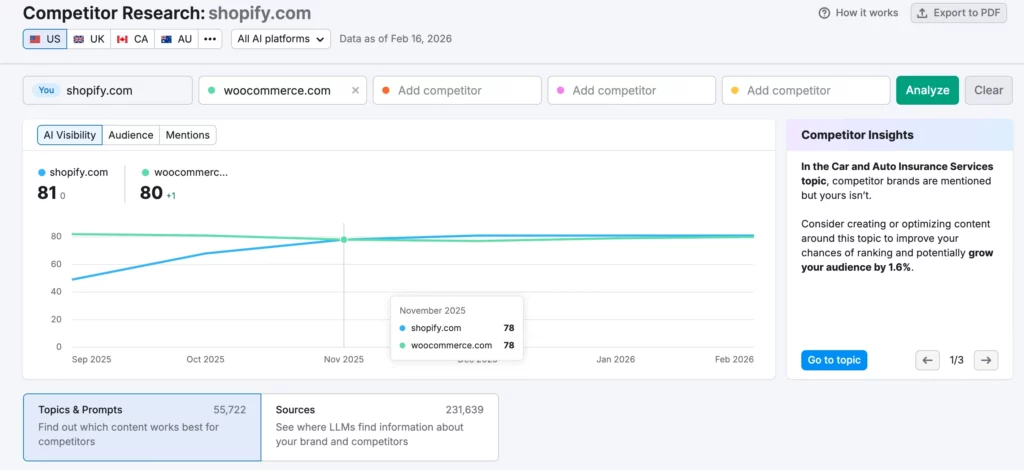
- AI Visibility gives a single score per domain plus a trend line over time. It’s a quick way to see who is ahead overall, and whether the gap is growing or shrinking.
- Audience is a reach-style estimate. It helps you judge how big the opportunity is in the areas where these domains show up.
- Mentions is how often each domain’s brand shows up in AI answers. This is the most direct view of who appears more often.
These three together stop people from drawing the wrong conclusion from one number. A domain can have high mentions but low reach, or strong reach but weaker presence inside answers.
The report includes a short insights panel that summarizes what stands out right now. It flags things like:
- topics where competitors are mentioned, but you aren’t
- areas where you’re currently ahead, but others are closing the gap
I like the flashcards that bring awareness to issues without having to look, it can help flag things you might not necessarily see.
Topics & Prompts (where the differences actually come from)
This lists topics (and can switch into prompt-level rows) and shows how each competitor performs side by side. It’s similar to the other parts I covered before, where it dives deeper into the prompts, domains, and topics to understand a brand’s position in comparison
Key parts that make it useful:
- Topic view helps you find broad areas where one competitor dominates or where you’re missing entirely.
- Prompt view gets specific. It shows the exact questions, the captured AI response snippet, and how crowded the answer is (how many brands and sources show up).
- AI Volume & intent mix help you judge whether a topic is worth time and what type of query it is (informational, commercial, etc.).
- The status filters make it simple to sort work:
Missing = competitors appear, you don’t
Weak = you appear less than competitors
Shared = you and competitors both appear
Sources (which websites are feeding the answers)
The Sources view shows which external domains are being used as sources in AI answers, and how that differs between you and your competitors.
What it helps with:
- Seeing which kinds of sites keep getting referenced in your space (big platforms, publishers, forums, tools, etc.).
- Finding source domains where competitors are present and you aren’t (using the same Missing/Weak/Shared/Strong/Unique grouping).
- Prioritizing where to publish, partner, contribute, or earn coverage based on what AI systems are repeatedly pulling from.
It also includes scale signals like how many URLs and prompts a source domain shows up across.
How to use Competitor Research
Although I didn’t have much use for this feature, here’s how it could be used:
- Find gaps to close: Use Missing topics/prompts to build a list of questions where competitors show up and you don’t. Use Weak to find areas where you appear, but competitors appear more often.
- Protect areas where you’re already ahead: Use Strong and Unique to identify topics that you don’t want to lose. Turn the most important ones into monitored items so changes don’t get missed.
- Turn competitor gains into specific content work: Use topic rows to pick the themes. Use prompt rows to get the exact questions and the wording AI is currently returning.
- Decide what’s worth effort: Use Audience and AI Volume to weigh potential upside before committing time.
- Choose where to earn visibility outside your own site: Use Sources → Missing/Weak to find which external sites competitors benefit from that you’re not present on. Use that list to guide outreach, partnerships, community participation, or placements.
- Make reporting easier: Use the trends for ongoing tracking. Export the topic/prompt/source lists when people want specifics.
My thoughts
What I liked
- Missing/Weak/Shared status filters make it easy to turn competitor gains into a clear to-do list.
- Topic and prompt views connect high-level gaps to the exact questions and answer snippets behind them.
- Sources comparison highlights where competitors are getting cited externally, which is useful for outreach and partnerships.
What I didn’t like
- Value drops quickly if you don’t already know your real competitors or set a tight comparison group.
- Audience and reach metrics can feel disconnected without cross-checking other views.
- Requires interpretation to avoid turning every competitor mention into a priority.
Best use case
Building a prioritized backlog of topics, prompts, and external sites to target based on where competitors consistently appear and you don’t.
How to interpret
Not every ‘Missing’ prompt is worth chasing. Use AI Volume, intent mix, and audience estimates to filter for gaps that actually matter.
Brand Performance
Brand Performance is a deep dive into a brand’s presence within AI. This part in particular (1 of 4 tabs) covers sentiment, insights, share of voice, and key business drivers. I’m not 100% confident in the accuracy of this part of the tool, but it’s likely the best out there at the moment.
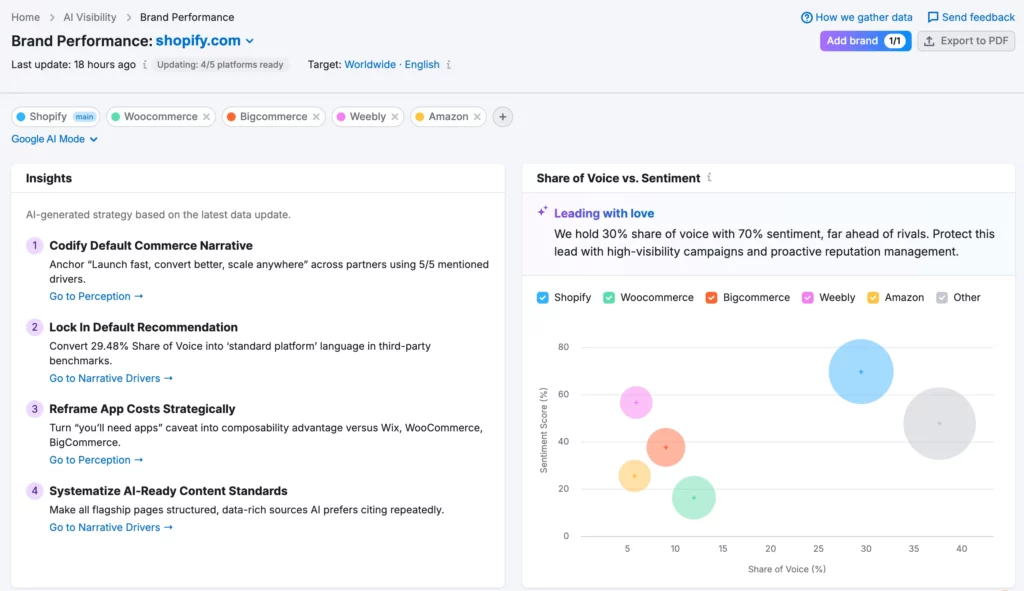
I think the 4 tabs of Brand Performance in Semrush One are all suited for those who really want to capture market share from competitors and position their brand in AI search. For those optimizing content and improving performance in general, I don’t think it’s necessary.
Insights (the AI-generated headline takeaways)
The Insights panel is a short, prioritized list of what to do next based on the latest data update. It’s a roll-up: it pulls from what’s happening in voice, sentiment, citations, and key narratives and turns it into a few ‘do this now’ recommendations (often linking you into Perception or Narrative Drivers).
Share of Voice vs. Sentiment (the position of each brand)
This is the map view: it shows how visible each brand is (share of voice) compared to how positively they’re talked about (sentiment). It’s the fastest way to spot:
- brands that are visible but disliked (risk/opportunity)
- brands that are loved but not visible (watchouts)
- whether you’re winning on both, or only one
Overall Sentiment & Share of Voice (quick roll-up cards)
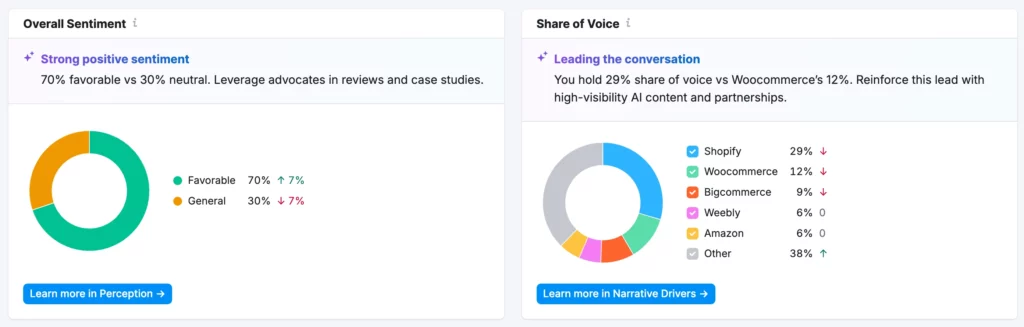
These are useful to look at a glance and summarize your current standing before you scroll into the details. They also act as jump points into the deeper tabs. I think these are good to screenshot and add to reports for clients or stakeholders, but otherwise skip to the detailed sections.
Key Business Drivers by Frequency (what AI keeps associating with each brand)
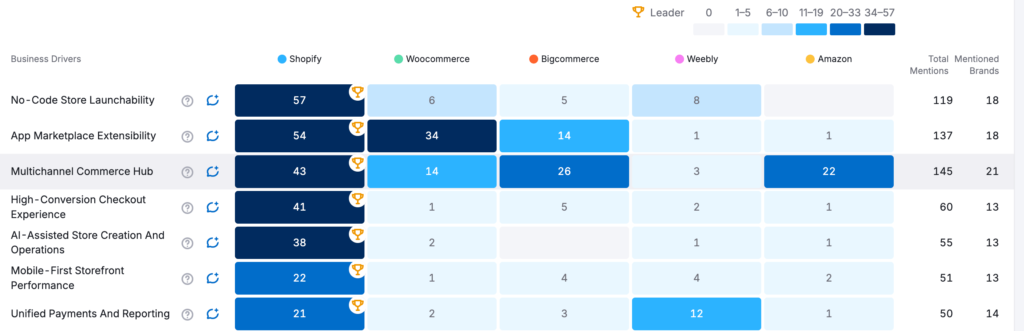
This heatmap breaks out the core business drivers (e.g., app ecosystem depth, multichannel, payments, headless, etc.) and shows how often each brand is connected to each driver. Plus totals like total mentions/brands mentioned. It’s how you see what you’re winning for and where competitors are owning a theme.
I still believe this is only useful if you are really diving into the brand side of AI search optimization.
How to use Brand Performance
These are a few different ways I would use Brand Performance:
- Get the headline: Start with Insights & the Share of Voice vs. Sentiment chart to understand whether you have a visibility lead, a perception lead, or both.
- Translate we’re winning/losing into themes: Use Key Business Drivers by Frequency to see what AI associates with you vs competitors, then decide what to reinforce or correct.
- Pick strategic moves, not random content: Use AI Strategic Opportunities to choose initiatives that match the data (and the timeframe tags help sequencing).
- Create competitor-ready positioning: Use the head-to-head cards to form messaging and content priorities per competitor (what to emphasize, what to counter).
My thoughts
What I liked
- Share of Voice vs Sentiment view shows whether you’re visible, trusted, both, or neither.
- Insights panel is an easy way to spot what changed and where to investigate next.
- Business driver/theme breakdown helps link visibility into positioning (what you’re known for vs competitors).
What I didn’t like
- It can feel like a layer of interpretation on top of other modules, which makes accuracy harder to judge.
- Some recommendations are too generic unless you already have a process to turn them into content/citation work.
- Easy to overreact to week-to-week shifts without enough context.
Best use case
Executive-level narrative tracking: spotting perception risks/opportunities and deciding which themes to optimize or correct before you plan content and PR.
How to interpret
Treat it as a directional briefing that tells you where to look, then validate the ‘why’ in prompts, citations, and source tables before changing strategy.
Perception
Perception is looking at how AI talks about your brand. It’s useful for seeing if AI isn’t perceiving your brand correctly and helping to pinpoint where you might be going wrong. For a user who hasn’t seen ‘brand perception’ before, this report will be very confusing at first glance.
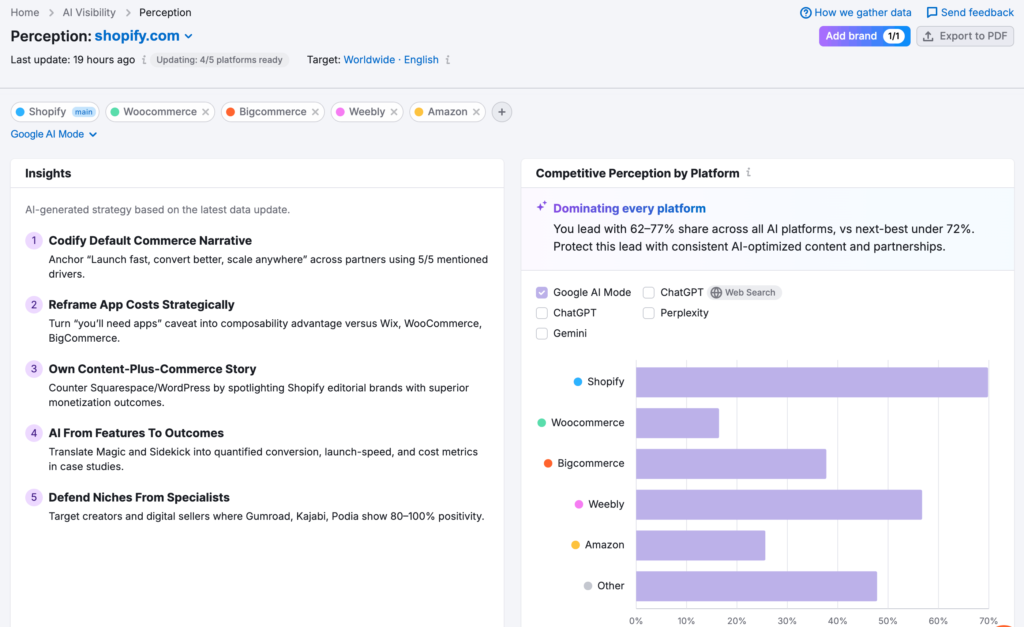
Insights & Competitive Perception by Platform
The Insights panel is similar to the Brand Performance tab. It summarizes what’s driving perception (what you’re winning on, what’s hurting you, and what to fix). It’s a quick glance checklist tied to sentiment and recurring critiques.
Competitive Perception by Platform breaks perception out by platform (Google AI Mode, ChatGPT, Gemini, Perplexity, etc.). It answers:
- where you’re strongest/weakest
- which platforms deserve targeted work (messaging, citations, prompt strategy)
Overall Sentiment (the current split) & Favorable Sentiment Over Time (trend tracking)
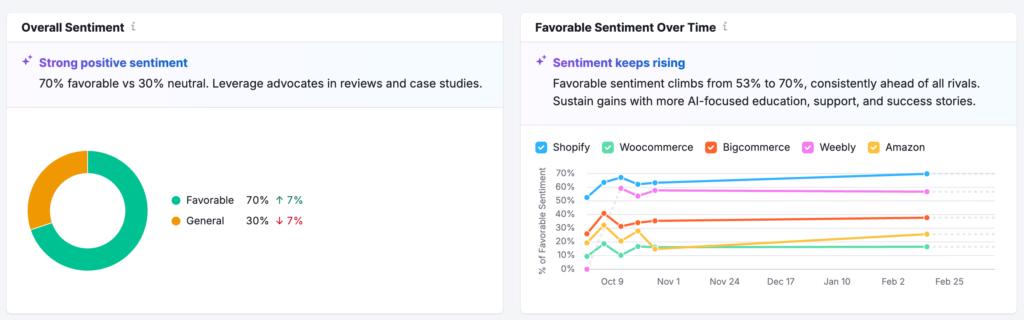
Overall Sentiment is the top-line sentiment distribution (favorable vs neutral), meant to give a quick read on whether perception is healthy.
Favorable Sentiment Over Time is the time-series view showing whether sentiment is improving or slipping, for you and competitors, so you can see momentum at a quick glance.
Key Sentiment Drivers (what creates positive vs negative perception)
This section lists both brand strength factors (positives) and areas for improvement (negatives) frequently mentioned by AI responses about your brand. It’s more user-friendly than some of the other cards/charts and a bit easier to follow.
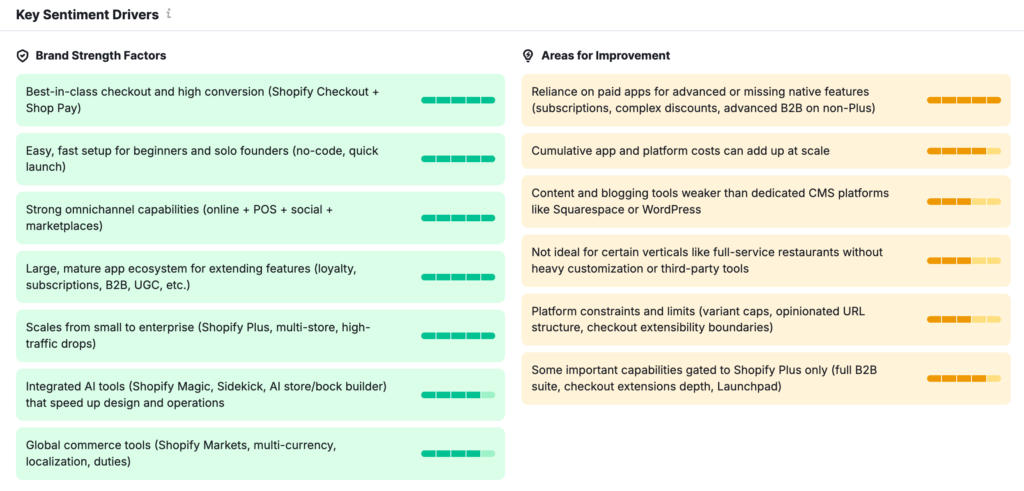
This is the most directly actionable part of the page because it tells you what language and claims are impacting brand sentiment. You can use this to your advantage when trying to influence AI.
Sentiment/Mentions by Feature Category & AI Feature Descriptions
Sentiment and Mentions summarize whether feature categories are being discussed at all (mentions) and how positively they’re framed (sentiment). It’s a quick way to find silent areas where you have no impact at all.
AI Feature Descriptions is where you can filter by category/sentiment/mentions to inspect how AI describes capabilities and where competitor descriptions exist, but yours don’t.
How to use Perception
Here are a few ways you can use the Perception reports:
- Find the perception problem first: Start with Overall Sentiment & Favorable Sentiment Over Time to confirm whether perception is stable or degrading.
- Pinpoint what’s causing it: Use Key Sentiment Drivers to identify the specific narratives creating positive and negative sentiment.
- Work platform-specifically: Use Competitive Perception by Platform to decide where to focus (some platforms may lag or differ in tone).
- Fill missing descriptor coverage: Use Feature Category charts and Feature Descriptions to find categories where you’re not being described at all. Then create content/citations that make those features quotable.
My thoughts
What I liked
- Key Sentiment Drivers is the most actionable view for identifying what language is helping or hurting you.
- Platform breakdown is useful because tone can differ materially between ChatGPT, Google AI Mode, Gemini, etc.
- Feature descriptions/categories help to find silent areas where AI doesn’t describe you at all.
What I didn’t like
- The report is confusing on first use; it’s not obvious what inputs are driving each driver/descriptor.
- Sentiment can look more precise than it really is. Small sampling changes can swing trends.
- Hard to map some negatives to a single fix without digging into the underlying prompts and sources.
Best use case
Catching perception drift early and building a correction plan (better on-site explanations & third-party proof) for the themes AI keeps getting wrong.
How to interpret
Don’t treat sentiment charts as ground truth. Use the drivers and example answers/sources to identify the specific claims to focus on or correct.
Narrative Drivers
Narrative Drivers covers what themes you’re winning at in AI Visibility. It helps to understand which narratives and proof points AI associates with each brand, and how to protect or change those narratives. I personally think it’s recycled information from other sections just in a different format, but it can still be useful.
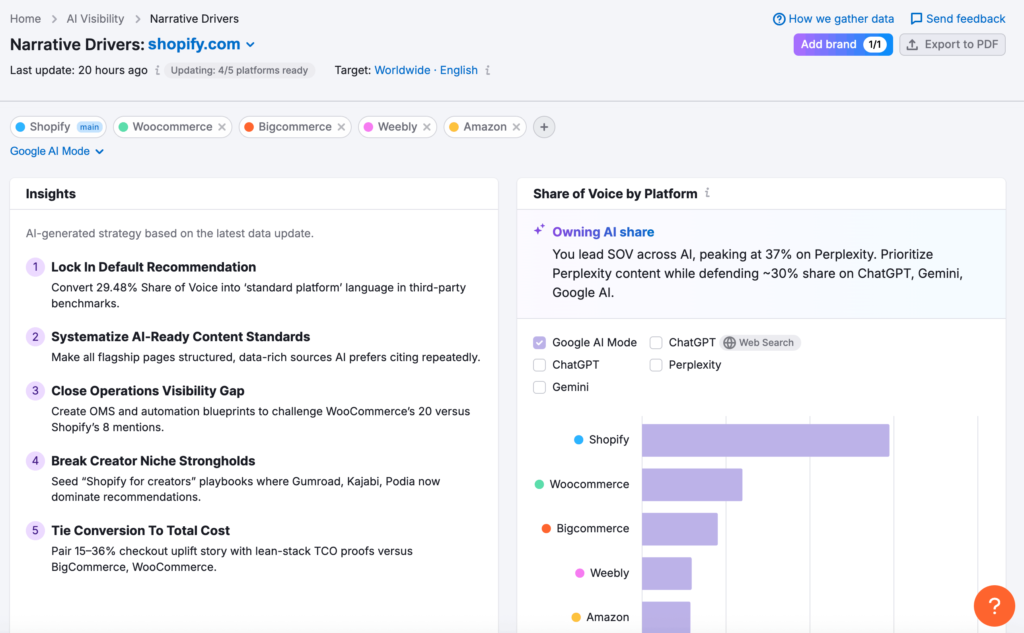
Insights & Share of Voice by Platform
The Insights panel is a prioritized set of narrative actions (what to double down on, what to counter, what to publish). While I like the recommendations, if you want to use the data and aren’t sure how, plug it into your own LLM and ask questions instead of relying on this as a source of truth.
The Share of Voice by Platform shows how your narrative share performs per AI channel (Google AI Mode, ChatGPT, Gemini, Perplexity, etc.). It helps you identify where a narrative is strong/weak and where to focus platform-specific work.
Share of Voice / Mentions / Average Position
This section gives you a visualization of three top comparisons:
- Share of Voice: % of presence vs competitors
- Mentions: how often each brand is referenced
- Average Position: where you tend to rank in answers
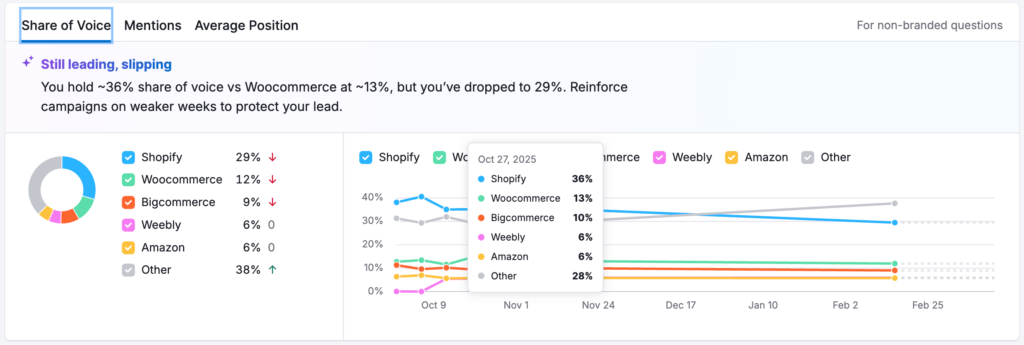
Together, they keep data aligned and prevent mistakes in reading the data (you can lead in voice but slip in position, or get mentions without being top-ranked). This is another one I like as a visual to show to stakeholders if needed.
Top Domains by Citations (who AI relies on as sources)
This section shows which domains are being cited most and how that changes over time. It’s additional proof behind narratives; if competitors are anchored by better third-party citations, they’ll often win narrative credibility.
It’s another repeated data point from other parts of the report, but it makes sense to include it here.
Dive Deeper (Answers vs Citations, Branded vs Non-branded)
This section goes more in-depth and has a lot of data to look at. Tabs split analysis into:
- Answers | Non-branded: Grow visibility beyond direct brand searches by reviewing answers to non-branded queries.
- Answers | Branded: Secure your top position, see how your brand appears in answers to direct queries.
- Citations | Non-branded: Identify growth opportunities by exploring sources that shape answers to non-branded queries.
- Citations | Branded: Ensure the right story is told by checking sources cited in answers to branded queries.
This is how you separate general category wins from brand-name wins, and how you see whether you’re winning because of your own site vs external sources.
How to use Narrative Drivers
- Start with the story: Read Insights to understand which narratives you currently own and which are at risk. Use AI to further analyze and interpret.
- Check platform dependence: Use Share of Voice by Platform to see where you’re strong or weak, then tailor content/citations/prompt strategy per platform.
- Pick the metric lens that matches the goal
– Use Share of Voice when you care about overall dominance
– Use Mentions when you care about ‘who gets talked about’
– Use Average Position when you care about being the top recommendation
- Strengthen credibility, not just messaging: Use Top Domains by Citations & Citations tabs to identify where you need more third-party proof to support the narrative you want AI to repeat.
- Turn narratives into prompt-level work: Use Breakdown by Question to build a list of questions to defend or win, then track changes over time.
My thoughts
What I liked
- Platform split makes it clear where a narrative is strong vs weak, which helps prioritize specific work.
- Share of Voice, Mentions, and Average Position together prevent misreading a single metric in isolation.
- Citation views connect narratives back to the external sources that give them credibility.
What I didn’t like
- Feels partially redundant with Brand Performance and Perception, just framed through a narrative lens.
- Insights can be high-level unless you dig into the underlying questions and citations.
- Easy to mistake correlation (being cited) for causation (why the narrative exists).
Best use case
Identifying which themes to reinforce with proof and which narratives need stronger third-party citations to compete.
How to interpret
Use it to decide what story to strengthen, then validate the supporting prompts and sources before turning it into a content or PR plan.
Questions
Questions look at what people ask (and how those questions cluster) in AI search. It’s good for looking at what topics and intents dominate the query set, and what the highest-opportunity questions look like inside each topic.
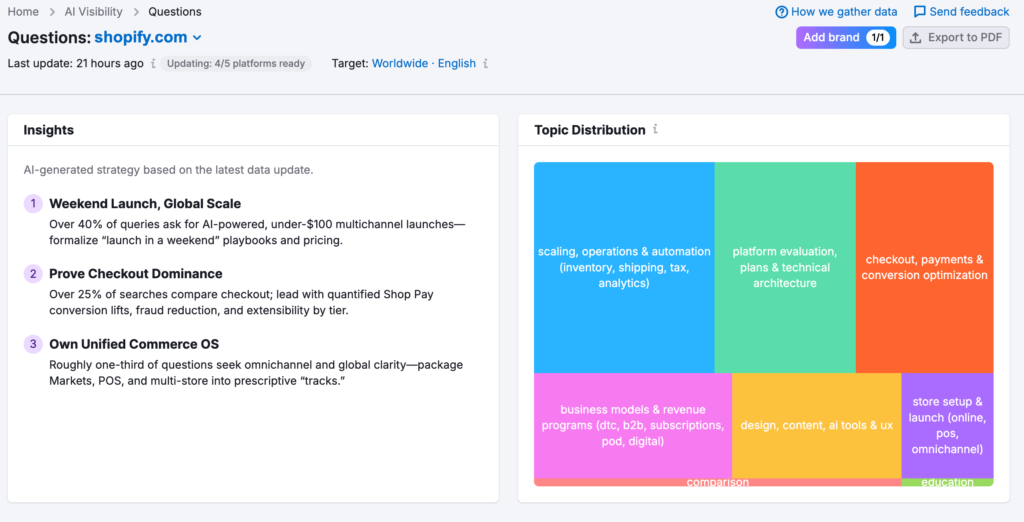
I actually find this report tab more useful than the other 3 – from a content perspective – as it gives more working data that can impact my strategy.
Topic Distribution (the category map/treemap)
This is the quick view of trending topics in user queries (e.g., product features, brand comparisons). It breaks it down into themes which show percentages too, a good way to see what coverage your brand has.
In my opinion, I don’t think it’s reliable to use on its own. I wouldn’t glance at this and go away with an action or information – I would rather dive into the information behind it and see what’s influencing that.
Query intent (distribution & trends)
This section is a good insight into the intent behind AI queries and shows 2 areas:
- Query Intent Distribution: Shows the percentage of different user intents, research, comparison, purchase, etc. within AI-driven queries, guiding your content focus.
- Intent Trends Over Time: Displays changes in user intent across periods, revealing emerging interests or changes in how consumers engage with your brand.
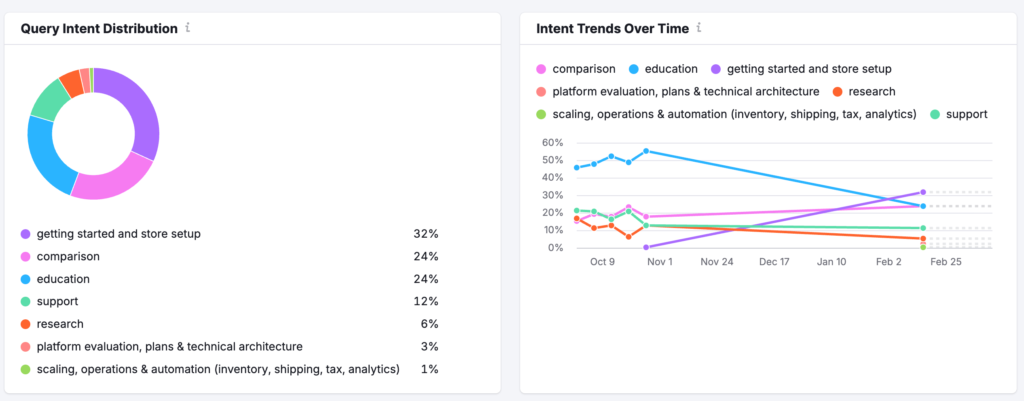
It’s useful for spotting changes like an increase in comparison queries lately, or if support questions are dropping.
Query Topics (topic-by-topic breakdown with example questions)
Query Topics groups actual user questions by theme (like ‘Product Features’ or ‘Pricing’), showing how often each intent arises. Useful for content planning. I like this part as it sparks ideation immediately and, when coupled with other data from the report, can align to an effective AI search strategy.
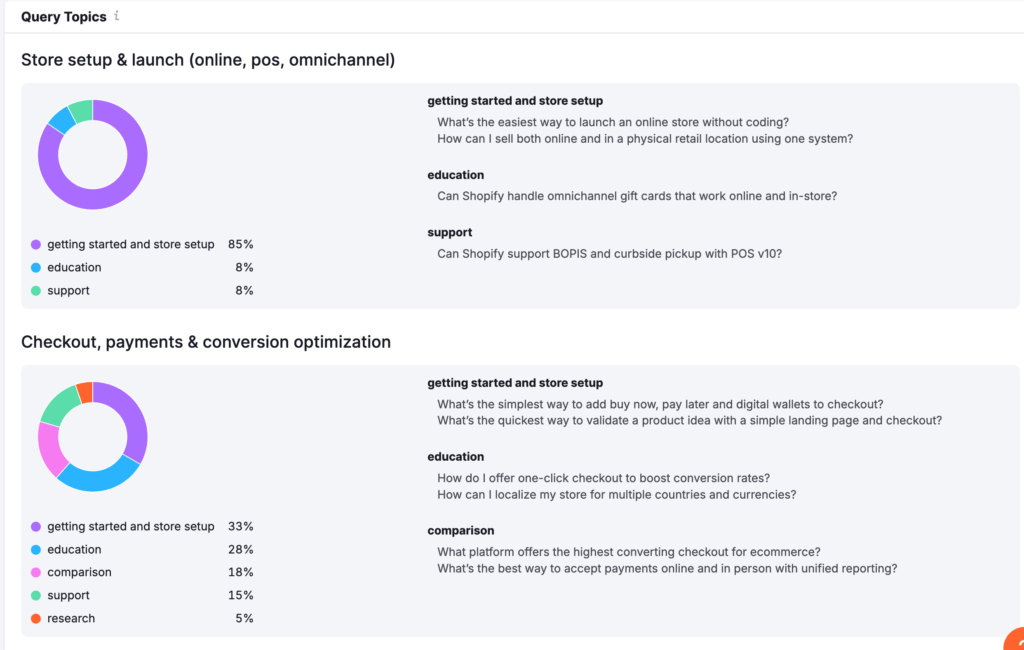
For each topic cluster, the report shows:
- An intent breakdown
- The dominant intents and their percentages
- Example questions grouped by intent
This is what turns the treemap into a prompt language you can write for.
How to use Questions
A couple of ways I would use the Questions data and report:
- Decide what to prioritize: Use Topic Distribution to pick the biggest clusters, then use the intent mix to decide whether you’re dealing with education content, comparison pages, or support documentation.
- Match content to intent: Use the topic cards to see which intents dominate inside each topic (some topics skew heavily educational; others are more comparison style).
- Steal the wording: Use the example questions inside each topic as the exact phrasing AI systems are being tested against, these are your content briefs.
- Track changes instead of guessing: Use Intent Trends Over Time to see whether the mix is changing (so you don’t over-invest in the wrong query type).
Summary
What I liked
- Topic clustering & example questions make it easy to convert demand into content briefs without guessing.
- Intent distribution and intent trends help prevent over-investing in the wrong content type (education vs comparison vs purchase).
- It’s one of the most immediately useful sections for ideation and planning.
What I didn’t like
- The treemap/cluster view is easy to misread without drilling into the examples behind each topic.
- It can overemphasize what’s loud in the dataset vs what’s highest value for your business.
- Needs cleanup/filters (market, language, brand vs non-brand) to stay relevant.
Best use case
Building (or refreshing) a content plan around the exact question wording and intent mix AI platforms are being tested against.
How to interpret
Treat clusters as signs on directional demand. Prioritize the questions that align with your revenue intent and validate them against your actual pipeline/customer questions.
My Thoughts After Using Semrush One
If I’m being honest, I think tracking AI visibility with Semrush One can pay off – IF you’re the kind of person who’s willing to spend time actually learning how AI works and how the data supports that.
Those who treat it like another set-and-forget dashboard end up underwhelmed, but the ones who use it as a research workflow get a lot more value out of it.
For me, the biggest payoff is Prompts. The data is more usable: you can see the exact question types and the language that keeps showing up, and that turns into new targets. It’s basically a keyword & intent discovery engine, except grounded in how AI is actually answering.
The citations and frequency side is useful too, but I’m less confident in it as a truth source. It’s great directionally, seeing which domains keep getting pulled into answers, and how often, but how accurate is it really? I’m not sure.
I don’t think the data is 100% reliable overall – but then again, I don’t think any AI Visibility data is 100% accurate on any platform unless it comes from the platform itself. Even then, it’s questionable.
Where it feels consistently strong is Competitor Research. That’s genuinely useful for finding where the gaps are and turning competitor advantage into a list of topics/questions to target.
So overall, my take is: Semrush One is worth it if you’re investing time in the workflow (prompts > topic gaps > content/citation plan > monitor). But I wouldn’t treat every number as the absolute truth.
I use it to spot patterns, compare performance, and generate targets. I sanity-check anything that looks like an absolute measurement (especially audience-style estimates) before I build decisions around it.
Semrush One vs Alternatives
If you want an end-to-end workflow inside one product, Semrush One is the best option here: it’s built around multiple connected views (visibility > competitor gaps > prompt research > brand/perception narratives > question/topic exploration), and it’s designed to feed work into monitoring/tracking rather than being a standalone dashboard.
Ahrefs can be considered similar (especially if you’re already using it for SEO), but its AI visibility features are more about brand monitoring through defined prompts/datasets than a full multi-module AI search optimization workflow. It’s good when you want AI visibility to sit alongside your existing keyword/backlink/content research stack, not replace it.
Where specialist tools tend to win is depth and control. If you care most about prompt-level coverage, repeatability, and confidence in how brands/competitors are detected and compared, tools like Profound (enterprise-oriented) and Peec (specialist AI visibility tracking) can be a better fit, at the cost of not being a full SEO suite.
- If you want workflow inside one tool: Semrush One.
- If you want SEO suite first, AI second: Ahrefs.
- If you want enterprise governance & deep analytics: Profound.
- If you want specialist prompt tracking: Peec.
| Tool | Strongest | Gaps | Best fit |
|---|---|---|---|
| Semrush One (AI Visibility) | Workflow & reporting in one place | Directional / modeled signals | Teams & agencies |
| Ahrefs | Strong SEO base & brand AI mentions | Less guided AEO workflow | Ahrefs-first SEO teams |
| Profound | Enterprise LLM analytics & governance | Higher cost & setup | Large orgs / enterprise |
| Peec AI | AEO-focused visibility tracking | Not a full SEO suite | AEO teams (paired with a suite) |
Final Verdict
Semrush One is worth buying if you’re investing real time into AI search tracking and you want a structured way to find prompts, spot competitor gaps, and monitor visibility. What you’re buying is the workflow, not perfect certainty.
The main downside is that some metrics and attribution can feel inconsistent, so treat the data as a strong planning signal and sanity-check anything that looks off before making big decisions.
FAQ Semrush One
Semrush One includes an AI tracking area that shows how a brand appears in AI answers. It focuses on prompts, mentions, citations, competitor comparisons, and brand perception so you can plan and monitor visibility over time.
Semrush One’s AI tracking includes Visibility Overview, Prompt Research, Competitor Research, Brand Performance (Perception, Narrative Drivers, Questions), and Prompt Tracking. Together, they cover discovery, competitive gaps, brand narrative, and ongoing monitoring.
Pricing depends on whether you buy Semrush One or AI Visibility standalone. From your pricing screenshots, AI Visibility Base is $99 per month per domain billed annually, and Semrush One annual pricing is Starter $165.17 per month, Pro+ $248.17 per month, and Advanced $455.67 per month, with higher tiers increasing the number of sites and daily tracking capacity.
Semrush One is best used for trends, comparisons, and planning, not perfect truth for every prompt. AI answers change, and some metrics are modeled, so it’s smart to sanity-check anything that looks off before you treat it as final.
Semrush One says it sources prompts from AI search clickstream data plus Google’s keyword dataset for AI Overviews, then dedupes and clusters prompts into topics. That means you’re looking at topic-level patterns, not a complete 1-to-1 list of every exact prompt people typed.
Semrush One uses different update speeds by section. Visibility Overview, Prompt Research, and Competitor Research are monthly, Brand Performance is weekly, and Prompt Tracking is daily.
Yes. Semrush One supports custom prompt monitoring through Prompt Tracking, where you define a prompt set and track it on a daily cadence, with prompt limits based on your plan.
Semrush One treats position differently by channel. In ChatGPT Search it ranks domains by the order they appear in the citation area, and in Google AI Mode it treats the AI answer as position 1 and assigns citations positions after that
Semrush One support varies by feature and market, and rollout can differ by country and metric. Prompt Tracking also has limits like desktop-only and different location granularity between Google AI Mode and ChatGPT, so it’s worth confirming support inside your project setup.
Yes. Semrush One includes export options so you can share reports and tables with stakeholders or clients. Just label the time range and update cadence so readers don’t assume every section is updated daily.