

AI citations are difficult to track without using a tool to support. It’s almost impossible to do it manually.
You need to know where your brand gets cited by AI, where it gets mentioned, where competitors are, and which prompts or topics are supporting each. Without that, you’re losing insights into where your audience is.
I tested and curated the best tools to track AI citations for marketers, looking at citation tracking, competitor comparisons, prompt coverage, reporting, and data quality.
One consideration: AI tracking tools are not 100% accurate. They run large prompt sets and aggregate data. No tool can truly know what happens inside every conversation of every AI tool for every user.
Some of these tools are built for large teams. Some are better for smaller in-house teams. These are the ones I would actually consider.
Read more on how to know if AI is using your content.
Best Tools to Track AI Citations: Quick Picks
- Best overall for marketers: Semrush One
- Best for enterprise teams: Profound
- Best for SEO teams: Ahrefs Brand Radar
- Best for lean teams: Peec AI
- Best budget-friendly option: Promptmonitor
How I Evaluated These Tools
I chose these tools based on what I think marketers would need when they are trying to understand AI visibility and use the findings to determine strategy. These are the key points I looked at:
- Citation tracking depth: Can it show when your site, pages, or content are cited in AI answers, not just mentioned?
- Mentions vs. citations: Does it distinguish brand mentions from source citations, so you can see the difference between visibility and attribution?
- Prompt-level tracking: Can you track the prompts that trigger mentions, citations, and competitor visibility?
- Competitor benchmarking: Can you see which competitors get cited more, and where they’re outperforming you?
- Model coverage: Does it track the core AI search platforms, like ChatGPT, Perplexity, Google AI Overviews, and similar platforms?
- Reporting and workflow fit: Is the reporting beneficial for marketers, or does it just dump data without any insight?
- Pricing and team fit: Does the tool make sense for the team buying it, whether a smaller in-house team, an agency, or a larger enterprise?
Before choosing a tool, it’s worth getting clear on how to track AI search visibility when citations change week to week.
10 Best AI Citation Tracking Tools
| Tool | Best for | Price (starting) |
|---|---|---|
| Semrush One | Most marketing teams that want SEO + AI visibility | $199/mo (Starter) |
| Ahrefs Brand Radar | AI visibility research inside Ahrefs | $199/mo (Brand Radar AI) |
| Profound | Deeper answer-engine intelligence | $499/mo (Profound Lite) |
| Peec AI | Lean teams that want source and gap analysis | $95/mo (Starter) |
| Otterly.AI | Daily prompt tracking + reporting | $29/mo (Lite) |
| Gauge | Diagnosing citation rate vs mention rate | $99/mo (Starter) |
| Conductor AI Search Performance | Enterprise topic-based AI visibility reporting | Custom pricing |
| SE Ranking AI Visibility Tool | Lower-cost competitor + source analysis | $89/mo (AI Search add-on) |
| LLM Pulse | Weekly multi-model tracking + traffic analysis | €49/mo (Starter) |
| Promptmonitor | Budget teams that want prompts + bot analytics | $29/mo (Starter) |
Semrush One
Best for: AI citation tracking and SEO analysis together.
Pricing: 7-day free trial. Starter $199/mo. Pro+ $299/mo. Advance $549/mo. Base AI Visibitly $99/mo. per domain.
Semrush One is one of my top picks because it gives marketers several useful insights. Starting from basic to advanced, if needed. This includes an AI Visibility Score that can be broken down by region and Competitor Research, which shows the prompts and topics where other brands are getting cited instead of you.
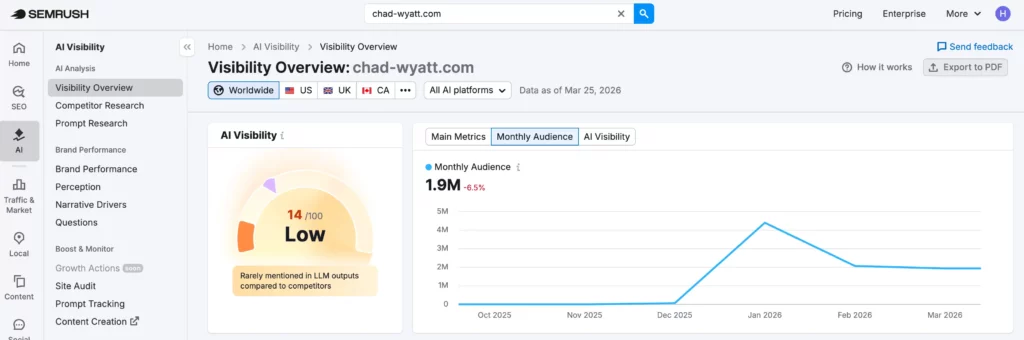
What I like most is the progression of features from diagnosis to prioritization. Prompt Research adds volume, difficulty, and intent data, so you can judge which AI questions are worth targeting. Brand Performance then shows share of voice, sentiment, and the narratives AI systems attach to your brand.
Once you know which prompts are important, Prompt Tracking lets you monitor them daily so you can see whether a content update, new page, or technical fix actually impacted performance.
Key features:
- SEO Toolkit and AI Visibility Toolkit in one subscription
- Tracks AI visibility across Google AI Overviews, AI Mode, ChatGPT, Perplexity, and Gemini
- Tracks brand mentions, prompts, and sources
- Competitor benchmarking across Google search and AI platforms
- Prompt Research and Prompt Tracking to find and monitor high-value queries
- AI Search Site Audit checks for technical blockers that can stop AI bots from crawling.
Pros:
- Strong fit for teams that already run SEO inside Semrush
- Gives you AI citation tracking without a separate workflow
- Useful mix of prompt research, competitor tracking, and site auditing
- Good option for teams that want SEO and AI visibility together
Cons:
- Costs more than other AI visibility tools
- Can be more than you need if you only want a simple citation tracker
- Best suited to one or a few domains, not the kind of large-scale monitoring an enterprise team may want
- Costs can rise if you need extra domains, extra prompts, or more team access to the AI toolkit
Semrush One works best for in-house marketing teams, SEO leads, and agencies that need to track AI citations alongside SEO performance. I would put it near the top of the list for teams that want one platform for rankings, audits, competitor research, and AI visibility, instead of using multiple tools.
Integrations: Semrush supports API access and an App Center, which is useful for teams that want to pull data into reporting workflows or extend the platform with other marketing apps.
Quick tip: Start with the prompts that already drive commercial traffic in search. If Semrush shows that competitors are getting cited on those questions and you aren’t, that’s usually a better place to start than chasing random numbers.
Ahrefs Brand Radar
Best for: SEO-led teams that want AI visibility inside Ahrefs
Pricing: From $199/mo. for one platform.
Ahrefs Brand Radar is a good choice as it gives you a starting dataset instead of making you build a prompt list from scratch. You can search a brand, product, region, or person across Ahrefs’ prompt database and see AI share of voice, top cited pages, and top cited domains. Useful for early research rather than a tool that only works once you have prompts to track.
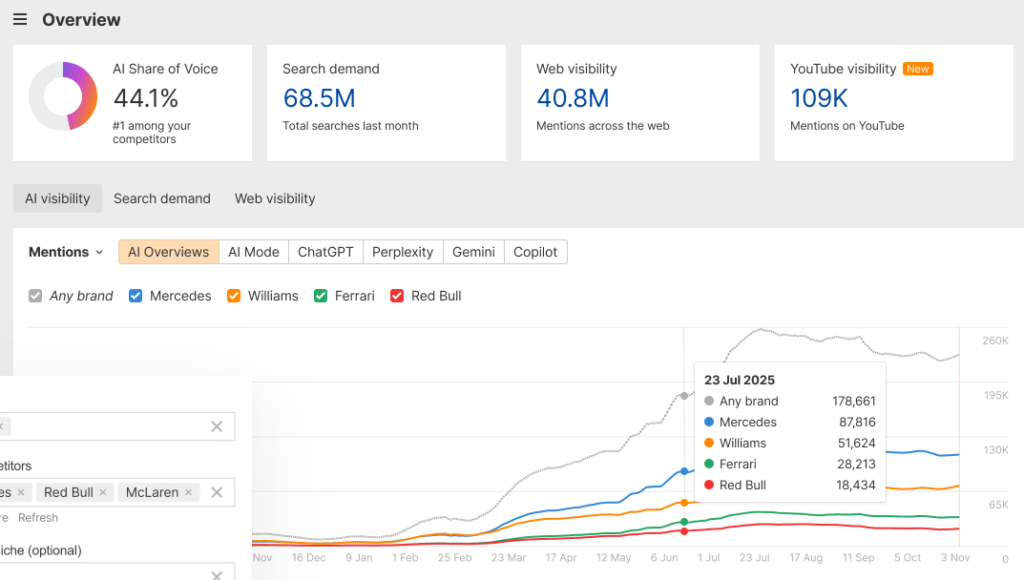
One of my favorite things about Brand Radar is how it combines research with custom tracking. You can use the built-in prompt set to see where competitors already perform, then add your own prompts for the commercial questions most relevant to your business. It also pulls in visibility data from the web, YouTube, Reddit, and TikTok.
Ahrefs also claims to be the largest AI visibility database powered by search-backed prompts – not synthetic ones.
Key features:
- Tracks AI visibility in AI Overviews and AI Mode, ChatGPT, Perplexity, Gemini, and Copilot
- Covers 300M+ search-backed prompts
- Shows AI share of voice, top cited pages, and top cited domains
- Lets you add custom prompts to monitor specific commercial questions
- Includes larger visibility data through search, web mentions, YouTube, Reddit, and TikTok
Pros:
- Strong starting point because you can research brands immediately
- Good competitor benchmarking
- Useful citation data, not just mention tracking
- Flexible enough for both broad brand research and custom prompt tracking
Cons:
- Can get expensive once you add more custom prompt tracking (pricing is confusing)
- Better for SEO teams than teams that only want a lightweight monitor
- Some broader channel indexes are still in beta
- You may need a different Ahrefs setup if you want deeper reporting beyond Brand Radar itself
Ahrefs Brand Radar makes the most sense for SEO teams, content teams, and agencies that already use Ahrefs and want AI citation tracking with search insights. It’s a strong fit not only for monitoring prompts, but for figuring out which brands, pages, and sources keep showing up in your niche.
Integrations: Connector for Looker Studio. Also supports integrations through Ahrefs Connect, which is built on API v3.
Quick tip: Start with the top cited domains for your main category terms before you add custom prompts. That will show you whether you have issues with citations, content gaps, or both.
Profound
Best for: Teams that need deeper answer-engine intelligence.
Pricing: Starter $99/mo. Growth $399/mo. Enterprise – custom.
Profound offers more in-depth data on AI search than other tools. Its Answer Engine Insights shows visibility scores, citations, citation authority, competitor rankings, platform comparisons, sentiment, keyword themes, and trend data.
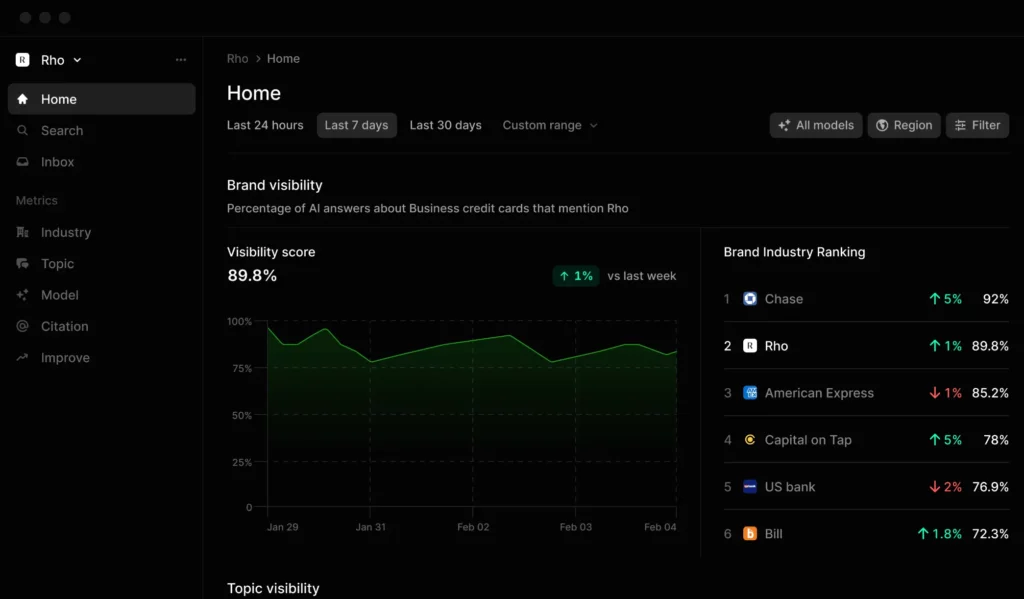
It has filters for things like region, topic, language, and audience persona. It also runs tracked prompts daily and captures answers from the browser, which covers what users are seeing.
One thing I like about profound is Prompt Volumes. This adds estimated demand, intent classification, sub-intent breakdowns, buyer-journey alignment, and demographic cuts by platform, age, and income.
Brand Relevant Prompts then shows the prompts that already cite your pages, the competitor pages that appear next to you, and the prompts where competitors show up. That’s the kind of detail that helps decide what to update, what to build, and which gaps to target first.
Key features:
- Answer Engine Insights for visibility scores, citations, citation authority, competitor rankings, sentiment, platform comparisons, and trends
- Daily prompt runs with responses captured directly from the browser rather than only from APIs
- Prompt Volumes for demand estimation, intent classification, sub-intent breakdowns, and demographic analysis
- Brand Relevant Prompts to show which prompts cite your pages, which competitors appear beside you, and where gaps are
- Agent Analytics for live AI crawler monitoring, attribution and traffic insights, content performance tracking, verified bot detection, and direct submission of new content to AI search
- Enterprise controls including SOC 2 Type II, SSO, RBAC, encryption, GDPR compliance, backups, and API access
Pros:
- Stronger feature depth than most tools in this category, especially on prompt intelligence and citation analysis
- Better technical visibility than tools that stop at answer monitoring, because Agent Analytics uses server logs and verifies bots
- Useful for content, SEO, PR, and brand teams, not just one team inside a company
- Agency support is built into the product direction
Cons:
- A more complex product than simpler AI citation trackers
- The best parts of the platform take more setup and more internal ownership
- Security, governance, and infrastructure features will matter more to larger or more technical teams than to smaller ones
Profound makes the most sense for teams that want more insights than whether they are cited or not. It’s a good fit for brands, agencies, content teams, PR teams, and SEO teams that want to understand prompt demand, citation sources, competitor overlap, and crawler behavior.
It’s still more than a small team needs if all they want is a basic prompt monitor.
Integrations: Google Analytics, Vercel, Akamai, Amazon CloudFront, Cloudflare, Fastly, Google Cloud, Netlify, WordPress, Contentful, Sanity, Slack, and API workflows.
Quick tip: Start with Brand Relevant Prompts. It gives you a good starting point as it shows the prompts that already cite your pages, the competitor pages that show up, and the gaps where you’re missing.
Peec AI
Best for: Mid-market and lean marketing teams.
Pricing: Starter $95/mo. Pro $245/mo. Advanced $495/mo.
Peec is a good AI citation tracking tool for marketers because the core reports are built around common challenges. It breaks performance into visibility, position, and sentiment, then shows top competitors and top sources. You can filter by model, country, tags, topics, competitor, and date range, which makes it easier to separate brand visibility from a specific market or prompt set.
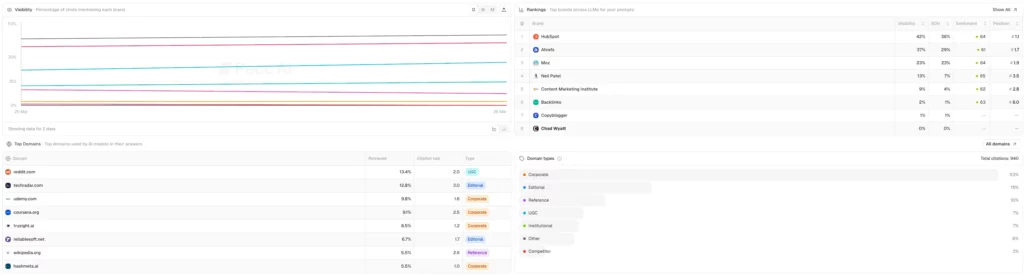
What I like most about Peec AI is the source analysis. This splits source data into Domains and URLs, to see which websites AI models see as authoritative and which specific pages keep getting pulled into answers.
The Gap Analysis shows the sources where competitors are mentioned, which is more useful than a generic competitor chart. Peec also turns source data into Actions, grouping opportunities into things like editorial listicles, UGC discussions, reference pages, and on-page content types, then tying each group to follow-up steps.
Another feature worth noting is how Peec collects the data. It uses UI scraping to interact with AI models through web interfaces, rather than relying only on APIs. That makes the data more accurate to what users see, and it also lets Peec track models that don’t have public APIs or limited API access.
Key features:
- Dashboard built around visibility, position, and sentiment
- Filters for model, country, tags, topics, competitor, and date range
- Domains and URLs views to show which sites and pages influence AI answers
- Gap Analysis on domains and URLs to find sources where competitors show up
- Actions that group source opportunities into on-page and off-page work with recommendations
- Prompt setup in bulk, with tags and topics for organization and reporting
- Looker Studio connector on higher tiers and API access on Enterprise
Pros:
- The source analysis is strong for a tool in this price range
- Easy to use because the dashboard is built around a small set of metrics
- Unlimited users even on Starter is an advantage for growing teams
- Daily tracking starts on the entry plan
Cons:
- It’s not a full SEO suite, so you still need another platform for rankings, audits, and keyword research
- API access is Enterprise-only, and some integrations only show up on Advanced or Enterprise
- Starter and Pro only include 3 models, so more model coverage means increased costs
Peec makes is best for in-house marketing teams, content teams, GEO teams, and agencies that want dedicated AI citation tracking. It’s especially useful to see which sources and page types are helping competitors win.
Integrations: Google Looker Studio is available through Peec’s connector. GSC/GA/Looker integrations are included on Advanced. API access is limited to Enterprise.
Quick tip: Start with the URLs view, not the headline visibility chart. It will show you the exact page types AI models keep citing in your category, which is the quickest way to spot whether you need more comparisons, listicles, product pages, or off-page coverage.
Otterly.AI
Best for: Teams that want daily AI citation monitoring and client-ready reporting.
Pricing: Lite $29/mo. Standard $189/mo. Premium $489/mo. Enterprise also available.
Otterly.AI works by taking a set of prompts, running them daily across the tracked AI platforms, and then turning the results into core reports for marketers. The main ones are Brand Visibility Index for how often your brand appears, Domain Ranking for which domains keep getting cited, and Link Citations Analysis for which URLs are shaping the answers for the prompts.

What I like most about Otterly is the prompt-to-action flow. AI Prompt Research helps you turn keywords into conversational prompts people ask in AI search.
Search Prompt Monitoring then tracks those prompts daily. After that, GEO Audit checks more than 25 on-page factors to show why a page might not be earning citations. A solid setup for a team that wants to analyze what to target and fix.
Reporting is also good here. Otterly lets you export prompt-level visibility data and citation links with fields like prompt, country, total citations, your brand mentioned, your domain cited, competitor mentioned, competitor cited, etc.
On most plans, the Looker Studio connector pulls in live fields like brand coverage, brand mentions, share of voice, average rank, domain coverage, citation share, and cited URL visits. Useful if you need to turn the raw data into a client report or an internal dashboard.
Key features:
- AI Prompt Research to turn keywords into AI search prompts.
- Daily prompt monitoring for ChatGPT, Google AI Overviews, Perplexity, and Microsoft Copilot, with Google AI Mode and Gemini sold as add-ons.
- Brand Visibility Index, Domain Ranking, and Link Citations Analysis for brand, domain, and source tracking.
- GEO Audit that checks 25+ on-page factors.
- Detailed exports for prompt data and citation data.
- Looker Studio connector on Standard, Premium, and Enterprise.
Pros:
- Strong reporting for the price. You get detailed exports plus a Looker Studio connector, which is useful for agency and internal reporting.
- Daily tracking starts on the entry plan. Useful if you want regular monitoring instead of occasional snapshots.
- Paid plans work well for teams, not just one user. Standard and Premium include unlimited team members and unlimited workspaces; good if you manage multiple brands or clients.
- Features cover the core workflow. Prompt research, visibility tracking, citation analysis, GEO audits, and multi-country support are all built in.
Cons:
- Lite is too limited for most serious use cases. 15 prompts is fine for testing, but not enough for ongoing monitoring.
- Some model coverage costs extra. Google AI Mode and Gemini are paid add-ons, so the base price isn’t the full cost for every team.
- No API yet. That’s a real limitation if you want to automate reporting beyond exports and Looker Studio.
- It’s better for ongoing tracking than deep investigation. If you want a more detailed view of why citations changed, prompt demand, or competitor sources.
Otterly.AI is a good fit for agencies and smaller teams that want daily prompt tracking, citation data, and reporting without a confusing setup. It’s best for ongoing monitoring rather than deeper diagnosis.
Integrations: Google Looker Studio is available on Standard, Premium, and Enterprise. Otterly doesn’t offer an API right now.
Quick tip: Start with the citation export, not the top-level visibility score. The export shows the URLs, positions, domains, and domain categories behind the answers, which makes it easier to spot whether AI platforms prefer product pages, editorial roundups, directories, or something else.
Gauge
Best for: Marketers who want citation rate and mention rate diagnostics
Pricing: Starter $99/mo. Growth $599/mo. Enterprise pricing available.
Gauge is one of the better tools here for figuring out why you aren’t getting cited. It separates mention rate from citation rate which is a good detail to focus on. A brand can appear in an answer without getting cited as the source, and Gauge shows that separation.

What I find good about Gauge is how it focuses on data that leads to action. Prompt Tracking lets you generate prompts from your keywords or build your own, then runs them daily across the tracked models. Competitor Analysis shows the exact prompts where competitors appear, and the content and sources driving those citations, so you can see what’s informing answers. ”
Another thing worth calling out is scale. Gauge supports unlimited tracked domains and unlimited competitors on every plan, while Growth and Enterprise add exports, BI integration, API access, and more seats. Which is good for teams that want to monitor properly, not just check a handful of prompts once in a while.
Key features:
- Prompt Tracking with keyword-based prompt generation or custom prompts.
- Daily monitoring for major AI platforms, with broader model coverage on Growth and Enterprise.
- Seperate mention rate and citation rate reporting.
- Competitor Analysis with head-to-head visibility, prompt-level gaps, and the sources behind competitor citations.
- Site Audit, Actions, and Content on higher tiers.
- Exports, BI integration, and API access on Growth and Enterprise.
Pros:
- Better than most tools at separating brand visibility from source visibility.
- Strong competitor workflow because it shows both the missing prompts and the sources behind competitor wins.
- Daily tracking across major AI platforms on Growth.
- Useful if you want diagnostics tied to execution.
Cons:
- Starter is limited to ChatGPT only.
- Growth is a big jump in price from Starter.
- Some of the more useful workflow features sit on higher tiers.
- More than a lot of smaller teams need if all they want is a lightweight mention tracker.
Gauge makes the most sense for content teams, SEO teams, agencies, and growth teams that already understand the basics and now want to see where citations break down, run competitor analysis, and determine actions. It’s not worth it if you only want a cheap prompt monitor.
Integrations: Exports, BI integration, and API access are available on Growth and Enterprise.
Quick tip: Start with the prompts where competitors already beat you, not a blank prompt list. Gauge’s gap analysis will show where you are missing, and the competitor view will show which sources are helping them win those answers. That gives you a better starting point for content updates.
Conductor AI Search Performance
Best for: Enterprise teams that want topic-based AI visibility reporting.
Pricing: Custom pricing.
Conductor is focused on brands, topics, personas, and prompts. You set the topics, Conductor generates related prompts, and then the main report tracks brand mentions and website citations. You can filter by AI engine, country, website, branded vs. unbranded prompts, active vs. inactive prompts, and date range.

It also breaks performance out by persona, intent, and sentiment which is a nice feature. Conductor supports ChatGPT, Claude Sonnet, Gemini, Google AI Mode, Google AIO, Microsoft Copilot, and Perplexity covering 160+ countries.
What I think Conductor does well is the detail. Topic Details shows the exact prompts generating mentions and citations, along with each prompt’s persona, search intent, branded or unbranded status, sentiment, and the AI response.
The performance views then add citation share of voice, mention share of voice, top cited pages, top mentioned brands, competitive market by topic, and prompt-level response details. Conductor also has page-level AI citation reporting, including an AI Citation Prompts table that shows the exact prompts driving citations to a specific page.
Key features:
- Overview reporting for brand mentions and website citations.
- Topic-based tracking, with Conductor generating up to 100 prompts per topic.
- Persona and search intent classification for tracked prompts.
- Sentiment reporting plus sentiment source analysis and statement-level review.
- Competitor views for citation share of voice, mention share of voice, top cited pages, top mentioned brands, and topic-level competitive matrices.
- Page-level citation reporting, including the exact prompts driving citations to a page.
Pros:
- Strong reporting structure for large teams. The topic, prompt, page, and competitor views fit together well.
- Good drill-downs. You can move from a trend chart to the exact prompt and AI response behind it.
- Useful market and competitor reporting. The share-of-voice and top-cited-page views are more actionable.
- Flexible setup. Brands, topics, personas, prompt type, country, and engine can all be tuned to fit the reporting.
Cons:
- Pricing isn’t given upfront.
- Good setup is important to get more value from it.
- New tracking isn’t instant. It can appear in as little as five hours, but it may take a few days.
- Better for teams with a real reporting process. If all you want is a lightweight prompt monitor, this is more structure than you need.
Conductor is a good fit for enterprise content, organic growth, and digital teams that need to report AI visibility across multiple brands, properties, topics, or markets. It’s useful for understanding which prompts, pages, sources, and competitors are getting the result.
Integrations: Google Analytics and Google Search Console are included across all Conductor Intelligence plans. Adobe Analytics is available on Growth, Professional, and Enterprise. Conductor also offers a Data API for BI dashboards, custom apps, automated reporting, and AI workflows.
Quick tip: Spend the time on topic setup before you start judging the data. Conductor generates prompts from the topics you track, and those prompts then inform everything else in the report. A better topic setup usually gives you a better view of performance.
SE Ranking AI Visibility Tool
Best for: Teams that want AI visibility tracking with strong competitor and source analysis at a lower price point.
Pricing: AI Search €79/mo. SE Visible $99/mo.
SE Ranking is better than it first looks because it splits data into multiple useful views. AI Competitor Research lets you track any brand’s visibility across AI channels, compare domains, review mentions and links for individual prompts, and track changes. AI Results Tracker then shows how your brand appears for prompts, including mentions, links, answer placement, competitor visibility, and the response.

One thing I like here is the source analysis. AI Source & Coverage Analysis maps the domains and URLs that appear in answers, groups them by source type like media, blogs, and forums, and shows which sources carry the most weight. Which tells you what kind of sources AI engines in your category seem to trust.
SE Visible adds more data with brand mentions, citations, sentiment trends, top domains, top URLs, filters by topic and engine, and multi-brand tracking.
Key features:
- AI Competitor Research for brand-level visibility, prompt-level review, and multi-domain comparison.
- AI Results Tracker for mentions, links, answer placement, competitor visibility, and response framing.
- AI Source & Coverage Analysis for domain and URL mapping, source categories, and source weighting.
- Historical data to monitor changes.
- Free AI visibility checker for your domain plus up to five competitors.
- SE Visible for brand mentions, citations, sentiment trends, multi-brand tracking, and weekly updates.
Pros:
- The competitor research is built in early. You can compare domains, prompts, mentions, and links without treating competitor tracking like an add-on.
- The source analysis is useful. Seeing which domains, URLs, and source types shape answers gives you a clearer content and PR direction.
- The pricing is more accessible than a lot of higher-end tools. The add-on starts lower, and the standalone SE Visible plans are still within reach for smaller teams.
- Multi-brand and sentiment tracking. That makes it a better fit for agencies and teams managing more than one brand.
Cons:
- The product split is a bit confusing. You need to know whether you want the AI Search add-on inside SE Ranking or SE Visible as a standalone product.
- The add-on coverage and the standalone coverage are not the same. The AI Search add-on lists AI Overviews, AI Mode, Perplexity, and ChatGPT, while SE Visible also includes Gemini and multi-brand tracking.
- The entry point starts at 200 prompts. That’s fine for many teams, but might be more than small teams need and less than larger teams want.
- Reporting depth is good, but the structure is still lighter than enterprise platforms. It’s more focused on visibility, competitors, and sources than on heavier governance or workflows.
SE Ranking is good for in-house teams, smaller agencies, and mid-market brands that want AI visibility data without jumping straight to an enterprise tool. It’s useful when you want competitor research, source analysis, and historical tracking in a package that’s reasonably priced.
Integrations: SE Ranking supports Looker Studio, Zapier, n8n, Make, Reportz, and SeoTools for Excel, and it offers an AI Search API through its API add-on.
Quick tip: Start with AI Source & Coverage Analysis before you spend time on headline visibility scores. The source view will tell you if AI engines in your category prefer editorial content, forums, blogs, or other source types – good for content planning.
LLM Pulse
Best for: Teams that want weekly multi-model tracking with strong citation and traffic analysis.
Pricing: Starter €49/mo. Growth €99/mo. Scale €299/mo. Scale+ €599/mo.
LLM Pulse is more geared towards a simple workflow: track prompts, analyze the responses, then connect that back to traffic and action. It runs prompts weekly on ChatGPT, Perplexity, Google AI Mode, Google AI Overviews, and Gemini on the standard plans, and it tracks visibility score, citation rate, sentiment, and share of voice.
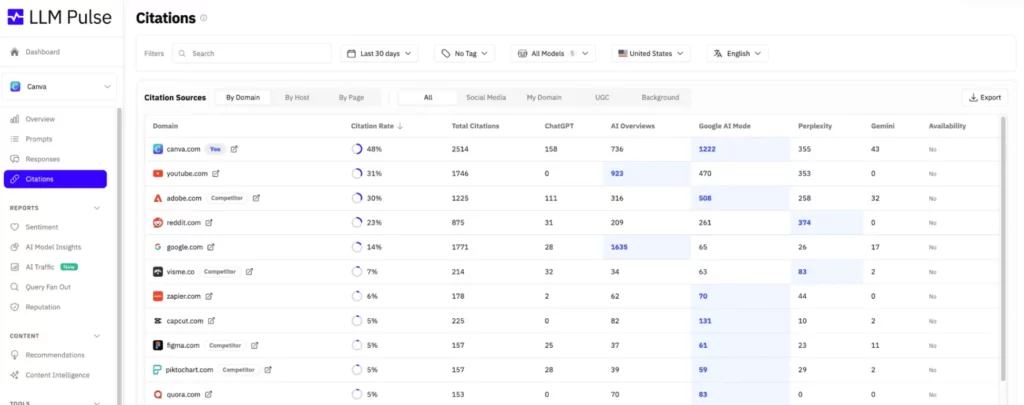
My favorite part of LLM Pulse is the source analysis which shows which websites, articles, and domains AI models cite when discussing your brand. It also highlights the domains cited most often, flags bad or outdated sources, and shows which sources cite competitors.
It helps you see what kinds of content get cited, which helps with content planning and optimization.
Another useful feature is the traffic portion. If you connect Google Analytics 4, LLM Pulse shows which AI channels lead to visits, which landing pages get that traffic, and whether those visits convert. Many tools miss that detail. It’s one thing to know you were cited. It’s more useful to know whether those citations sent visitors.
Key features:
- Weekly prompt tracking across ChatGPT, Perplexity, Google AI Mode, Google AI Overviews, and Gemini on standard plans.
- Visibility score, citation rate, sentiment, and share of voice tracking.
- Citation Sources Analysis for cited domains, cited URLs, source quality, citation trends, and competitor source gaps.
- App store citation tracking for Google Play and App Store links.
- GA4 integration for AI traffic, landing pages, source attribution, and conversions.
- Looker Studio, API access, and MCP integration on higher plans.
Pros:
- Strong source analysis. It’s good at showing which domains inform AI answers and where competitors have a citation advantage.
- Good model coverage on entry plans. You’re not stuck with one or two platforms at the low end.
- Traffic data is built in. The GA4 integration makes it easier to connect visibility to visits and conversions.
- Starter and Growth are easy to adopt. Both include Looker Studio, exports, app citation tracking, and unlimited team members.
Cons:
- Tracking is weekly, not daily. That’s fine for trend monitoring, but slower for teams that want faster feedback.
- API access starts on Scale+, so deeper automation costs more.
- Standard plans stop at five core models. Deeper model coverage like Claude, Copilot, Grok, and Meta AI is positioned as enterprise coverage.
- Competitor limits scale by plan. Starter allows 5 competitors per project, Growth 10, and Scale/Scale+ 15.
LLM Pulse is a good fit for agencies, content teams, PR teams, and brand teams that want to watch how AI models cite them across multiple engines and then connect that back to source quality and traffic. It’s useful if you care about which sources are pulling into the answer, as well as if your brand was mentioned too.
Integrations: Google Analytics 4 is supported for AI traffic tracking. On higher plans, LLM Pulse also supports a REST API, Looker Studio, MCP integration, and AI-agent workflows through that MCP layer.
Quick tip: Start with prompts where buyers compare brands or ask for recommendations. LLM Pulse’s source analysis is strongest when the prompt already gets the model to cite and compare sources.
Promptmonitor
Best for: Smaller teams and agencies on tighter budgets.
Pricing: Starter $29/mo. Growth $39/mo. Pro $129/mo. Agency plan available.
Promptmonitors core metrics are Visibility Score, Presence by LLM, and Top Competitors, so you can see how many times a brand appears, which models mention the most, and the competition. The Visibility Score is based on presence rate and cross-model consistency, better than other models as it doesn’t rely on over-weighting one engine.
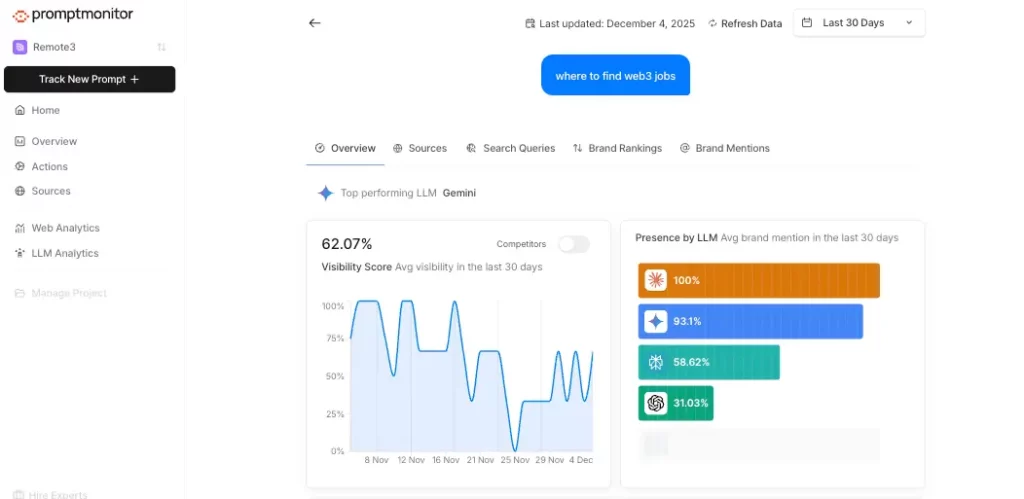
What I like about Promptmonitor is the amount of detail you get once you open a tracked prompt. Prompt Analytics shows the AI responses, highlights where your brand is mentioned, lets you hover over citations to inspect the sources, and then breaks the prompt out into Sources, Search Queries, Brand Rankings, and Brand Mentions tabs.
That means you can move through a more detailed workflow and understand the path better without leaving the prompt view.
Actions are also worth mentioning. It turns the data into two simple workstreams: Write Content, which shows the search queries AI models use when researching your prompts, and Build Backlinks, which shows the sources AI models cite without mentioning your brand.
This gives smaller teams actionable info instead of just a dashboard. On top of that, Promptmonitor includes website analytics and AI crawler and bot analytics, so you can track both human visits and server-side AI bot traffic in the same product.
Key features:
- Tracks prompts across ChatGPT, Claude, Gemini, DeepSeek, Grok, Perplexity, Google AI Overview, and AI Mode depending on plan.
- Visibility Score, Presence by LLM, and Top Competitors for project-level visibility tracking.
- Prompt Analytics with actual responses, cited sources, search queries, brand rankings, and sentiment-tagged brand mentions.
- Actions page for content opportunities and backlink or outreach opportunities.
- Website analytics plus AI search bot and crawler analytics.
- CSV export, weekly email reports, and geographic tracking.
Pros:
- A lot of useful features for the price. You get prompt tracking, competitor data, source analysis, content ideas, and bot analytics without paying enterprise prices.
- The prompt view is stronger than you would expect at this price point. It shows actual responses, cited sources, search queries, rankings, and mentions in one place.
- The Actions page is useful. It gives you concrete content and outreach opportunities instead of leaving you to interpret the data yourself.
- Growth and Pro are well set up for small teams and agencies. Both add daily refresh and unlimited team seats.
Cons:
- Starter gets challenging. You only get 25 prompts, 1 seat, and twice-a-week refresh, so most real teams will outgrow it early on.
- The richer model coverage starts higher up. AI Mode and AI Overview are listed on Pro, not on Starter or Growth.
- Reporting is basic compared to higher-end tools. You get exports and email reports, but not the deeper reporting and integration some larger platforms offer.
- Some setup is technical. Human traffic uses a script, but AI bot tracking needs server-side middleware or the REST API.
Promptmonitor is a good fit for smaller in-house teams, early-stage companies, and agencies that want prompt tracking, source analysis, and AI bot analytics without paying for a bigger platform. It’s useful when you want a low-cost way to see which prompts are important, the sources getting cited, and what to write or pitch next.
Integrations: Promptmonitor offers a REST API for server-side analytics and provides a Next.js middleware option for AI crawler tracking. The product leans more on built-in analytics, CSV export, and weekly reports than on a long integrations list.
Quick tip: Start with your highest-value commercial prompts, then check the Search Queries and Sources tabs before you write anything new. That will show you how AI models are researching the question and which sources they trust, which is usually a better starting point.
Final Verdict: Which Tool Should You Choose?
Choose Semrush One if you want one main tool for both SEO and AI visibility. It’s still the best fit for most marketing teams because it combines Semrush’s SEO Toolkit and AI Visibility Toolkit in one workflow. Including competitor benchmarking, prompt discovery, and AI visibility tracking across Google AI Overviews, AI Mode, ChatGPT, Perplexity, and Gemini.
Choose Profound if you want deeper answer-engine intelligence. It goes more in-depth on things like visibility scores, citation authority, competitive benchmarking, platform comparisons, prompt demand, and prompt-level analysis.
Choose Ahrefs Brand Radar if your team already works inside Ahrefs. The biggest advantage is that you can start with Ahrefs’ built-in AI visibility database and research brands, products, regions, and sources immediately, instead of building a prompt set from scratch.
Choose Peec AI or Otterly.AI if you want a simpler, dedicated AI visibility tool. I would go for Peec AI if you want source analysis, gap analysis, and seeing which domains and URLs help competitors win citations. Or Otterly.AI if you want daily prompt tracking, exports, GEO audits, and client-ready reporting through Looker Studio.
Choose Promptmonitor if budget is most important. It’s the easiest starting point for smaller teams because even the lower plans include broad model coverage, and the Growth plan adds daily refresh, unlimited seats, website analytics, AI crawler analytics, and CSV export at a much lower price than most other tools.
You might also want to check out the best generative engine optimization tools.
FAQ
AI citation tracking is the process of monitoring whether AI products cite your site, pages, or brand in their answers. The better tools also show which prompts triggered those citations, which competitors appeared instead of you, and how that changes over time.
An AI mention means your brand name appears in the answer. An AI citation means the answer uses your site or page as a source. That difference matters because a brand can get mentioned without getting the source attribution or traffic value that usually matters more.
For most marketers, Semrush One is the best fit. It combines AI visibility tracking with a broader SEO workflow, so you can track prompts, mentions, competitor gaps, and technical issues in the same platform.
Profound is the strongest option for enterprise teams. It goes deeper on answer-engine tracking, prompt analysis, citation analysis, and agent analytics than most tools in this category.
Use Ahrefs Brand Radar. It gives you AI visibility tracking, AI share of voice, top cited pages, top cited domains, and custom prompt tracking inside Ahrefs.
If cost is the main constraint, Promptmonitor is the best budget pick from this list. If you can spend more and want a stronger workflow, Peec AI or Otterly.AI are better options for ongoing monitoring and team use. Otterly’s public pricing starts at $29 per month and includes daily tracking on every plan.
Many of them do, but coverage varies by vendor and plan. Semrush tracks Google AI visibility and prompt monitoring, Ahrefs Brand Radar tracks AI search visibility across a large prompt set, Profound focuses on major answer engines, and Otterly tracks ChatGPT, Google AI Overviews, Perplexity, and Copilot by default.
Yes. That is one of the main reasons to use them. Tools like Semrush, Ahrefs Brand Radar, and Profound all support competitor analysis, which helps you see which brands and domains keep getting cited for the prompts you care about.
They are worth it if your team is going to use the data. The value comes from finding prompt gaps, source gaps, and competitor wins you can respond to with better pages, better positioning, and better distribution. If no one is going to act on that information, the tool will not do much for you.
Start with five things: prompt tracking, citation tracking, mention tracking, competitor analysis, and coverage of the AI platforms your buyers actually use. After that, look at reporting, workflow fit, and price. That is usually enough to narrow the field fast.