
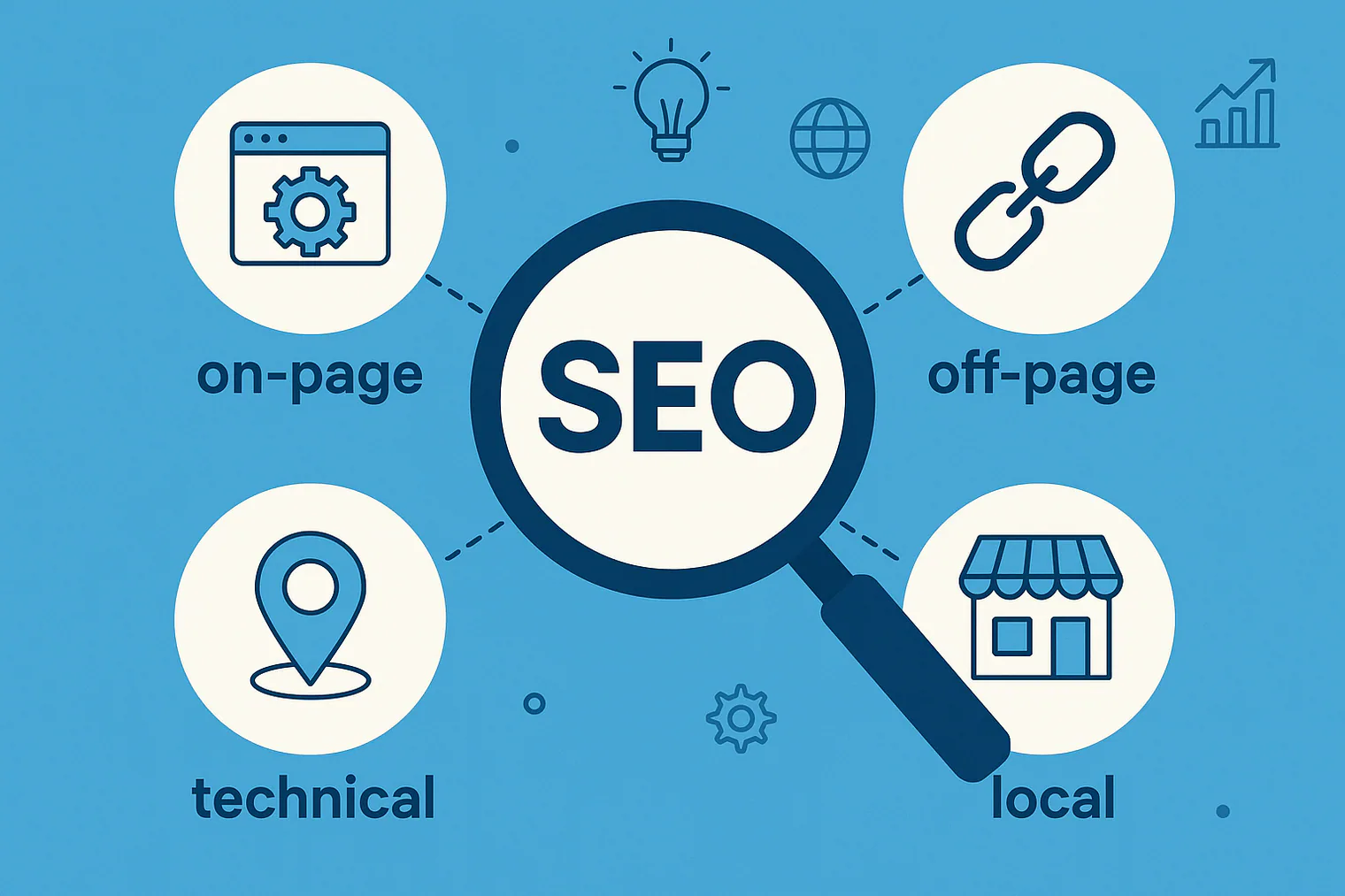
SEO helps people find your content through search. That’s the simple version. But there’s a lot more to it than that, so much more that there are 4 different types of SEO or ‘branches’; each of which requires different skillsets. You don’t need to be fully skilled in each area, but you should at the very least, understand the ins and outs of each. Generally speaking, technical SEO is the most challenging for marketers as it requires some level of technical expertise. Certain practices and techniques will not apply to all businesses either; local SEO practices would not apply to e-commerce brands for example.
If you want to get seen, all four need your attention. Here’s a quick breakdown of how each one works and why they matter.
TL;DR: On-page SEO is about what you publish. Off-page SEO is what others say about it. Technical SEO makes sure your site runs cleanly behind the scenes. Local SEO helps you show up in local searches.
On-Page SEO
On-page SEO is everything you do on a specific page to help it rank. Most people believe on-page SEO is about adding keywords on a page, which is true to some extent, but it’s also about making the page clear, structured, and relevant, both for search engines and the people who click to read it. This is likely one of the easiest areas of SEO to learn and implement.
Here are some tips:
Topic, Intent, And Keywords
The first step is knowing what the page is actually about. This sounds basic, but it’s where a lot of people get stuck. They start with a keyword like email marketing tips and try to write around it, instead of focusing on what someone actually wants when they search for that phrase, known as ‘Search Intent’ in the SEO world. The difference is subtle, but it shows in the structure and usefulness of the content. Search intent is very important; if your page doesn’t fulfil the intent of the search, it will not rank or show to users.
Although you should start with the topic and user, keywords are still important as they’re a key ranking factor for Google, and could also inform future content. Relevant keywords should be used effectively throughout your content, including the body, headings, and meta title/description. Keyword research is a whole topic in itself, so I won’t cover that here but in short:
Look for terms that your audience uses, not just ones with high volume. Focus on intent, what someone is really looking for when they type that term. Consider long-tail keywords and upcoming trends for quick wins. SEO tools like Google Search Console, Ahrefs, or even autocomplete can give you a good starting point.
Meta Tags
Your meta title and meta description don’t guarantee rankings, but they do affect how often people click. Think of it as a short pitch in the search results to convince users why they should click your article/page. A good meta title matches the search term while making it clear what the page delivers. The description should expand on that and really drive that user to click.

Example:
Meta Title:
How to Start a Newsletter: A Step-by-Step Guide for Beginners
Meta Description:
Learn how to start a newsletter from scratch. This guide covers setup, tools, content strategy, and how to grow your list.
It’s clean, direct, and speaks to someone looking for clear steps.
Headings & Structure
People rarely read web pages top to bottom. They skim. Strong heading tags (H1, H2, H3) help both search engines and readers understand the structure. Every page should have a single H1 (usually the title), followed by a logical breakdown using H2s and H3s and all the way up to H6. Think of header tags as a hierarchy with 1 being most important and 6 being the least.
For example, a blog post titled “11 Email Marketing Metrics You Should Be Tracking” might be broken down like this:
- H1: 11 Email Marketing Metrics You Should Be Tracking
- H2: 1. Open Rate
- H2: 2. Click-Through Rate
- H2: 3. Bounce Rate
- H3: Hard vs. Soft Bounces (under Bounce Rate)
That structure gives search engines context and makes it easier for readers to find what they’re looking for.
Internal Links
Every page you create on your site should link to at least one other page, ideally multiple pages. This doesn’t mean adding ‘Click Here’ and hyperlinking to a random page, it means link other relevant pages with strong anchor text. For example, if you’re writing about content strategy and you’ve already written about keyword clustering, link to it. This keeps people on your site longer and helps search engines understand how your content connects.
Anchor text should be descriptive and relevant to the content you’re linking to. It should fit naturally in the content; sometimes you may have to adjust sentences and structure to input relevant anchor text, which is ok. For example:
- Wrong: Learn more about anchor text here.
- Correct: When considering the fundamentals of anchor text,…
Image Optimization
Most people forget about the images, which is a big mistake in SEO and is actually one of the basics. Every image should:
- Be compressed to reduce page size and load time
- Use descriptive filenames (e.g. email-open-rate-chart.png instead of IMG_2034.png)
- Include alt text that describes the image, not just for SEO but for accessibility
If your post includes charts, screenshots, or data visuals, those images should support the content, not just decorate it.
Monitor & Update Regularly
A published page is much like looking after a plant; if it’s not updated every now and then, it will die. Search engines will prioritize fresh content with updated statistics, links, and information. Additionally, if your competition produces new content after yours, it will likely overtake your position in the SERPs. It’s best not to be reactive, though; you should set an update cadence of every 6 months (generally speaking) for content. For your most valuable content (pieces that drive the best results) consider ‘lightly’ updating every 3 months, for evergreen content, consider updating once per year.
Off-Page SEO
Off-page SEO builds your site’s reputation. It focuses more on earning trust, both from search engines and real people, by being referenced, linked to, and talked about in the right places. Backlinks are the most important and challenging aspect of off-page SEO. Backlinks are links directly to your pages/website that come from another site, which I will cover in more detail below.
Backlinks
The most valuable backlinks come from sites that are trustworthy and topically related to yours. For example, you run a SaaS platform and get a backlink from a known tech review site or a marketing blog with strong ‘domain authority’. Google sees those links as endorsements.
Another example, a blog post about email segmentation strategies that gets linked in a Klaviyo article carries far more weight than ten links from unrelated lifestyle blogs. It’s not just about the domain; it’s about topical relevance and how naturally the link fits into the referring content.
What doesn’t work: bulk link-building from low-quality guest posts, private blog networks (PBNs), or random business directories. These used to work, but Google is better at spotting patterns and devaluing artificial signals. Especially avoid Fiverr where you can purchase ‘100 high DA links for $5’ – these will end up getting your site penalised.
How To Get Backlinks
Backlinks should be natural and occur over time – the best links are earned. To do that, you need linkable content, like resources that other people naturally want to link to.
A few examples that tend to perform well:
- Original data or benchmarks: If you publish survey results or performance benchmarks (e.g. ‘average open rate by industry’), those pages often get referenced in blog posts, webinars, and whitepapers.
- How-to guides or process breakdowns: Step-by-step content that explains a process clearly can become a good reference. If someone is writing about onboarding emails, and your guide covers examples, structure, and timing, it’s likely to get linked to.
- Visual assets: Charts, infographics, or frameworks often get reused in presentations and embedded in blog posts, with a link back to the source.
Another way you can get backlinks is by cold messaging/emailing your valuable content to other content owners and suggesting your source for use in their content. Although this is time-consuming and doesn’t have a high success rate, it can work if done correctly (thoughtful, value-driven communication with benefits for both parties – NOT link exchanges).
Unlinked Mentions
Sometimes your brand or name gets mentioned without a link. These are called unlinked citations. While they don’t carry the same weight as backlinks, they still help search engine crawlers understand context and authority, especially when they appear in trusted sources.
For example, if your blog post is quoted in a marketing podcast transcript or listed in a ‘resources’ section of a newsletter, Google still sees the association between your brand and the topic.
You can also track these using tools like Mention or Google Alerts. If a source seems credible and the mention fits naturally, it’s sometimes worth reaching out and asking for a link, politely and without pressure.
Social Exposure & Secondary SEO Impact
Social media itself isn’t a direct ranking factor. A post doesn’t pass link equity. But social activity still plays a role in SEO indirectly. More eyes means more chances to earn links. For example, a LinkedIn post that drives a lot of engagement and includes a link to your article might get picked up by a newsletter or referenced in someone else’s blog.
Social proof also increases perceived value. When your content is shared widely, it builds trust. That makes it more likely that someone will consider your site authoritative and link-worthy.
You don’t need to go viral, just reach the right audience at the right time. Sharing your content where your audience is active (forums, Slack groups, newsletter, etc.) is often more effective and valuable than chasing likes on big platforms.
Build Authority Over Time
Off-page SEO is slower than on-page. You can update a page or fix a technical issue in a day, but building backlinks and reputation happens over months or years. That’s why paying people for one-off packages to secure quick wins or get around Google is really not worth it.
The key is to stay visible and active to your audience. This includes publishing consistently, showing up in industry discussions, collaborating with influential figures, or simply creating high-quality content that others want to reference. If your site becomes known as a reliable source, people will link to you without being asked.
Technical SEO
Technical SEO is everything that happens behind the scenes. The technical aspects that make sure your site runs smooth, loads quickly, and can be understood by search engines. Most of this work doesn’t touch your content directly, but it affects whether that content gets crawled, indexed, and ranked. You don’t need to be a developer to get the basics right, but you do need to know what to look for.
That being said, when addressing the performance issues, hiring a developer is probably best. Especially when it comes to code and the functionaility of your website. If you use WordPress, there are some caching/speed apps that put a blanket over performance and improve results, but generally speaking, tackling the issues directly is better.
Crawlability
Before a page can rank, Google has to find it. That starts with crawlability, whether search engines can access and read your site. A crawler is essentially a bot that maps out the structure of your website by following links from page to page (importance of internal linking). It gathers information about each URL it discovers, like the content, metadata, and internal links, and sends that data back to Google’s index.
If a page isn’t crawlable due to technical issues like broken links, poor site architecture, or blocked resources in your robots.txt file, it may never make it into the index. No indexation means no chance of ranking.
The two main tools that control this are:
- robots.txt: A file that tells search engines which parts of your site they can or can’t crawl.
- meta robots tags: Page-level instructions like
noindexornofollow
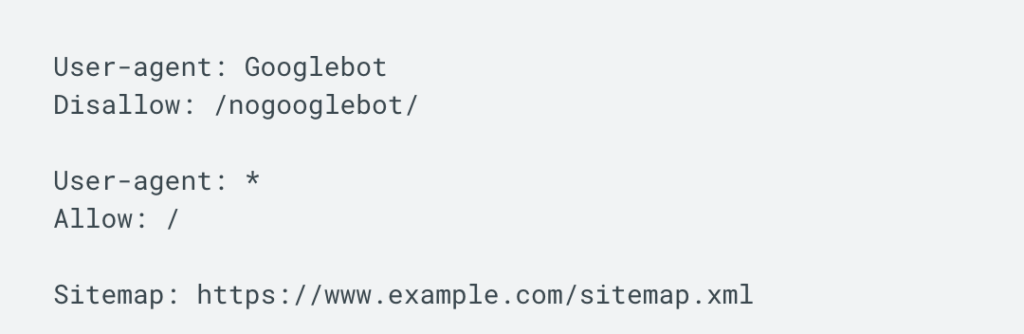
Most sites don’t need complex rules here. But a common mistake is blocking important pages by accident, like having Disallow: / in your robots.txt, which blocks the whole site. Another issue: using noindex on pages you want to rank. Always double-check this when launching or redesigning a site.
Site Speed & Experience
Page speed affects both rankings and user experience. If your site is slow to load, especially on mobile, people will leave and go somewhere else, causing a high bounce rate, and that sends negative signals to Google.
You can test your site using PageSpeed Insights, which gives you a rundown of performance along with suggestions. Again, this is where you might need a developer to step in.
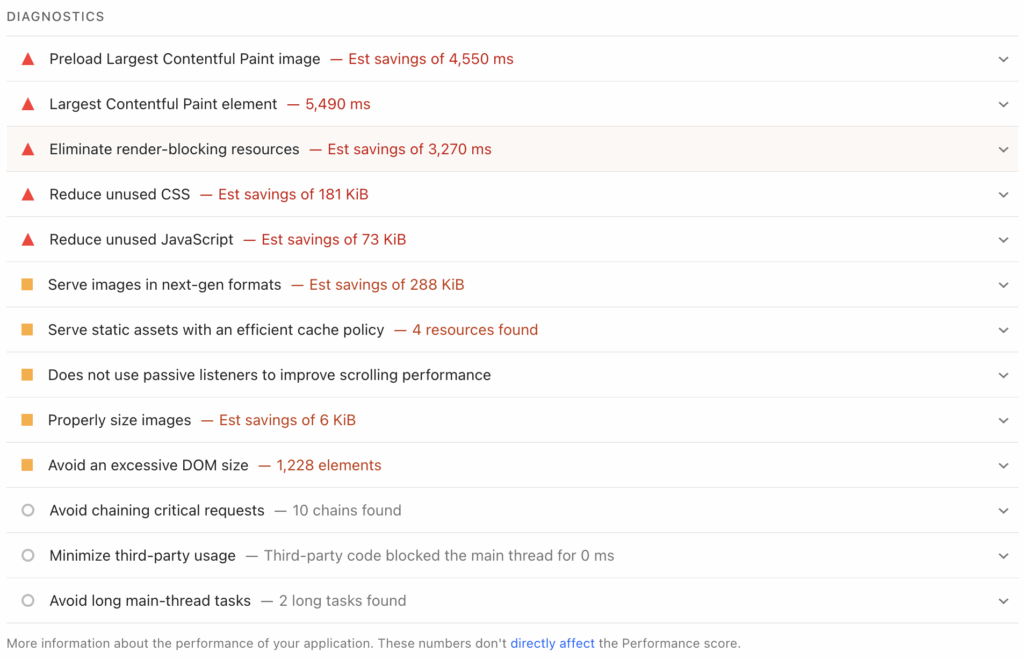
If your site uses WordPress, plugins like WP Rocket or LiteSpeed Cache can implement fixes automatically (caution: they can also break themes and sites), some common fixes include:
- Compress images (without losing quality)
- Use modern formats like WebP
- Minify CSS and JavaScript
- Enable browser caching
- Use a CDN (Content Delivery Network) for global traffic
Mobile Optimization
Google began mobile-first indexing back in 2016 and fully completed the rollout in 2023. It focuses on indexing mobile versions of sites first, as the main standard because more people use mobile devices for browsing now. If your content isn’t usable on a phone, it’s not going to rank well.
Responsive design is the standard now. That means your site layout adapts to different screen sizes without requiring a separate mobile version. Some key elements for a mobile-friendly experience:
- Readable Text: No zooming required.
- Tap-Friendly Elements: Buttons and links are easily clickable.
- Content Fit: No horizontal scrolling or overflowing off-screen.
You can test your site with Google’s Mobile-Friendly Test.
HTTPS
If your site still uses HTTP instead of HTTPS, that’s a problem – especially as it’s probably one of the easiest things you can do (it’s often done at a domain setup level). Google treats HTTPS as a ranking signal. More importantly, browsers will flag your site as “Not Secure,” which can hurt trust and cause people to leave the page.
Make sure your SSL certificate is active and auto-renewing. Redirect all HTTP versions of your pages to HTTPS to avoid duplicate content issues too.
Structured Data
Structured data (also called schema markup) is code that helps search engines understand the meaning behind your content. It doesn’t affect rankings directly, but it can enhance how your page appears in search results. If your result appears in these unique areas of the SERPs, it can result in increased engagement and traffic.
For example:
- A recipe can show cook time, ratings, and calories.
- An event can show date and location.
- A product can show price and availability.
Use tools like Schema.org and Google’s Rich Results Test to add and validate structured data.
Sitemaps And Internal Structure
An XML sitemap tells search engines which pages exist on your site and how often they’re updated, helping crawlers discover content effectively. It should be clean, auto-generated, and updated as new content is published. Most modern CMS platforms, along with SEO plugins, handle this automatatically. You’ll typically find your sitemap accessible via a URL like yourdomain.com/sitemap.xml and can submit this directly in Google Search Console.
Also, make sure your internal linking structure makes sense. Important pages should be accessible within a few clicks from the homepage. Orphaned pages (those with no internal links) are harder to crawl and rank.
Technical SEO Isn’t One And Done
It’s easy to assume once a site is set up correctly, it’ll stay that way. But things break. Plugins get updated. Redirects get added and forgotten. Content changes without updating meta tags. There are many small technical aspects that can cause bigger SEO problems over time. Run regular audits using tools like Screaming Frog, Ahrefs, or Google Search Console. Fix broken links, clean up redirect chains, and keep your site structure logical.
Local SEO
Local SEO helps businesses show up when people search for something nearby. It’s especially important for service providers, brick-and-mortar businesses, or anyone who wants to reach a local audience. Local SEO would not apply to ecommerce stores or digital products. The focus here isn’t on ranking globally, it’s about ranking in key local service areas to maximize leads and sales.
When someone searches ‘electrician near me‘ or ‘best coffee shop in Asheville‘, Google uses location signals to decide what to show. That’s where local SEO comes in. Businesses or individual contractors want to show up top of those results, whether it’s maps or search, in order to win more business.
Google Business Profile
The most important tool for local SEO is your Google Business Profile (previusly Google My Business). This is what powers the map results and the info panel that shows your location, hours, reviews, and more. It’s one of the more basic tasks that should be done for any local business where the profile should be; Fully filled out, verified and consistently updated.
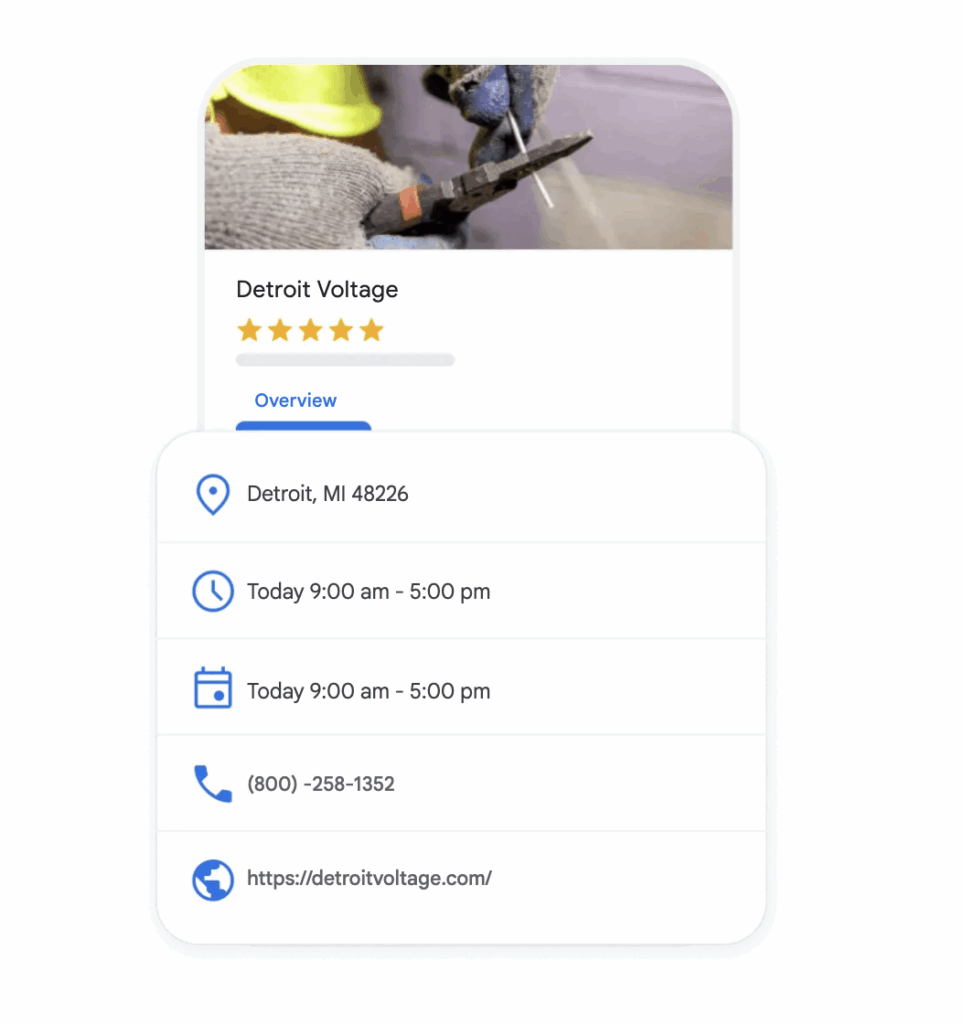
Key areas to focus on:
- Business name: Use your real name and don’t keyword stuff.
- Categories: Choose a primary category that fits your service and add secondary categories if needed.
- Business hours: Keep these updated, especially during holidays.
- Photos: Add high-quality photos of your office, products, or team.
- Services and description: Use this to explain what you offer in a clear way.
Local Citations and NAP
NAP stands for Name, Address, Phone Number. It needs to be consistent everywhere your business is listed online. This includes directories like Yelp, Bing Places, Apple Maps, industry-specific sites, and social media profiles. Inconsistent information, like an old phone number or two versions of your business name, can confuse both users and search engines.
Search engines use these citations as trust signals when evaluating the legitimacy and relevance of a local business. If your NAP details vary from one site to another, it creates doubt about which information is correct. This can lead to lower local rankings, or worse, lost leads if customers can’t reach you. Tools like Moz Local, Yext, or BrightLocal can help manage citations. Even a manual check of your top citations is worth the effort, especially if your business has recently moved, rebranded, or changed its contact information.
Local Landing Pages
If you operate across multiple locations, you shouldn’t cram them all into one page. Instead you should create a separate landing page for each city or area. This will help with ranking efforts for each specific location. But don’t just swap out the city name and leave everything else the same, that’s thin content. Each local landing page should also have unique, valuable content that appeals directly to the audience in that area.
Think about common questions or pain points specific to that location, differences in service demand, or even seasonal trends that vary by region. Adding locally relevant FAQs, area-specific imagery, and embedding Google Maps with your business pinned can all boost engagement and local relevance. The goal is to make each page genuinely useful, not just for SEO, but for real visitors looking for your services in their city.
Local Reviews
Reviews on Google (and other platforms like Yelp, Facebook, and industry-specific directories) not only build trust with potential customers, but also send strong signals to search engines. A steady flow of authentic, high-quality reviews shows that your business is active, reliable, and delivering good service, factors that influence both local rankings and conversion rates.
What matters most:
- Quantity: More reviews generally improve trust and visibility, but quality matters too.
- Recency: Fresh reviews show your business is still operating at a high level; outdated ones carry less weight.
- Keywords: Reviews that naturally include your services and city name can help with local SEO efforts.
- Responses: Responding to both positive and negative reviews shows you’re attentive, and Google favors businesses that stay engaged.
To build review volume naturally, ask satisfied customers, ideally via email, text, or in person. Provide a direct link to your Google Business Profile to make it easy. Avoid offering rewards or posting fake reviews; not only can this violate platform guidelines, but Google’s algorithm is effective at detecting unnatural patterns and you will be penalized.
Local Content And Backlinks
Creating content for local SEO is slightly different and should be relevant to your local audience. This increases your relevance in the market and helps search engines understand which location to serve the results. It also makes your site more engaging and trustworthy to local visitors. The type of content would depend on your business and goal, but for example, this could include:
- Blog posts about local events, collaborations, or community news.
- Case studies from nearby clients that highlight specific results or projects.
- Service area pages or resource guides tailored to your region.
Equally important are local backlinks. You can earn these by getting listed in your local chamber of commerce, sponsoring events, partnering with nearby organizations, or being featured in regional media and blogs.