
Search intent is the purpose behind a search query, meaning the information, site, comparison, or action the person expects the results to provide.
Intent decides what search engines show for a query, like definitions, how-to guides, comparison lists, category pages, product pages, or local results. If your page is the wrong format for the primary intent, you might struggle to earn clicks and hold rankings because users bounce back to the results.
Most queries map to four intent types: informational, navigational, commercial investigation, and transactional. Some queries are mixed or unclear, and AI summaries can satisfy parts of informational intent before anyone clicks, so structure and extractable answers are also important.
In this article, I will be running through how to classify a query’s intent from the wording and the SERP, then choose the page type, sections, and CTA that match how people are searching.
What Is Search Intent?
Search intent is the goal behind a query, meaning what the searcher is trying to accomplish next. You gather it from the words in the query and from the result types the engine chooses to show.
Search intent is not the same thing as the topic. The topic might be ’email marketing,’ but the intent can be to learn (what is email marketing), compare (best email marketing tools), or buy (email marketing software pricing).
Google’s quality rater guidelines describe this as ‘user intent,’ and they evaluate results based on how well the result meets the need implied by the query, including cases where there can be more than one strong intent.
Google cares because intent is a ranking constraint. If most searchers want a store locator or a homepage, Google tries to show pages that complete that job, and it expects results to honor clear intent when it’s obvious.
Different search engines recognize intent, but they can classify the same query differently because they have different ranking systems and different result mixes.
With AI search now, Intent works differently because some informational intent gets completed on the SERP, before a click. Data analysis found that when an AI summary appeared, users clicked a traditional result in 8% of visits versus 15% when no AI summary appeared, and they clicked a link inside the AI summary in 1% of visits (source).
For search intent, this changes which informational queries still generate traffic. Basic ‘what is’ queries can be satisfied by the overview, so the click often only happens when the searcher needs more than a short summary. Google also says clicks from pages with AI Overviews can be ‘higher quality,’ meaning users are less likely to quickly return to the SERP.
Why Is Search Intent Important?
Intent is important because it determines which page types can rank for a query. If the SERP is full of product and category pages, a long explainer is competing in the wrong result set. If the SERP is full of guides, a product page usually cannot satisfy what most searchers want.
It’s also how you decide page format before you write. Whether you need a definition-first explainer, a comparison page, a location page, a pricing page, or a product page. Without that decision, teams often ship ‘good content’ in the wrong format and then keep rewriting copy instead of fixing the page type.
Intent is also how you prevent keyword targeting mistakes. The same topic can have multiple intents, and those intents often need separate URLs. If you force one URL to cover learn, compare, and buy, you usually get a page that does not fully satisfy any one need.
Finally, search intent affects clicks and conversions because it sets expectations. Your title and snippet need to perform the same job as the SERP showing. Your on-page modules and CTA need to match what the searcher is ready for, like steps and examples for informational queries, or pricing and policies for transactional queries.
How Do You Identify Search Intent?
You identify intent by reading the query, then checking what Google ranks and highlights on the SERP. The SERP is the fastest way to see what the engine thinks satisfies the query. You then pick one dominant intent to build the page around and support any secondary intent with small modules and internal links.
Step 1: Read the query for intent signals
This step predicts intent before you open the SERP, so you know what to look for and what might be mixed.
Start with modifiers because they often map to a page type.
- ‘What is’ and ‘how to’ usually expect an explainer or steps.
- ‘Best,’ ‘vs,’ and ‘review’ usually expect comparisons and evaluation criteria.
- ‘Price,’ ‘buy,’ ‘demo,’ and ‘quote’ usually expect an offer page with pricing and a clear CTA.
- ‘Near me’ usually expects local results tied to location and hours.
Then label brand and specificity.
- Branded queries (HubSpot pricing, Ahrefs login) usually have navigational intent, even if they include a generic word like ‘pricing’.
- Generic queries can still be transactional if the query is specific (‘buy iPhone 15 Pro 256GB’) or can be commercial if it signals evaluation (‘best CRM for startups).
- Problem statements (’email deliverability issues,’ ‘how to reduce churn’) are usually informational, unless paired with a solution-shopping modifier (‘software,’ ‘tool,’ ‘service’).
Step 2: Confirm with the SERP
This step tells you the primary intent, as the top results show what Google is returning for that query today.
Scan the top results and label the page types.
- If you mostly see guides, glossary pages, and videos, the primary intent is informational.
- If you see category pages, product pages, pricing pages, or service pages, the intent is transactional.
- If you see ‘best,’ ‘top,’ ‘alternatives,’ and ‘vs’ pages, the intent is commercial investigation.
- If you see a brand homepage plus sitelinks, the intent is navigational.
Record SERP features because they often show the expected format.
- A featured snippet and People Also Ask usually reinforce informational intent and push you toward clear definitions and tight sections.
- Shopping results can be a sign of transactional intent.
- A local pack usually shows local transactional intent, even if the query looks broad.
Finally, note the dominant angle across top results. Look for repeated qualifiers like ‘for beginners,’ ‘cheap,’ ‘enterprise,’ ‘near me,’ or a clear freshness pattern like ‘2025’ or ‘2026.’ If most ranking pages use the same qualifier, treat it as part of intent because it changes what the searcher expects to see first.
Step 3: Decide primary intent and secondary intent
This step prevents you from building a page that tries to do four jobs and does none of them well.
Pick the primary intent based on what most of the top results are. If 7 out of 10 are comparison pages, build a comparison page, not a glossary entry. If the SERP is split, choose the intent that matches the strongest cluster of results and the most prominent SERP features, then commit to that page type.
Support secondary intent with modules and internal links instead of rewriting the whole page into a hybrid. For example:
- On an informational page, add a short ‘tool options’ block, a comparison table, or an FAQ that answers purchase-adjacent questions, then link to a comparison or product page.
- On a commercial page, add a ‘pricing and next steps’ module and link to the transactional page, without turning the comparison into a checkout page.
What Are The Four Types Of Search Intent?
Search intent usually fits into four buckets that describe what the searcher is trying to do next. Each one maps to a set of page types that search engines tend to rank for that query. If you publish the wrong page type for the intent, you usually can’t compete, even if the topic coverage is good.
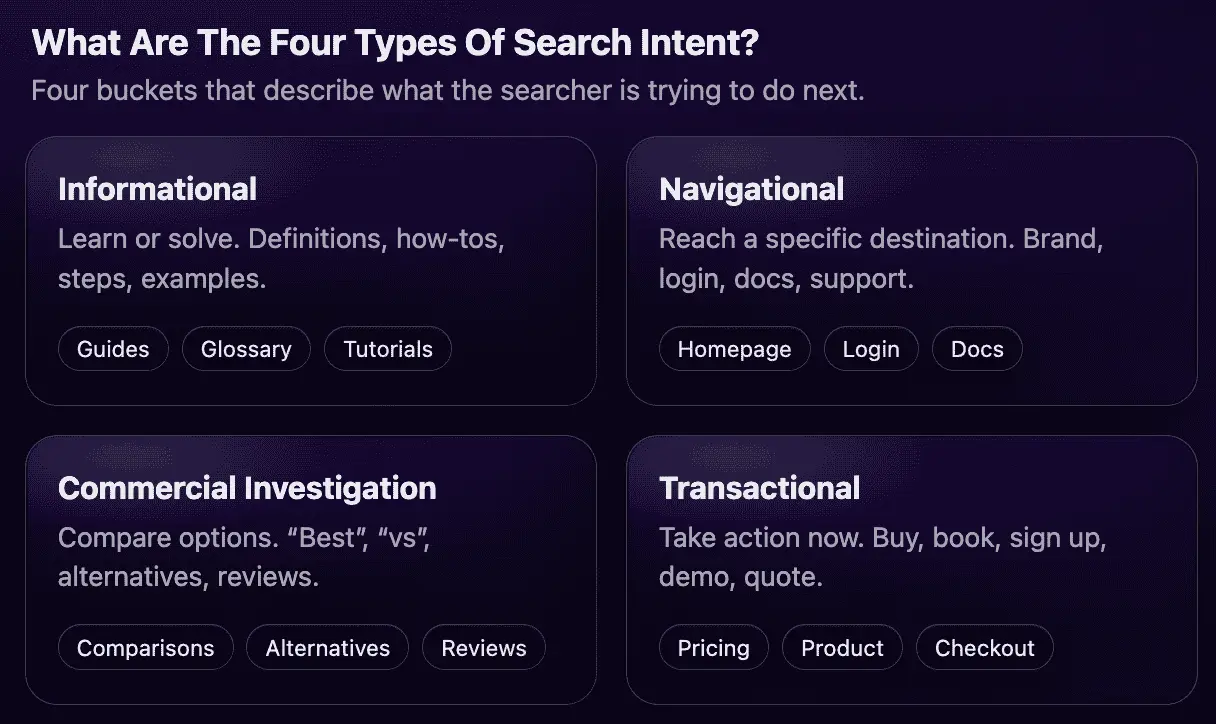
Informational intent
Informational intent is when a user is trying to get knowledge or guidance, not complete a transaction. The searcher wants an explanation, a definition, or instructions so they can understand something or do something.

These searches cover both quick answers and deeper learning. Some people want a one-sentence definition. Others need steps, examples, or troubleshooting to complete a task.
Informational intent often sits above evaluation. A page that answers clearly can earn return visits, branded searches, and internal clicks into comparison or product pages when the user is ready.
How do you identify informational intent?
Start with the words in the query because they usually show what the person wants next. ‘What is’ and ‘why’ usually indicate the searcher wants an explanation. ‘How to’ usually indicates they want a process they can follow.
Look for modifiers that indicate a deliverable. ‘Examples,’ ‘template,’ and ‘checklist’ usually mean the searcher wants something usable, not a broad overview. Problem-style queries (‘fix,’ ‘troubleshoot,’ ‘error,’ ‘not working’) often indicate the user wants a solution and expects steps.
Then confirm with the SERP. Informational intent SERPs usually rank guides, glossary pages, how-to content, videos, and tools, because those formats answer fast and expand. SERP features like featured snippets and People Also Ask are also common because they support direct answers and related sub-questions.
How do you target and optimize for informational intent?
Answer the main question immediately, then expand. Put a direct definition or first step near the top, and make sure it can stand alone if someone only reads that section.
Structure the page around follow-up questions. Use H2s that match the next questions someone would search, and keep each section tight so it is easy to scan. Add examples so the reader can apply the idea, not just understand it.
Use visuals when the query implies action. Screenshots, short step lists, and checklists reduce confusion for tasks and workflows. If the topic involves settings, tools, or UI, visuals often do more than additional text.
Treat conversion as a next step, not the page’s main job. Use internal links to a comparison page, pricing page, or product page when it is a natural continuation of the informational need. Keep the primary CTA aligned to ‘learn’ or ‘do,’ and let the commercial path be optional and clear.
Navigational Intent
Navigational intent is when the searcher is trying to reach a specific brand, product, or page. They already know where they want to go, and search is being used as a shortcut instead of typing the URL or using bookmarks.

These queries are usually won by making the destination obvious. Longer content rarely helps because the user is not asking to learn or compare. They are trying to land on the correct page fast.
For SEO, navigational intent is mostly a technical and information architecture problem. If Google can’t identify the correct destination, you lose clicks to the wrong URL, aggregators, or third-party pages that happen to match the query terms.
How do you identify navigational intent?
Start with brand signals. If the query includes a brand, product name, or branded acronym, it is often navigational. Modifiers like ‘login,’ ‘pricing,’ ‘support,’ ‘contact,’ ‘docs,’ and ‘address’ usually indicate the exact page they want.
Then confirm with the SERP. Navigational queries typically show a homepage or a specific branded page in position one, often with sitelinks. You may also see a knowledge panel, app links, or a ‘Sign in’ style result.
If the SERP shows multiple destinations (homepage, support, pricing) the query may be underspecified. In those cases, the best approach is to make sure each destination page is clear and indexable so Google can pick the right one per variant.
How do you target and optimize for navigational intent?
Make key destination pages easy to crawl, index, and understand. Use titles that name the page plainly (‘Pricing,’ ‘Login,’ ‘Support,’ ‘Docs,’ ‘Contact’) and keep those page names consistent across navigation labels, H1s, and internal links.
Reduce ambiguity with a clean site structure. Make sure you have one canonical URL for each destination and avoid duplicate versions that compete (for example, multiple pricing URLs). Add internal links from the homepage and primary navigation so crawlers and users can reach these pages quickly.
Use structured data where it helps to improve entity and site signals. Organization supports brand identity. LocalBusiness supports location-based destinations. WebSite with SearchAction can help when on-site search is a real feature and you want search engines to understand it.
Commercial Investigation Intent
Commercial investigation intent is when the searcher is deciding between options. They are not ready to buy yet, but they are trying to narrow the list using features, pros and cons, pricing, and proof.
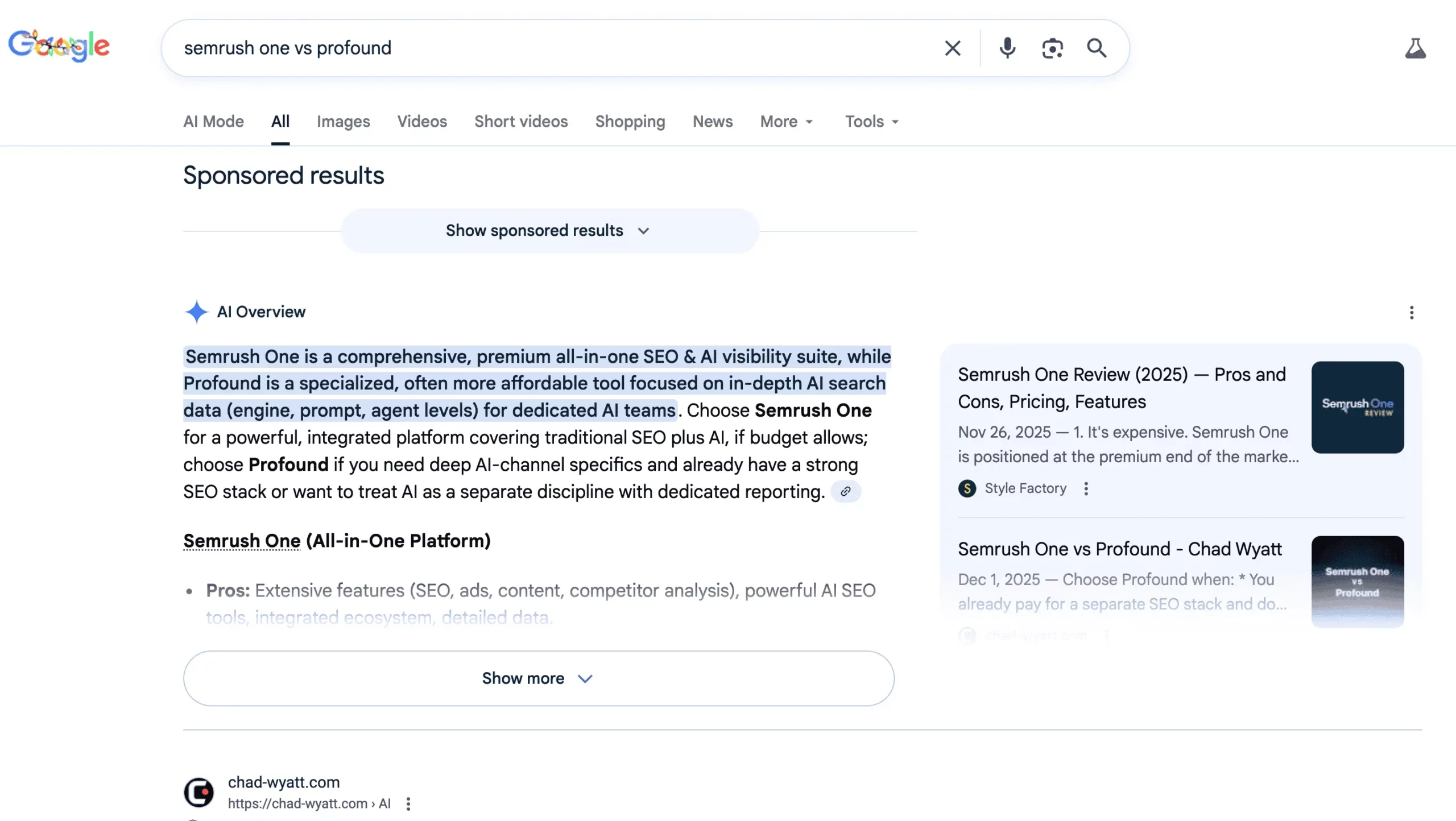
These queries are high value because the user is actively selecting a solution. The page has to help them make a decision, not just describe what something is. If your content doesn’t reduce uncertainty, the user keeps searching.
This intent is where positioning shows up in organic search. The SERP is often full of ‘best,’ ‘vs,’ ‘alternatives,’ and review pages because those formats are linked to how people decide.
How do you identify commercial investigation intent?
Look for evaluation language in the query. Terms like ‘best,’ ‘top,’ ‘vs,’ ‘review,’ ‘alternatives,’ ‘pricing,’ ‘features,’ and ‘for [audience]’ usually mean the user is comparing options or going through a shortlist.
Confirm with the SERP by checking the primary page types. Commercial investigation SERPs often rank list pages, comparisons, roundups, and review content. Forums can appear when the query implies subjective points and the algorithm thinks discussion content helps.
Pay attention to the angle, because it is often part of intent. ‘Best CRM for startups’ is not the same intent as ‘best CRM for enterprise.’ The SERP will usually tell you which criteria is important by repeating the same qualifiers and headings across the top results.
How do you target and optimize for commercial investigation intent?
Start with a short decision summary so the user can decide for themselves. Tell them who each option is for and what changes the choice. Then make the comparison easy to scan, because the user is trying to narrow choices fast.
Use explicit criteria and proof. The page should explain what you compared, why it matters, and how each option performs. Include tables where they reduce work for the reader, and keep the criteria stable so the comparison is consistent.
Guide them to conversion without turning the page into a sales pitch. The job is evaluation, so the primary CTA is often ‘see pricing,’ ‘view plans,’ or ‘book a demo’ after the reader has enough context. Use internal links to dedicated pricing or product pages so the user can act when ready.
Schema can help when it matches real page content. Use Product when describing specific products in a structured way. Use Review only for genuine reviews you are allowed to publish. Use FAQPage for common evaluation questions you answer on-page.
Transactional Intent
Transactional intent is when the searcher is ready to take an action, like buying, signing up, booking, or requesting a quote. The page needs to remove friction and answer the ‘can I do this right now’ questions.

These queries are less about learning and more about completion. Searchers expect immediate clarity on price, availability, and what happens after they click. If that information is missing, they return to the SERP and choose a result that makes action easier.
For SEO, transactional intent often depends on strong page fundamentals. Page speed, clear CTAs, trust, and clean indexing are key because the user is making a high-commitment click.
How do you identify transactional intent?
Look for action language and purchase modifiers. ‘Buy,’ ‘order,’ ‘coupon,’ ‘free trial,’ ‘demo,’ ‘quote,’ ‘book,’ ‘plans,’ and ‘pricing’ usually indicate readiness to act.
Confirm with the SERP by checking what ranks. Transactional SERPs often show product pages, category pages, service pages, local packs, and merchant listings or ads. If shopping or local features dominate, that is usually a strong sign of transactional intent.
Also watch for implied transaction even without ‘buy.’ Queries with a very specific model, plan name, or service type often behave transactionally because the searcher is already past early research.
How do you target and optimize for transactional intent?
Put the offer, key details, and primary CTA where they are easy to find. The top of the page should make it clear what you are selling, what it costs, and what the next step is. Then answer the trust and policy questions that block action, like availability, delivery, returns, support, and security.
Keep the path to completion simple. Reduce form fields, avoid distracting CTAs, and make the page fast and stable on mobile. If the query implies local action, show location, hours, and booking details clearly.
Use structured data that matches the page and is eligible. Product and Offer support product and pricing details. AggregateRating can help when you meet requirements and the data is accurate. LocalBusiness for when location is part of the conversion.
Mixed intent
Mixed intent means the same query can have more than one interpretation, and search engines try to satisfy more than one need on the same SERP. Google’s rater guidelines describe this as a primary interpretation plus possible minor interpretations, which is why you sometimes see different page types ranking together.
Mixed intent is common on short, generic queries because there is not enough detail to tell whether the person wants to learn, compare, or buy. It also shows up when the query sits on a boundary, like ’email marketing’ (definition vs tools) or ‘CRM pricing’ (education vs plan selection).
How to spot mixed intent quickly
Use the top results and SERP features as the signal for what Google is trying to satisfy.
- Split page types in the top results: guides mixed with category pages, comparison pages mixed with product pages, or editorial pages mixed with local pages.
- Features that serve different needs: a featured snippet and People Also Ask alongside Shopping results, or a local pack alongside guides.
- Competing angles in titles: ‘for beginners’ mixed with ‘pricing,’ ‘near me,’ ‘templates,’ or ‘best.’
What to do when intent is unclear
Pick one primary intent and build a page that fully completes that need. Trying to serve every intent equally usually produces a page that feels unfocused and does not match what the SERP rewards.
- Match the dominant SERP pattern: build the same page type that appears most often in the top results today.
- Support the secondary intent in contained sections: add a comparison snapshot, an FAQ block, a pricing preview, or a “next steps” module without changing the overall page type.
- Use internal links to complete the next action: send people to the page built for the next intent (guide to comparison, comparison to pricing or demo, product to booking or checkout).
AI And Search Intent
AI answers can satisfy part of informational intent directly in the discussion, then send users to sources when they want more detail, proof, or an action step. This reduces clicks for ‘simple answer’ queries and moves more traffic toward pages that add something the AI response can’t fully replace.
AI search also expands a single query into multiple related sub-questions behind the scenes (for example: definitions, steps, edge cases, comparisons, and ‘best for’ variants). For SEOs, that changes the target from ‘rank for one keyword’ to ‘be the best source for one of the subtopics the system pulls into the answer,’ with clear sections that can be quoted and a page that satisfies the follow-through need.
What this changes for content strategy
Some informational queries are satisified early on, meaning the click only happens when the page offers something the overview cannot fully replace. Other queries become more ‘multi-intent,’ where the same session includes learning, evaluation plus next steps.
A practical way to adjust is to separate informational topics into two groups:
- Simple answers: definitions, short explanations, basic steps that an AI summary can cover quickly.
- Deep follow-through: workflows, edge cases, comparisons, templates, tools, original data, or policy details that require a page.
What to optimize for AI on the page
Build pages so they work in two modes: they should provide a clean extractable answer, and they should also give the user a reason to click and stay.
- Make one section easy to quote: a direct definition or summary near the top, then tight H2s that map to follow-up questions.
- Add ‘can’t be summarized’ value: templates, calculators, screenshots, checklists, step sequences, decision criteria, and tables when they reduce ambiguity.
- Make sources and ownership obvious: show who wrote it, when it was updated, and what evidence supports key claims (especially for YMYL-adjacent topics).
- Route the next step on purpose: use ‘next step’ modules and internal links to move from informational to comparison or transactional pages without forcing a purchase CTA.
FAQ – Search Intent
Search intent is the goal behind a search query. It tells you what the person wants to do next, like learn, find a specific site, compare options, or buy.
The four common types are informational, navigational, commercial investigation, and transactional. Each type tends to reward a different page format in the search results.
Read the query for clues like “what is,” “best,” “vs,” or “buy,” then check the SERP. The page types that rank in the top results usually reveal the dominant intent.
Yes. Some queries are mixed, so the SERP may show a blend of guides, comparisons, and product pages. In that case, choose one dominant intent to build around and support the other intent with a small section and internal links.
It matters because search engines try to rank pages that complete the query’s job. If your page format does not match what the SERP is rewarding, it is harder to rank and harder to convert.
Publish the page type the SERP is already showing: guides for informational, brand destination pages for navigational, comparisons for commercial investigation, and product or service pages for transactional.
AI answers can satisfy simple informational intent on the results page, so basic definitions may earn fewer clicks. Pages that still win tend to add something extra, like clear steps, templates, tools, screenshots, or comparisons that help people decide.