
Generative Engine Optimization (GEO) is structuring content so individual sections can be retrieved and cited in answers generated by chat and search tools.
For many queries, the first thing a user sees is a direct answer and then a conversation instead of search results. That answer is built from short passages taken from webpages, docs, and product pages, which is condensed into one response.
If your pricing, features, and definitions are scattered across a page, the content that gets reused is often missing the one line that makes it accurate. You end up with summaries that don’t include key information or cite a competitor that states the details more clearly.
GEO is about optimizing existing content for AI retrieval: put the definition in the first visible section, keep claims next to proof, and keep pricing and limits in the same section so they can be reused without relying on earlier paragraphs.
What Is Generative Engine Optimization?
Generative engine optimization is the process of making your content easy for AI answer engines to find, understand, and reuse in responses. The goal is to increase how often and how accurately your brand is cited when people ask questions in LMMs like ChatGPT, Gemini, Copilot, Perplexity, and Google AI Overviews.
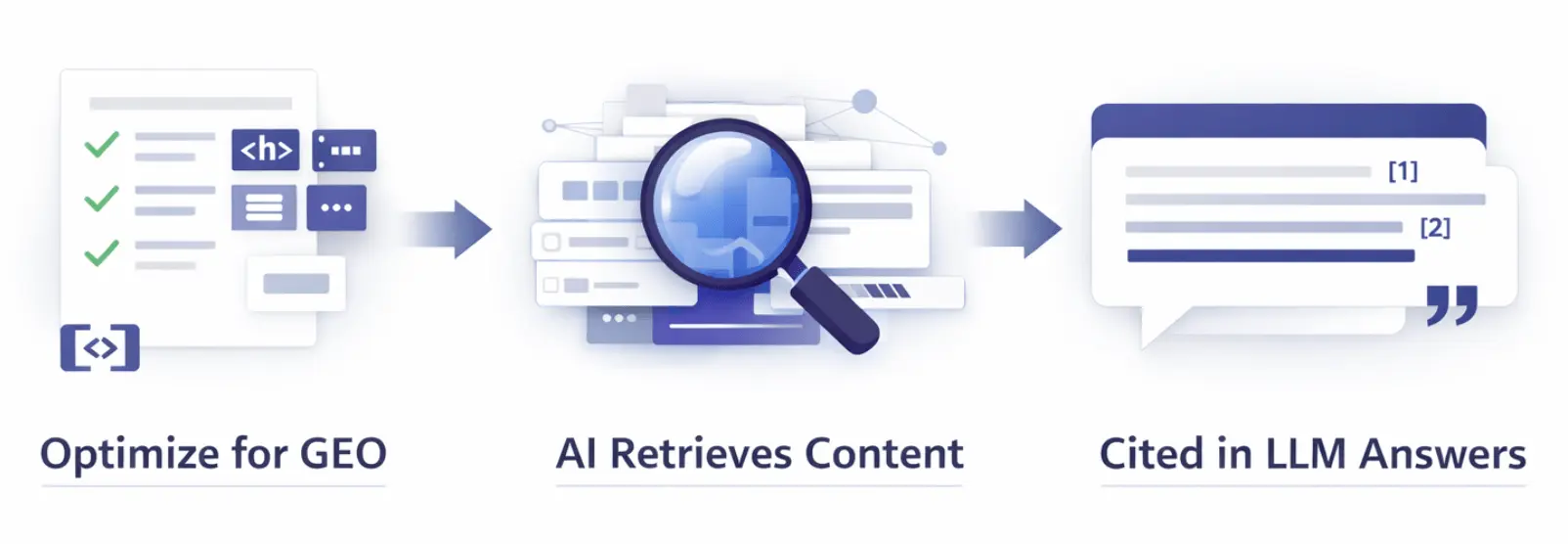
It’s considered to be a branch of search engine optimization (SEO) as many of the core practices overlap. But GEO targets different ‘ranking factors’ which puts more weight on clarity, structure, and proof.
Key factors of GEO:
- Writing optimized for short answers. Clear definitions, direct steps, and short explanations.
- Entity clarity. Consistent names for your product, category, use case, and audience.
- Proof and trust. Citable details like policies, specs, and sources that can be checked.
- Context. Who the advice is for, when it applies, and where it breaks.
- Reusable chunks. Tables, bullet lists, and FAQs that can be retrieved without losing context.
AI Search & GEO
AI search is where people use AI to research, ask questions, and get an answer. That includes LLMs and any search results that are powered by AI.
For a lot of queries, the answers in AI is enough for users. When they do click, they usually pick one of the sources cites. For example, research found that when a Google AI summary appeared, users clicked a traditional result in 8% of visits, compared to 15% when no AI summary appeared. They clicked a link inside the AI summary in about 1% of visits (source).
That’s why it’s so important to invest time into GEO. Optimizing your content to be retreived by AI helps to build brand recall, diversify organic traffic, and stay in competition with other brands.
On the page, that usually means:
- Put the direct answer high on the page, in plain words.
- Keep the claim and the constraint in the same paragraph.
- Use headings that match the question someone would ask.
- Keep facts in plain text, not only in images or scripts.
- Add short FAQs that restate the key points in one or two sentences.
Read more on AI Search.
Why Is GEO Important?
GEO is imporant because AI search is constantly growing and user behavior is starting to move towards AI conversations. If your content isn’t easy to retrieve and cite, you can lose visibility even when you rank well in traditional search.
GEO also protects accuracy. When your page is optimized with the correct details, LLMs are less likely to over generalize or mistake it.
It also improves attribution. AI tends to cite sources that directly back a sentence. If your proof is hidden, split across sections, or locked in an image, you may get mentioned without a link.
What GEO helps you get
- More chances to be cited in AI answers
- Accurate summaries of your product or content
- More qualified clicks from readers compared to not being cited in AI at all
- Consistent messaging across channels since the page is written in clean, reusable blocks
When GEO is most important
GEO is most valuable when you rely on search for demand capture and your buyers research with AI.
- High intent questions like best tool, pricing, alternatives, and comparisons
- Complex topics where missing a constraint changes the recommendation
- Categories where trust is a blocker and you need clear proof points
- Brands with many similar competitors where one clear differentiator needs to travel
How Do You Optimize A Page For GEO?
Optimize content for GEO by putting the answer where AI crawlers can pick it up easily, then writing sections that can be reused, finally by backing key claims with plain text proof and dates.
Step 1. Summarize the content at the top of the page
The top of the page should answer the main question right away because LLMs often pull from the opening lines. Do not lead with background.
Make these changes in the opening:
- Add a 1 to 2 sentence answer directly under the main heading.
- Add two quick lines that set boundaries. Best for and Not a fit if.
- Add links to the pages that verify the details. Pricing, limits, security, integrations, docs.
Step 2. Add sections that are ready to quote
Create sections that match search intent. Use question headings. Put the direct answer first. Then add the details that keep it true.
Useful section types:
- What is it. One sentence, then 2 to 3 limits like plan, region, or requirements.
- When should you use it. 3 to 5 bullets with clear conditions.
- How do you do it. Numbered steps with required inputs and the expected output.
- What should you compare. Must have requirements, like supports Shopify, has abandoned cart automation, and stays under $X a month at your list size.
Step 3. Add proof and dates next to claims
When the proof is missing or split up, AI can’t point to one clear passage, so it either skips you or summarizes you too broadly.
On page, do this:
- Put numbers, units, and scope in the same sentence as the claim.
- Mark pricing, limits, and policies with As of YYYY MM DD.
- Link to primary documentation from the exact sentence the link supports.
Step 4. Add a comparison section that helps someone choose
People use AI to compare options and pick one. If your page lists the deciding factors in plain text, it is easier for the tool to reuse and cite.
Build the block like this:
- List 4 to 6 decision points that change the choice. Price model, key limits, required features, support level.
- Write each point as a condition. Example. ‘Needs approval workflows’ or ‘Only works on Enterprise.’
- End with one line that says who each option is best for, based on those conditions.
Step 5. Clean up structure and markup
Use headings that match real questions. Add FAQPage and HowTo only if the page includes real FAQs or real step by step instructions.
Before you publish:
- Each core claim appears once across the cluster, with one number and one date.
- Plan names, pricing terms, and limits match your pricing and docs pages.
- Related pages do not contradict each other on the same feature.
Read how to optimize for GEO.
How Is GEO Different From SEO And AEO?
SEO, AEO, and GEO all work together, but they impact different aspects of search. SEO is about rankings and clicks, AEO is about direct-answer SERP features, and GEO is about being cited inside generated answers.
- SEO improves how a page gets found and clicked.
- AEO improves how a page gets used in classic SERP answer features like featured snippets and People Also Ask.
- GEO improves how a page section gets quoted, rewritten, and cited inside chat answers and answer engines.
| SEO | AEO | GEO | |
|---|---|---|---|
| Primary outcome | Rank and get the click | Win direct answer features | Get cited in generated answers |
| Where it shows up | Organic listings | Snippets, PAA, knowledge panels | Chat answers and AI summaries |
| How it gets judged | Rankings, CTR, sessions | Feature ownership, CTR | Citations, mentions, inclusion |
| Formats that win | Category, product, guides | Definitions, steps, FAQs | Standalone sections with limits |
| How to measure | GSC and rank tracking | SERP feature tracking | Track a query set and citations |
On one page, keep the intent clean by assigning each block a job.
- Put the query’s direct answer in the first 1–2 sentences under the matching H2 (AEO + GEO).
- Put the deciding details in the same block: limits, pricing model, and scope (GEO).
- Keep the rest of the page built for the click: comparison table, screenshots, setup steps, and links to docs (SEO + post-click conversion).
Read GEO vs SEO vs AEO and how is GEO different from SEO.
What Content Formats Show Up Most In Generated Answers?
Certain page formats get reused more than others because they are easy to quote without losing context. Below are the formats that show up most often, and how to write each one so it stays accurate when lifted into an answer.
Definitions
Definition-style answers show up for category queries and feature questions because one sentence can carry the whole point.
Write the definition as the first line under the heading. Add the boundary right after it, like plan limits, required setup, or what it does not include.
- Add: one-sentence definition + 2–3 constraint lines (plan, region, requirements)
- Remove: long intros before the definition
Short recommendation lists (best X for Y)
These show up on ‘best’ queries because the answer needs a small set of options with a reason for each.
Make the reason checkable. Tie it to a requirement (‘SAML + SCIM’, ‘SOC 2 Type II’, ‘under $X per seat’), not an adjective.
- Add: 3–6 options, each with a one-line ‘best for’ condition and one constraint line
- Remove: generic ‘best for teams’ copy with no thresholds
Comparisons (X vs Y, alternatives, pricing)
Comparison queries turn into a few criteria rows and one or two deciding differences.
Put the criteria table above the long prose. Use the same rows buyers ask about: pricing unit, limits, security/compliance, deployment, support, and setup time.
- Add: table + ‘Differences that change setup’ section + pricing and plan notes in plain text
- Remove: feature dumps that avoid plan limits and quotas
Step-by-step
Task queries get answered with steps because the user needs an outcome, not context.
Write steps with exact UI labels, required inputs, and the expected output after each step. If a step depends on a role or plan, state it in the step, not in a separate section.
- Add: numbered steps + prerequisites + example values
- Remove: concept-only explanations on pages targeting ‘how to’ queries
Troubleshooting
Fix queries often appear as error text or a symptom (‘401’, ‘webhook not firing’, ‘sync stuck’).
Use a pattern: symptom → cause → fix → verify. Include the exact error message variants and where they appear (UI, API response, logs).
- Add: error text, likely causes, and one fix per cause
- Remove: ‘try again’ advice with no checks
Templates and checklists
These show up when the query implies a reusable artifact: ‘requirements’, ‘RFP’, ‘migration plan’, ‘evaluation checklist’.
Make the template copy-paste friendly. Put it in plain text with headings that match how teams file it internally (Security, Data, Integrations, Admin).
- Add: checklist with pass/fail criteria and placeholders (owner, date, link)
- Remove: templates embedded only in PDFs or images
Decision trees
These show up when the query is conditional (‘should I use X or Y’, ‘which plan do I need’, ‘what’s best if…’).
Write it as a short set of if/then branches with hard cutoffs. Each branch should end in a concrete next step, like ‘Use Plan B’ or ‘You need SAML, so use Enterprise’.
- Add: 5–10 branches, each based on one requirement
- Remove: open-ended branching like ‘it depends’ without thresholds
How Do You Track GEO Performance?
Track a fixed prompt set, record which URLs get cited, then connect every page edit to changes in citations and conversions.
Start with 20–50 prompts that reflect real intents: definitions, ‘best X for Y’, ‘X vs Y’, ‘alternatives’, ‘pricing’, ‘limits’, ‘integrations’, and ‘security’. Run the same prompts weekly, save the full output, and save the cited URLs. If you don’t keep the prompt set stable, you can’t tell if changes came from your page updates or from different wording.
You can track a few things with decent confidence. Citations and mentions by prompt are the core. Competitor presence in the same answers is the next best proxy. Then tie it back to site outcomes you control, like conversions on the pages you’re optimizing. True impressions inside chat tools are still mostly unknown, so don’t build your reporting around them.
A simple monthly report works if it stays consistent:
| What you log | What it tells you |
|---|---|
| Prompts run (unchanged all month) | Measurement stays comparable |
| URLs cited per prompt (you + competitors) | Which pages are getting pulled into answers |
| Block reused (heading + first 2–3 sentences) | Which section is doing the work |
| Fixes shipped (what changed, where) | Why the output changed |
| Conversions on edited pages | Whether the work correlates with downstream actions |
Tools that help with GEO
If you only want a small stack, these three cover most teams. But for measurement, AI citation tracking should focus on repeat visibility, not single screenshots or one-off mentions.
Semrush One combines classic SEO data with an AI Visibility Toolkit so you can see how generative engines talk about your brand alongside rankings and traffic. It tracks how often LLMs cite your brand, which prompts trigger mentions, and which pages or sources those answers come from.
Conductor has an AI Search Performance module shows how your brand appears inside AI Overviews and other AI results. It tracks mentions, citations, and sentiment across multiple engines and ties them to your existing keyword and content data. You can see where AI systems already quote your content and where they favor competitors instead.
Profound is an enterprise GEO platform that captures real user-facing answers from AI engines and pairs them with crawler logs to show exactly when, where, and how your brand is cited. It tracks visibility, sentiment, and share of voice across multiple AI channels and then links those answers back to pages, sources, and technical signals.
Read more of the best GEO tools.
How Do You Run A GEO Audit?
A GEO audit is a structured pass to find where your pages fail when they get reused as snippets. You are checking for three break points. The page does not answer fast. The section cannot stand alone. The claim is missing a limit, date, or source of truth.
Step 1. Pick the pages and the query each page should answer
Start with the pages that get pulled into buying and setup answers. Pricing, product, integrations, comparisons, plus your top 10 to 20 guides. For each page, write one target query in plain language and treat it as the page’s job. You will use that query to judge the top of the page and the one section that should win the citation.
Step 2. Audit the page using six checklist categories
Work top to bottom and log only the issues that change reuse. Focus on missing direct answers, missing constraints, and conflicts across pages. If a fix will not change what a snippet would say, skip it.
| Category | Check | Fix if it fails |
|---|---|---|
| First screen | Answers the query in 1 to 2 sentences and states the main limit | Rewrite the opener as answer plus limit plus one proof detail |
| Blocks | Headings match query language and each section starts with the answer | Convert headings to questions and move limits into the same block as the claim |
| Proof | Numbers have units and scope, policies have an as of date, proof is linkable | Add units and dates in line and link to the exact doc section near the claim |
| Entities | Product, plan, and feature names match across pages | Standardize names and add a plain category line near the top |
| Comparisons | Evaluation pages include decision criteria and a clear not a fit list | Add a small criteria table and 3 concrete disqualifiers |
| Internal links | Links point to proof pages with specific anchor text | Add links from the opener to proof sections and replace vague anchors |
Step 3. Turn findings into a prioritized backlog
Your output is a backlog an editor can ship. Prioritize by frequency and severity. Frequency is how often the page supports high intent queries. Severity is whether the gap causes wrong summaries, missing limits, or lost citations.
Use a simple ticket format:
- Issue. Pricing page states “starts at $X” but does not say per user or per month.
- Why it blocks reuse. The snippet can be reused without the unit, so the price reads wrong.
- Fix. Add the unit in the same sentence and add an as of date. Link to the pricing terms section that defines the unit.
- Owner. Content or PMM
- Pages impacted. /pricing, /plans
- Ship date. [date]
Read more on how to run a GEO audit.
GEO Content Frameworks
GEO content frameworks are page patterns you reuse to write answers in a predictable way. They help because AI often pulls one section at a time. If the section follows a familiar structure and includes the limit next to the claim, it is more likely to be reused correctly and cited.
Pick the framework based on the search intent so the page answers fast, stays specific, and does not drop key requirements.
How do you choose the right framework?
Use the query pattern to pick the page structure. Keep this chooser tight so it stays readable on mobile.
| Query pattern | Use this structure |
|---|---|
| ‘What is X’, ‘meaning of X’ | Explainer |
| ‘How to X’, ‘set up X’, ‘connect X to Y’ | Step-by-step guide |
| ‘X vs Y’, ‘alternatives to X’, ‘best X for Y’ | Comparison blocks |
| ‘X not working’, ‘error code’, ‘why is X failing’ | Troubleshooting block |
Explainer framework
Use this for definition and feature intent. Start the section with a one sentence definition that answers the question in plain terms. Follow it with the boundary line that keeps it accurate, like plan, region, requirement, or what it does not include.
Then add a small facts block with 3 to 5 items. Each item should be a concrete detail a reader can verify, like a requirement, a limit, or a named integration.
Step by step framework
Use this for setup and task intent. Put prerequisites before the steps so the snippet does not drop the requirement, like role, access level, plan, or tool needed. Keep steps short and start each one with a verb.
End with a short FAQ that covers the break points that stop the task, like missing permissions, common error messages, or fields people overlook.
Comparison framework
Use this for evaluation intent. Open with 2 to 3 lines that state the deciding difference, not a summary of both products. Put the criteria table immediately after so the key facts are easy to reuse.
Keep rows tied to decisions, like pricing unit, plan limits, compliance, setup requirements, deployment, and support. Avoid feature slogans and generic pros and cons.
Troubleshooting framework
Use this for fix intent. Start with the symptom in the heading, then give the most likely cause in the first line. Follow with a short list of fixes in priority order, and end with a verify step so the reader knows the issue is resolved. Include the exact error text people see and where it appears, like UI, API response, or logs.
Read more GEO content frameworks.
FAQ – Generative Engine Optimization
Generative Engine Optimization (GEO) is the practice of structuring content so individual sections can be retrieved and reused in generated answers. Put the definition in the first visible section of the page so it can be quoted without a scroll.
SEO work targets rankings and clicks from results pages. GEO work targets whether a section of your page gets quoted or cited inside a generated answer, even if nobody clicks. Write each section so the first 1–2 sentences answer the query and include the plan limit or requirement that changes the meaning.
No. People still use search results pages, and rankings still send traffic for plenty of queries. Treat GEO as a page-structure pass on top of your existing SEO pages, then fix the blocks that keep getting misquoted or skipped.
Most of the time, the page has the info, but the first chunk under the relevant heading does not include the full answer plus the constraint. Move the limit, scope, or requirement into the same two-sentence block as the claim, then re-test the same prompt set a week later.
Short sections with question-based headings and answer-first paragraphs get reused more often than long narrative intros. Put the checkable detail next to the claim, like a number with units, a plan name, and an ‘as of’ date.
Use a heading that matches the question someone types, then answer in 1–2 sentences right under it. Keep the constraint in that same block, like ‘Enterprise plan only’ or ‘requires admin access’, so the reused passage doesn’t drop it. Then add proof detail in plain text under the answer, not buried later.
FAQPage or HowTo for GEO? Schema can help label the content type, but it won’t fix weak sections. Add FAQPage only when you have real Q&A, and add HowTo only when you have prerequisites and steps. Do the text and structure work first, then add markup as the last pass.
Start with pages that already get high-intent visits and support evaluation, like pricing, integrations, security, and comparison pages. Those pages usually contain the deciding details, so errors and missing limits show up fast in generated answers. Update the first screen and the top two blocks before rewriting the rest.
Run the same 20–50 prompts weekly and record which URLs get cited for each prompt. Log the exact heading and the first 2–3 sentences that got reused, then note what you changed on the page that week. That creates a clean before/after record tied to shipped edits.