
Content chunking is breaking content into smaller sections (chunks) so AI can find and retrieve important info easily.
It also comes with some benefits to user experience – but it’s being used as a GEO/AEO ‘tactic’ now to optimize content for AI search.
Although I think content chunking can help with AI retrieval, there isn’t enough data to fully validate it. Which I’ll cover further down.
In this article, I’ll explain how to optimize with content chunking and look at whether it’s worth it.
What Is Content Chunking?
Content chunking is structuring a page into smaller sections where each section answers one specific question or subtopic. The goal is that an LLM or AI crawler can pull one section, and that stands as an accurate answer on its own.
A good chunk has a clear heading, a direct answer near the top, and the details to support it. Short enough to be valuable to the reader and AI, long enough to get your point and explanation across.
It’s how content has been written over many years, focusing on user experience and making it easy for people to read content as attention spans have declined.
Now it’s being used as an AI tactic for getting cited in AI answers.
What chunking is not.
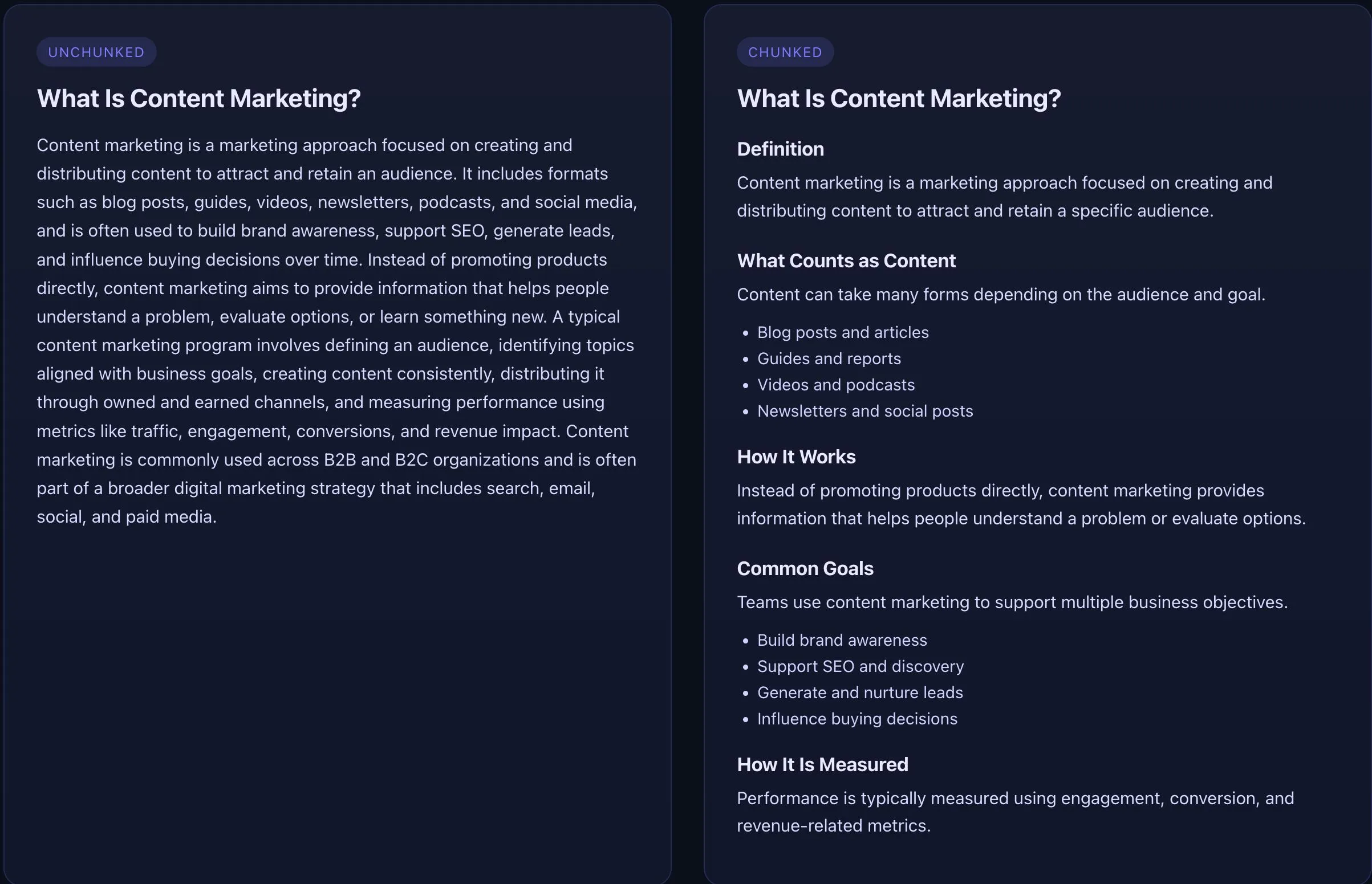
It’s not turning a page into hundreds of tiny, one-sentence fragments. That often makes the content harder to scan and easier to misread because each piece loses context.
It’s not writing for bots first. You still create the page for the human who comes to read it, so the sections need to flow and show logic, not just answer a question.
Marketers call it ‘chunking’ now because content doesn’t always get read start to finish. It gets skimmed, searched, and reused section by section.
So the way you break up the page affects what information gets picked up.
How To Do Content Chunking
Write headings that clearly label what follows
Headings are the primary ‘breakpoints’ of your content. If someone scans the page, each heading should tell them exactly what they are looking for. Headings that are vague, clever, or generic are useless to both readers and AI.
Good headings are specific, match intent, and easy to understand when skimming. They describe the topic or outcome of the section in plain language, without filler words or internal jargon. If a heading can’t stand on its own in an outline with other headings, it’s not good enough.
Use question-style headings when the section is directly answering a common query. Use descriptive headings when the section explains a process, walks through an idea, or builds an argument over several paragraphs.
Not everything should be framed as a question. Narrative and high-level content usually reads worse when it is.
Headings should make it easy for a reader to find the section that matches their intent, and easy for AI to match that section to the same intent.
Keep each section aligned to the H2
Each H2 is a starting point for what that chunk will include. The content underneath should stay on that topic and deliver what the heading implies, without drifting.
When a section tries to cover too many topics, it becomes harder for the reader to stay on track and harder for AI to match the right content to the right intent, because the chunk contains mixed signals instead of one clear subject.
A simple check is to read the headings only. If two headings could swap sections and nothing would feel wrong, the headings are too generic. Tighten the heading to match what you actually cover, or split the section so each topic gets its own clearly named space.
Answer the query or put the outcome first
Open each section with the direct response to the heading. One or two sentences is usually enough. This helps the reader understand the point immediately, and gives AI the information it needs immediately, increasing the chances of citation.
Right after the answer, add what makes it useful. That can be proof, a short example, a simple rule of thumb, steps, or a constraint that changes the recommendation.
Keeping the answer and the supporting detail together makes the section more reliable when it’s pulled as a standalone chunk, because the qualifiers and context stay attached to the claim.
Write like someone might land in the middle of the page
A lot of readers don’t start at the top. They jump to the part that matches their question. Your sections should still make sense if someone reads only that section.
That means fewer references like ‘as we covered earlier.’ When needed, restate the subject in plain language so the first paragraph doesn’t depend on context from the previous section.
Every section should provide value to the reader – if it’s fluff, then get rid of it.
Use formats that make skimming easier
Use bullets when the reader needs a list of criteria, steps, options, or features. Use short paragraphs when you’re explaining a concept or setting up an example.
If a section implies action, add a clear next move. One line is enough, like what to check, what to change, or what to test next. Make it specific to that section so it feels helpful, not like a generic CTA.
A wall of text is off-putting to a reader and AI. If you are unsure, run your final draft through AI and ask directly. A basic prompt you could use:
“This is a final draft of my article on XXXX targeted at [audience] with [intent]. Check and provide feedback on the content UX, readability, format, and structure of the content.”
Make the whole page feel like one piece
Structure helps, but too much structure can feel like a pile of disconnected answers. Add short transitions between major sections so the reader understands why the next section exists.
A simple way to check flow is to read only the first sentence of each section. If it feels like a clean path from definition to implications to next steps, you’re in a good place. If it feels jumpy, add a bridging sentence or reorder the sections.
If you treat every section as its own piece, you risk harming search engine optimization efforts.
Does Content Chunking Really Improve AI Retrieval?
There isn’t a single, definitive answer backed by masses of data that proves chunking improves retrieval across every AI model. The retrieval process for major LLMs is not public knowledge and also has a lot of moving parts, like embeddings, reranking, and query rewriting.
Still, the data and experiments that do exist point in one direction. If AI is trying to find the best passage to answer a question, then how a page is split into passages is going to affect what gets pulled.
Findings that suggest chunking improves AI retrieval it
1) SEO experiments suggest structure changes the passage that gets picked.
In a small controlled test, Chris Green rewrote the same topics in different formats and then tested how strongly each version matched queries after being chunked and vectorized. His headline result was consistent across scenarios.
Q&A style content produced the strongest semantic match, dense prose performed worst, and structured content with headings and lists performed close to Q&A for non-question queries. (source)
This is the closest thing to ‘chunking improves retrieval’ that an SEO can test without access to a search engine’s internal pipeline. It doesn’t prove rankings.
It does show that when a system relies on semantic matching at the passage level, structure changes which chunk looks like the best answer.
2) Bench tests show that ‘where you cut’ changes whether the system finds the right answer.
NVIDIA tested multiple ways of splitting the same documents before retrieval. Their top-line result is simple. When content stayed in larger, natural units, it performed best on average.
In their tests, ‘page-level’ chunking had the highest average accuracy at 0.648 and it was also the most consistent across datasets with the lowest standard deviation at 0.107.
They also found that very small chunks and very large chunks tended to underperform, which points to a practical ‘middle’ where each chunk has enough context to be understood, but not so much that the key point gets buried. (source)
If your answer is split away from its qualifiers, examples, or limits, the system can grab a partial truth. Chunking that keeps one idea and its supporting context together gives retrieval a cleaner target.
3) Google-style selection appears to have hard limits, which makes density more valuable than length.
Dan Petrovic analyzed over 7,000 queries and looked at how much text Google’s AI uses as source material.
His finding is that selection plateaus around 540 words per page. Past that point, longer pages don’t get pulled into the answer. (source)
He also frames it as a fixed ‘grounding budget’ of roughly 2,000 words per query spread across multiple sources. In the same write-up, the median share for the #1-ranked source was 531 words and for the #5 source it was 266 words.
The content takeaway is if only a slice of your page is likely to be used, then the goal is to make that slice contain a complete, high-density answer, not a teaser that depends on paragraphs further down.
My view as a content marketer.
I believe chunking can contribute to AI retrieval, but I also think it doesn’t matter.
Chunking probably helps retrieval today because LLMs still behave like passage pickers. They hunt for the best short section to reuse, so clean boundaries and clear answers give them better options.
That could change. Models keep getting better at long-context reading and stitching ideas back together. Even if that happens, betting everything on ‘being easy to extract’ is a weak strategy if it makes the page worse for users.
The safe approach is to treat chunking as a way to make the content clearer, not as a way to strip it down.
I think chunking for user experience and chunking for AI are different things. For user experience, it’s naturally chunked to make it easy for the reader. Those using chunking as a tactic are trying to get key information into a small section and ‘win’ the citation. Even if that means completely changing their content style.
What to Take Away
Chunking is most useful when it turns your key ideas into clean, smaller sections that contain valuable information to the reader first > then for AI. The evidence doesn’t say it guarantees outcomes. It does suggest structure changes, what gets picked when systems select passages.
Here’s the advice I would give:
- Optimize your content for human readers first.
- Run through some GEO/AEO tactics to add to your valuable content draft.
- Track if you’re getting citations > if you are, it’s working. If not, investigate further.
- Organic Google search still dominates > don’t overdo it optimizing for something that might get phased out.
FAQ – Content Chunking
Content chunking is structuring a page into clear sections so each section covers one topic and can be understood on its own. It helps readers scan content and helps AI systems retrieve specific information accurately.
No. Content chunking is a long-standing content and UX practice. It’s now discussed as an AI optimization tactic because AI systems also rely on clearly defined sections to retrieve information.
It can. Existing experiments and retrieval tests suggest that clearly structured sections are easier for AI systems to match to intent and reuse accurately, but chunking alone does not guarantee citations or visibility.
No. Chunking can make content easier to retrieve, but citations still depend on relevance, authority, and competition. Chunking is a supporting factor, not a ranking signal.
No. FAQs are one format. Chunking also applies to narrative content, process-driven guides, and high-level explanations. Not all content should be framed as questions.
A chunk should be long enough to explain the point accurately, including context and qualifiers, and no longer. There is no ideal word count. Completeness matters more than size.
Yes. Over-chunking removes context and creates shallow sections that are easy to misinterpret. This hurts readers first and can also lead to partial or misleading AI retrieval.
User experience first. Chunking that improves clarity and readability usually helps retrieval. Chunking done only to win citations often makes content worse.
No. Most content already uses some form of chunking. Improvements usually come from tightening headings, aligning sections to their headings, and moving the core point earlier.
Probably less as a differentiator, but still as a best practice. Clear structure will continue to help readers and reduce the risk of misinterpretation when content is reused.